
It all started because an RF remote I already used decided to stop working the way I needed it to.
I have a Ventisol ceiling fan controlled by a 433 MHz remote. For a while I used one of those Tuya bridges that mix RF and infrared. It did exactly what I wanted: I pressed a button on the remote, it learned the signal, and then I could replay it from Home Assistant.
Until it stopped being something I wanted to trust.
I started looking for a ready-made replacement. My initial idea was simple: find some Zigbee or Wi-Fi device that did RF learning the same way, pair it with Home Assistant and move on with my life.
In practice, that search went a lot worse than I expected.
Either the devices depended on the cloud, or the integration was limited, or they cost way too much in Brazil, or there was simply no guarantee at all that they could clone that specific remote.
After a while trying to find a finished product, I arrived at the obvious question:
If what I need is to receive an RF signal, save it and transmit it later, why not build it myself?
And that is how esphome-rf-cloner was born.
Today it lives on GitHub:
github.com/codebyant/esphome-rf-cloner
But the project that exists today is very different from that first prototype.
The problem I wanted to solve
My initial case was a Ventisol ceiling fan, using the model 13930 remote.
The original goal was pretty modest:
- press a button on the remote;
- capture the RF signal;
- save it;
- replay it with an ESP32;
- control it from Home Assistant.
I did not want to understand the fan’s protocol.
I did not want to figure out what each bit meant.
I did not want to write a Ventisol-specific driver.
I just wanted to clone what the remote already did.
That detail ended up shaping a good part of the project later on.
The hardware
I already had Home Assistant running at home, and a good chunk of my automation was already integrated into it. So using an ESP32 as a bridge made a lot of sense.
For the first prototype I used:
- ESP32 DevKit V1
- CC1101 433 MHz module
- jumper wires
- the Ventisol remote itself
- Home Assistant
- ESPHome
These are the exact parts I used:
- The ESP32 DevKit V1 I used: USB-C version or Micro-USB version
- The CC1101 433 MHz module I used
My module is an E07-M1101D, based on the CC1101.
The wiring that ended up validated was:
| CC1101 | ESP32 |
|---|---|
| GND | GND |
| VCC | 3V3 |
| GDO0 | GPIO22 |
| CSN | GPIO5 |
| SCK | GPIO18 |
| MOSI / SI | GPIO23 |
| MISO / SO | GPIO19 |
| GDO2 | GPIO4 |
One important point: the CC1101 runs at 3.3 V. I did not connect the module to 5 V.
Before transmitting anything, I needed to find out what was on the air
At the start I was not even sure the remote was transmitting exactly where I thought it was.
The nominal frequency was 433.92 MHz, but I wanted to confirm that in practice.
I first ran a wider sweep with the CC1101. The test went through a range of roughly 387 to 464 MHz looking for activity.
It was one of the most fun parts of the project, because that is where it stopped being theory. I pressed the remote and could literally watch spikes of RF activity.
Then I narrowed it down until I reached the right region.
The remote really was at 433.92 MHz.
The modulation was compatible with ASK/OOK.
From there I could stop looking for the signal and start looking at its shape.
Capturing the raw signal
My first approach was deliberately simple.
Instead of trying to interpret the protocol, I started measuring the time between level changes of the signal received by the CC1101.
The result was basically a list of positive and negative pulses, in microseconds.
In the Ventisol captures I saw timings close to:
- short pulse: roughly 220 to 280 µs
- long pulse: roughly 700 to 760 µs
A typical capture had about 65 timings.
The gap between frames was around 8.6 to 9.4 ms, depending on the capture.
In one of the first stable tests, the equivalent frame I was looking at could be represented like this:
00000001111110011000100000111110But that bitstream never became the center of the project.
What really mattered was this:
HIGH  ~280 us
LOW   ~710 us
HIGH  ~280 us
LOW   ~710 us
...
gap   ~8660 us
If I could reproduce the same timings, maybe I would not even need to understand the protocol.
The first transmission did not work
Capturing is one thing.
Getting the device to accept the transmitted signal is another.
The first replay attempt did absolutely nothing to the fan.
That is when I started looking more carefully at:
- pulse count;
- polarity;
- gap between frames;
- repetition;
- start and end of the capture;
- artificial timings introduced by the receiver.
One important thing that showed up in this process was an extra timing that was not part of the physical signal, but a consequence of the capture ending.
I also had to stop treating the gap between frames as something inferred from the time between callbacks.
The best data was the waveform itself.
If the remote transmitted:
frame
gap
frame
gap
frame
I wanted to store that gap as a real part of what had been measured.
After those adjustments, I tried another replay.
This time the fan responded.
That was the moment the project really began.
I did not need to figure out the protocol
Up to that point I still thought I might end up having to fully reverse engineer the remote.
Figure out the address, the command, the checksum, the frame structure and all of that.
But the raw replay worked perfectly.
So I stopped.
For the goal of this project, decoding the protocol would be extra work with no real benefit.
If I can store:
frequency
modulation
timings
gap
repeat count
and then replay it faithfully, I already have a cloner.
That also made the project much more interesting.
It stopped being:
a controller for a Ventisol fan
and became:
a generic cloner for compatible RF commands.
That change looks small, but it was probably the most important decision of the whole project.
The first prototype became a learner
The first working version was still very manual.
It captured a command, printed the timings, I pasted them into the code and transmitted again.
It worked, but it was a bench toy.
I wanted the behavior of the commercial bridges:
- tell it to learn;
- press the button on the remote;
- give it a name;
- store it;
- never have to recompile firmware again.
So I implemented a real learner.
The ESP got a learning state.
When armed, it opens a window of roughly 15 seconds waiting for RF.
The receiver uses a filter for very short pulses, 100 µs in my case, and leaves a window large enough to observe complete repeats of the frame.
A remote usually transmits the same frame several times while the button is held down.
That is great for validation.
Instead of blindly trusting the first sequence received, I could compare repeats and check that I was really capturing something consistent.
The first command truly learned
Once that part was ready, I stopped feeding the system known frames.
I armed the learner.
I held a button on the remote.
The ESP captured it.
Saved it.
Then I told it to transmit what it had learned on its own.
The fan responded.
At that point I was no longer testing an RF transmitter.
I had a cloner.
Persistent storage
The next problem was obvious.
If I reboot the ESP and lose everything, it is useless for home automation.
So the commands had to survive reboots and reflashes.
I built a dedicated store on the device.
Each command got, among other things:
command_id
name
frequency_hz
modulation
timings
gap_us
repeat_times
One important decision was separating the name from the identity.
The name can change.
The ID cannot.
So a command can start out like this:
command_id: 2
name: light
and later become:
command_id: 2
name: bedroom_light
without stopping being the same command.
That became even more important once I started integrating with Home Assistant.
IDs that are never reused
I also decided that a command_id should never be used again after a command is deleted.
If I had:
1
2
3
and deleted 3 and created another command, it should not become the new 3.
It would become:
4That behavior simplifies identity outside the ESP a lot.
If Home Assistant knows command_id = 3, that ID will never represent anything else in the future.
It is a small rule that prevents a whole bunch of weird problems later.
The bridge needed an identity too
The same reasoning applied to the device itself.
I created a persistent bridge_id, independent of IP, hostname or ESPHome.
In my case it is a 16-byte identifier represented in hexadecimal.
That means the bridge’s logical identity does not depend on the physical hardware always being the same.
That decision ended up enabling a feature I was not even thinking about at the start: fully replacing the ESP32 without losing the relationship with Home Assistant.
Revision
I also added a registry revision.
It works as a monotonic number that represents real changes to the set of commands.
Transmitting a command does not change the revision.
Renaming, learning or deleting does.
With that, if Home Assistant has a copy of the state at revision 5 and the ESP is still at 5, there is no reason to rebuild everything again.
I also had to think about the number’s limit.
Since that value crosses the ESPHome API as a signed 32-bit integer, I explicitly defined the valid range and reserved the terminal value.
No silent overflow.
This would probably never be reached in a real installation, but it is exactly the kind of bug I prefer to eliminate while the format is still under my control.
Portable backup
At this point there was already too much information on the ESP for me to accept that the only backup was that microcontroller’s flash.
So I created an export format independent from the physical format used in storage.
An exported command looks conceptually like this:
{
  "schema": 1,
  "found": true,
  "bridge_id": "...",
  "command_id": 2,
  "name": "light",
  "pulses": 65,
  "gap_us": 8669,
  "repeat_times": 20,
  "frequency_hz": 433920000,
  "modulation": 0,
  "timings": [
    280,
    -710
  ]
}
The real timings obviously have many more values.
The point is that this file does not depend on the internal flash layout.
I can change the storage implementation in the future without necessarily invalidating the backup format.
Restore and hardware replacement
After export, restore came almost naturally.
The protocol I implemented is split into steps:
restore_begin
import command
import command
import command
restore_commit
While a restore is open, normal operations are blocked.
If power goes out halfway through, the system can detect that there is an incomplete restore.
I did not want a state where half the commands came from the backup and the ESP simply pretended everything was fine.
The test I really wanted to run
I ran a full replacement test.
First I had a bridge working normally.
I made a backup.
Then I did a factory reset so the device came back with a different identity.
Home Assistant detected that this hardware was no longer the logical bridge it knew.
Instead of silently adopting the new identity, the system froze reconciliation.
Then I ran the restore.
The old bridge came back to life logically, with the same command IDs.
The exported waveform came back bit for bit.
And, more importantly, after that I told it to transmit again.
The fan responded.
It was not just a pretty JSON.
It was a real backup.
The ESPHome integration
From early on I wanted this to work with ESPHome, because that is how I already like to expose devices to Home Assistant.
But I did not want every learned command to require editing YAML.
That was a requirement from the very beginning.
Learning a new button on the remote had to be a runtime operation.
So the component exposes actions for things like:
status
list
learn
send
send_id
delete
delete_id
rename
clear
cancel
factory_reset
export
restore_begin
import
restore_commit
The internal interface changed a lot during the project, but the idea stayed the same.
The ESP is the authority over the RF commands.
Home Assistant can organize, display, back up and restore.
It is not a second master of that registry.
Home Assistant without a second ESPHome connection
When I started the native Home Assistant integration, one of the first temptations would be to open a dedicated connection using the ESPHome API.
I did not do that.
Home Assistant already has an ESPHome integration maintaining that connection.
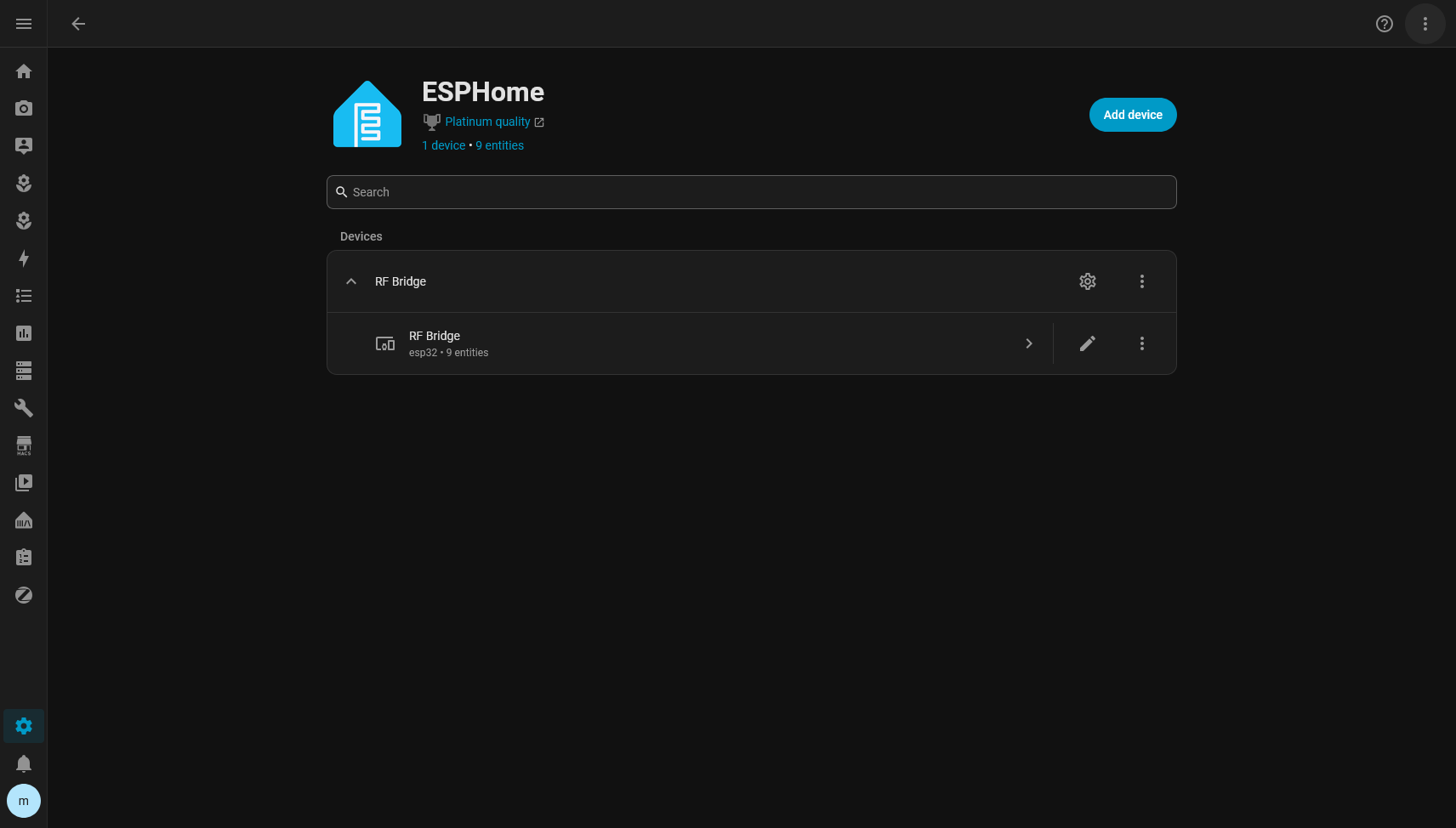
So the RF Cloner integration uses the services/actions layer that ESPHome already provides inside HA.
That avoids two concurrent connections to the same device and keeps RF Cloner tied to the ESPHome config entry, not to a fixed IP.
That decision got validated in an almost funny way during development.
DHCP changed the ESP’s IP.
Nothing broke.
That was exactly what I wanted.
The first Home Assistant version
In the first integration, every learned command became a button entity.
Something like:
button.light
button.speed_1
button.power
The unique_id uses:
{bridge_id}_{command_id}So renaming a command does not recreate the entity.
Moving things around should not recreate it either.
The button stays the same button as far as Home Assistant is concerned.
That preserves:
- entity_id
- history
- automations
- dashboards
- customizations
In the initial version I made a deliberate decision: a command was not a Device.
A button on a remote is not a physical device.
Creating one Device per command would fill the Device Registry with meaningless things.
v0.1.0
When that first cycle was solid, I published v0.1.0.
Before that, I ran an amount of tests I would never have imagined running when I wired up that first CC1101 on the bench.
The firmware suite reached:
579 checks
0 failures
There were also integration logic tests and restore tests.
On top of that I ran live tests on a real Home Assistant, because some things are simply not worth much when simulated.
For example:
- restarting HA;
- restarting the ESP;
- renaming a command;
- deleting;
- restoring;
- changing hardware;
- transmitting real RF.
Whenever possible I ended the test by pressing a virtual button and looking at the physical device.
That avoids the classic situation where all the mocks are green while the fan stays still.
v0.2 started with a simple question
After v0.1, an organization problem came up.
I had commands.
But commands for what?
If I have:
light
speed_1
speed_2
power
they belong to the fan.
If I also have:
open
close
stop
those might belong to the gate.
In Home Assistant it made a lot more sense to represent:
That is where the concept of RF Target came from, which became RF Device in the UI.
The ESP does not know a fan exists.
That is on purpose.
For the firmware there are still only RF commands.
Organizing them into equipment is Home Assistant’s job.
RF Device is a Device, a command is an entity
The separation ended up like this:
In practice, Home Assistant’s entity list ends up grouped by equipment:
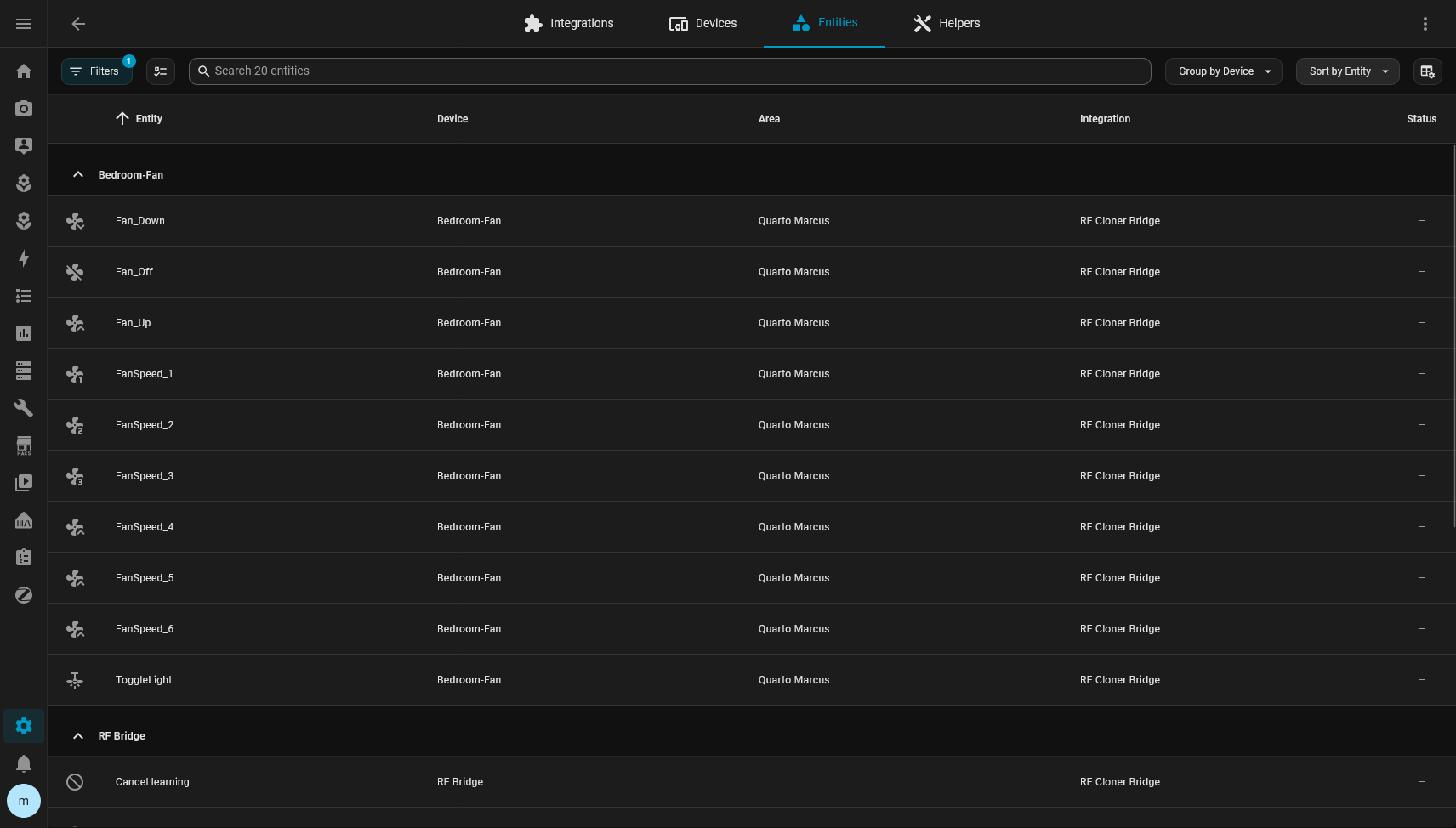
An RF Device has:
- its own
target_id - name
- type
- area
A command keeps the same command_id.
Moving light from one piece of equipment to another changes absolutely nothing on the ESP.
That was an important rule in v0.2.
Home Assistant organization must not cause unnecessary writes to the RF registry.
Icons
I also added per-command icons.
It looks cosmetic, but it makes a big difference once the list starts growing.
RF Cloner can suggest something like:
light -> mdi:lightbulb
power -> mdi:power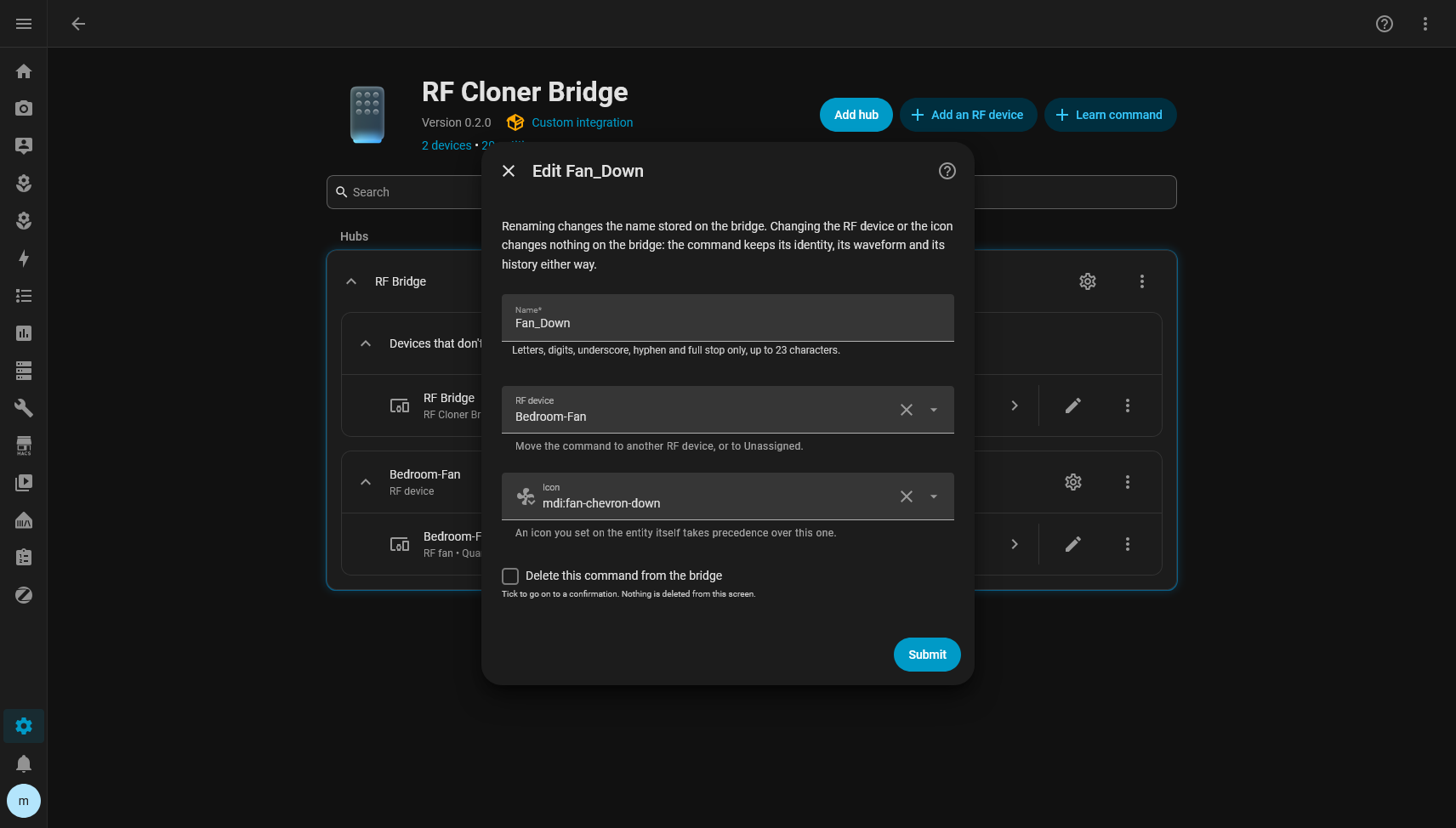
But if the user manually sets an icon in Home Assistant’s own Entity Registry, the user’s override wins.
That was tested explicitly.
RF Cloner can change the default icon underneath and Home Assistant keeps showing the one chosen manually.
If the override is removed, the integration’s latest icon shows up again.
Migrating from v0.1 to v0.2
This is where the project got more serious for me.
v0.1 was already public.
I could no longer just decide that the old format was inconvenient and wipe everything.
The migration had to preserve real installations.
v0.1 commands could already have:
- a customized entity_id;
- automations;
- history;
- an area;
- an icon;
- a name changed by the user.
So the migration test was not:
did the commands show up afterwards?
It was:
are they exactly the same entities?
On my real Home Assistant I validated:
command_id
unique_id
entity_id
registry record id
before and after.
Everything stayed the same.
And the migration wrote nothing to the ESP.
The revision stayed exactly the same.
Testing what the framework actually does
One thing this project reinforced for me is how much tests against Home Assistant’s real implementation matter.
At one point I discovered that removing a Config Subentry makes HA remove the Devices and Entities belonging to that subentry before the integration’s listeners get to do anything.
That directly affected the behavior of deleting an RF Device.
My rule was:
deleting the fan must not delete the RF commands.
It should only remove the organization.
So I tested the recovery behavior using Home Assistant’s own Deleted Entity Registry.
When deleting the target:
Fanthe command:
button.lightgoes back to Unassigned.
But it keeps the same:
unique_id
entity_id
registry record
icon
customizations
I did not want to believe that from the code alone.
I tested it live.
It worked.
A bug my tests had approved
One of the most interesting bugs showed up with Area.
The RF Device had been created in the area:
Quarto MarcusThen I manually moved the Device in Home Assistant to:
Sala de estarRF Cloner correctly did not overwrite that choice on reload.
So far, great.
Then I opened the integration’s form to put it back in Quarto Marcus.
The form was already showing Quarto Marcus, because that was the old value saved in the subentry.
So I selected Quarto Marcus, submitted, and nothing happened.
The Device stayed in Sala de estar.
The worst part is that there was a test covering exactly that.
And it passed.
The test was wrong for the same reason as the implementation.
Both compared the chosen area with the stored value.
But the truth at that moment was the Device Registry.
I fixed the form to use the Device’s current area.
Then I rewrote the test with the real scenario:
create in Quarto
manually move to Sala
open form
form must show Sala
choose Quarto
submit
Device must go back to Quarto
That test is probably worth more than several unit tests written straight from the implementation.
Learning directly into a target
The next test was learning a command with the fan chosen as the RF Device.
The flow became:
Name
RF Device
Icon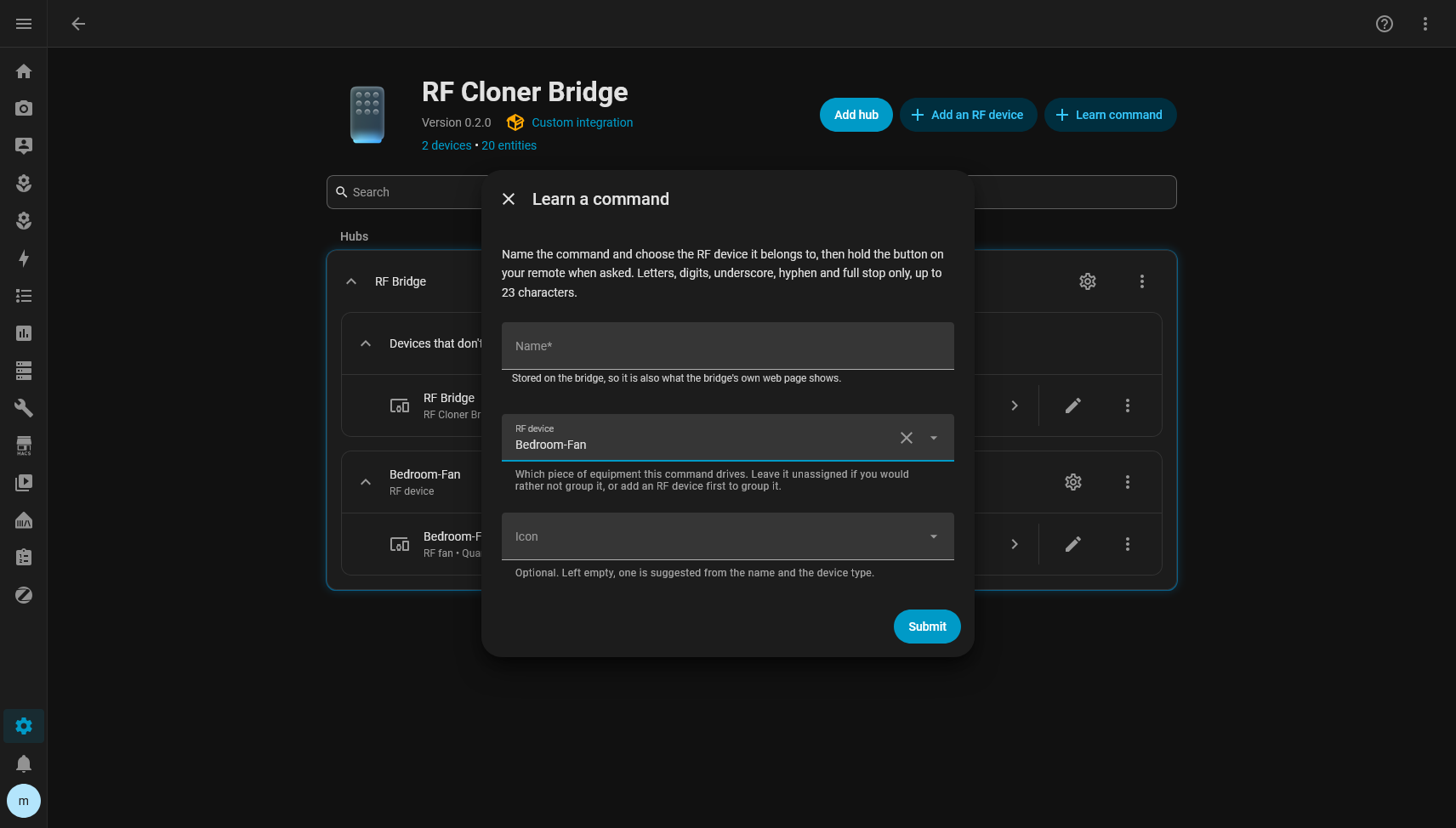
I armed the capture.
I held the remote.
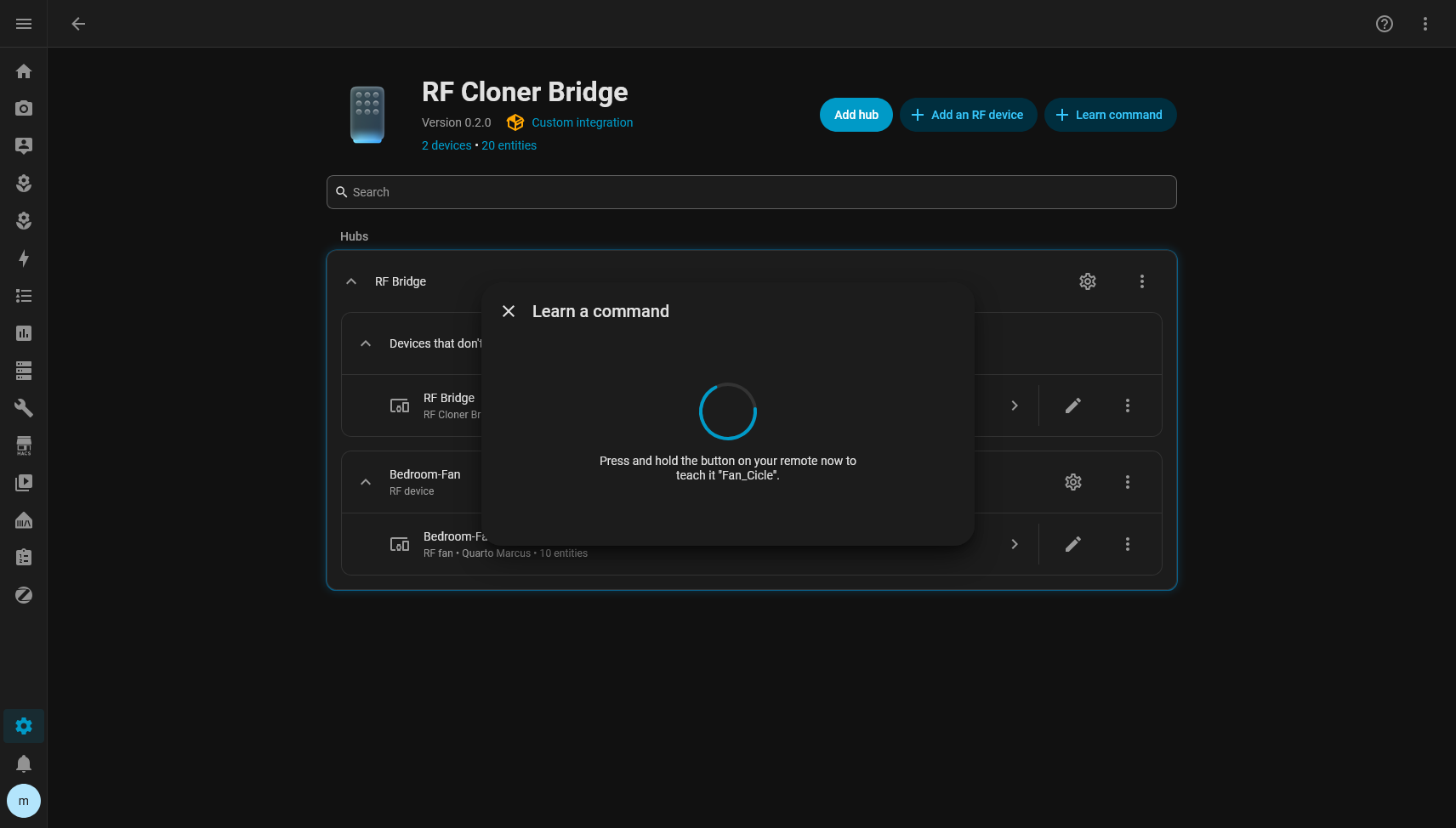
The ESP learned it.
The command got a new ID.
Home Assistant created the entity directly on the fan Device.
No temporary entity in Unassigned.
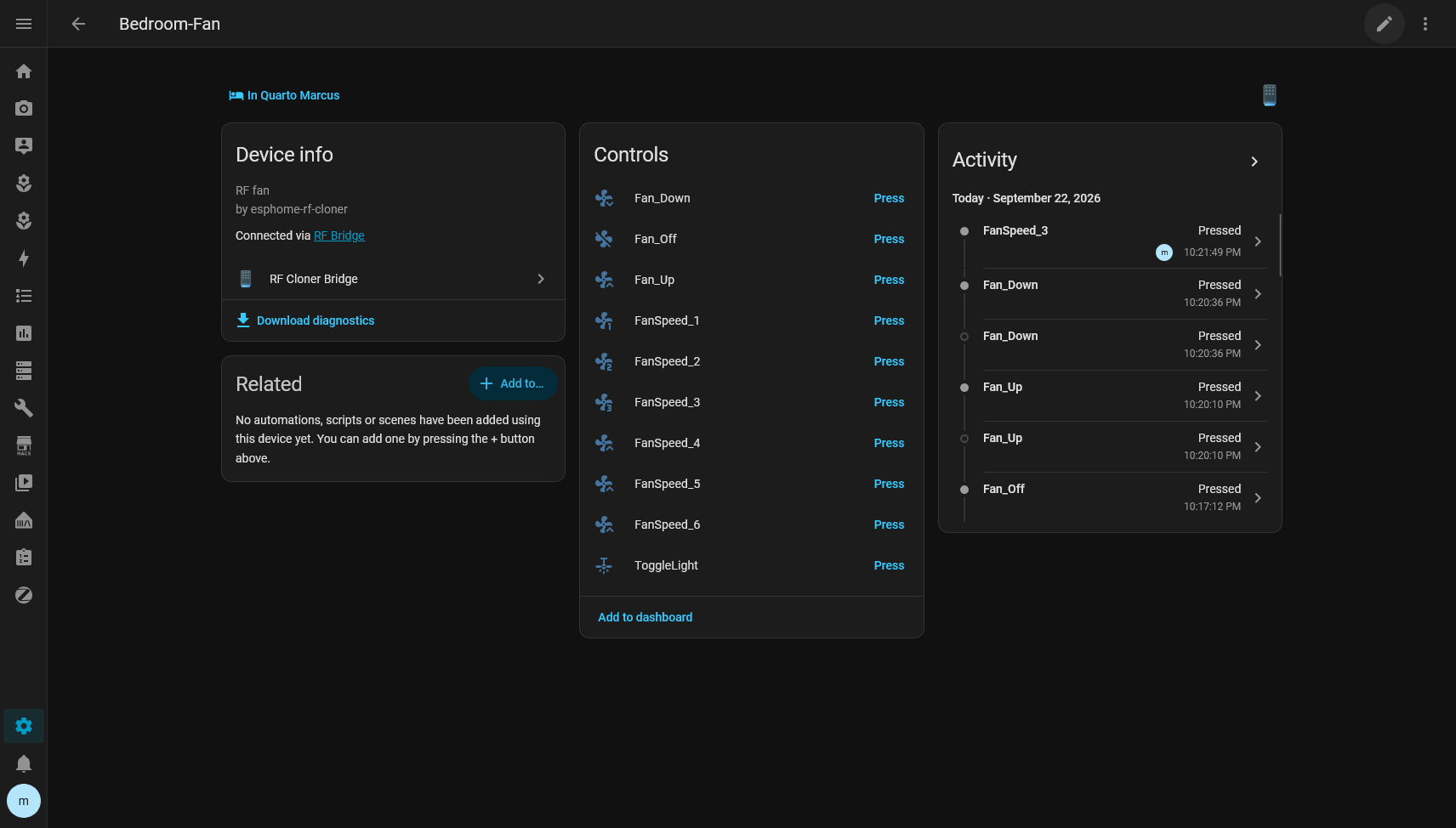
Then I told it to transmit from the freshly created button.
The fan responded.
Once again, the test ended in the physical world.
And then I deleted the command
To close the loop, I deleted just that throwaway command.
I watched Home Assistant’s event bus to make sure the integration was calling:
rf_delete_idwith the immutable ID.
Not the name-based version.
The command disappeared from the ESP and from Home Assistant.
The revision advanced once.
The ID was retired.
The next ID did not go backwards.
The snapshot was updated.
The other commands stayed intact.
v0.2.0
After that cycle I published v0.2.0.
By then the tests stood at:
Firmware
579 checks
0 failures

Integration logic
24 checks
0 failures

Home Assistant
40 passed
On top of that I went through:
- compileall
- translation parity
- hassfest
- HACS validation
- CI on GitHub
- live tests with hardware
All green.
The v0.2.0 tag was published with the firmware and the RF backup format exactly the same as v0.1.
v0.2 was essentially an evolution of the Home Assistant integration.
And of course I found a bug right after
After the release I decided to do something that looks ridiculously obvious in hindsight.
I deleted the configuration and tried to install it as if I had never seen the project before.
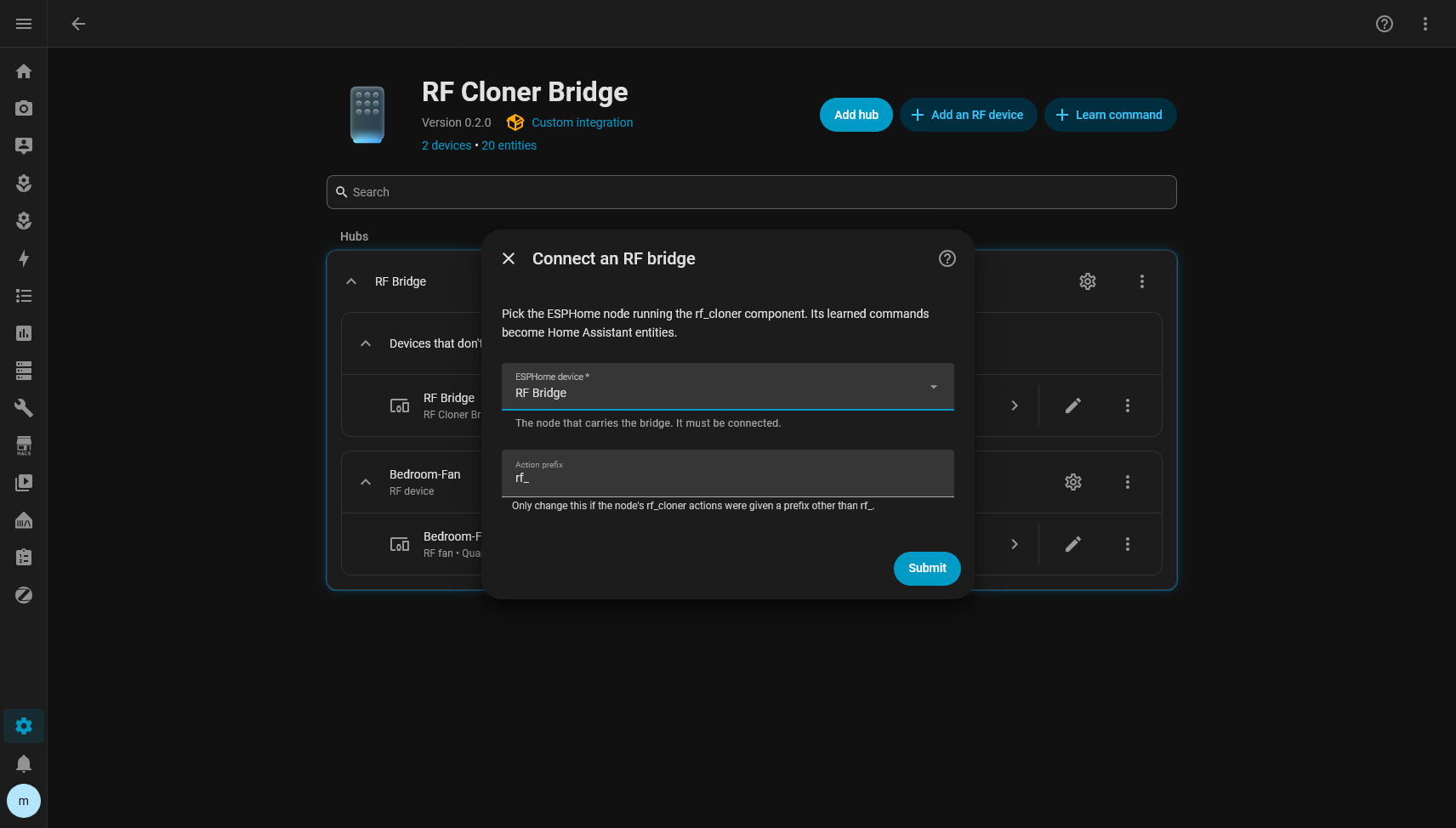
The initial screen showed up like this:
Title.
Submit button.
No fields.
The funny thing is that the backend was perfect.
It returned:
ESPHome device
Action prefix
The problem was in Home Assistant’s frontend.
The selector used was a required ConfigEntrySelector with no initial value.
In the 2026.9 frontend, that went through a function that tried to produce the form’s initial values and ended up throwing:
Selector config_entry not supported in initial form dataThe exception interrupted the render.
That is why only the title and the button were left, since they sat outside the broken subtree.
It was a particularly good bug to find, because any backend-only test would have passed.
The JSON was right.
Home Assistant was serializing it right.
The problem only existed in the browser.
The fix was to use a normal selector filled with the available ESPHome config entries, keeping the config_entry_id as the value.
After that, onboarding finally worked for real.
Testing as a user showed another problem
With the form fixed, I kept using the integration as if I were someone installing it for the first time.
And I noticed another problem.
Not a technical one.
A UX one.
Creating an RF Device was easy.
The integration page already had:
Add an RF deviceI created:
Ventilador
Fan
Quarto Marcus
But learning a command was hidden behind the bridge’s gear icon.
The path was something like:
RF Cloner
Bridge configuration
RF commands
Learn a command
The flow worked.
But I myself was looking around for where the product’s main action was.
So the next fix was obvious.
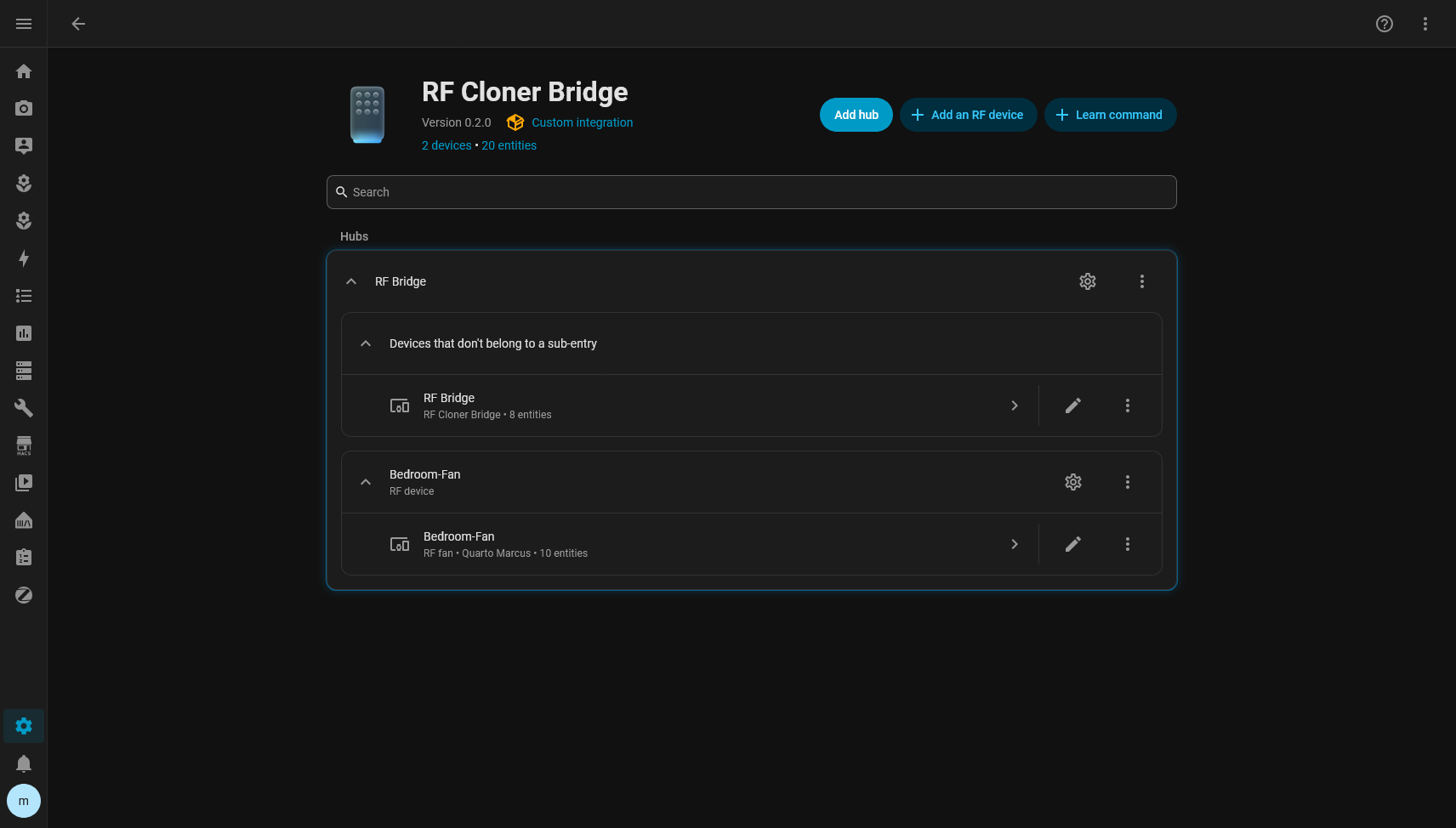
On the integration’s main screen I want two actions:
Add an RF device
Learn command
No custom dashboard.
No parallel frontend.
No fake admin entity.
Home Assistant already has almost all the pieces.
The problem was just making the main operation discoverable.
That was exactly where the project stood when I started writing this post. Before I finished the text, the button was already there, on the repository’s main branch, waiting for the next release:
What the project became
It is funny to look back, because I only wanted to replace a Tuya bridge.
Today the project has a very clear split.
On the ESP
The ESP is responsible for what is really RF:
- learning;
- validating;
- storing;
- transmitting;
- deleting;
- renaming;
- exporting;
- restoring;
- keeping IDs;
- keeping the revision.
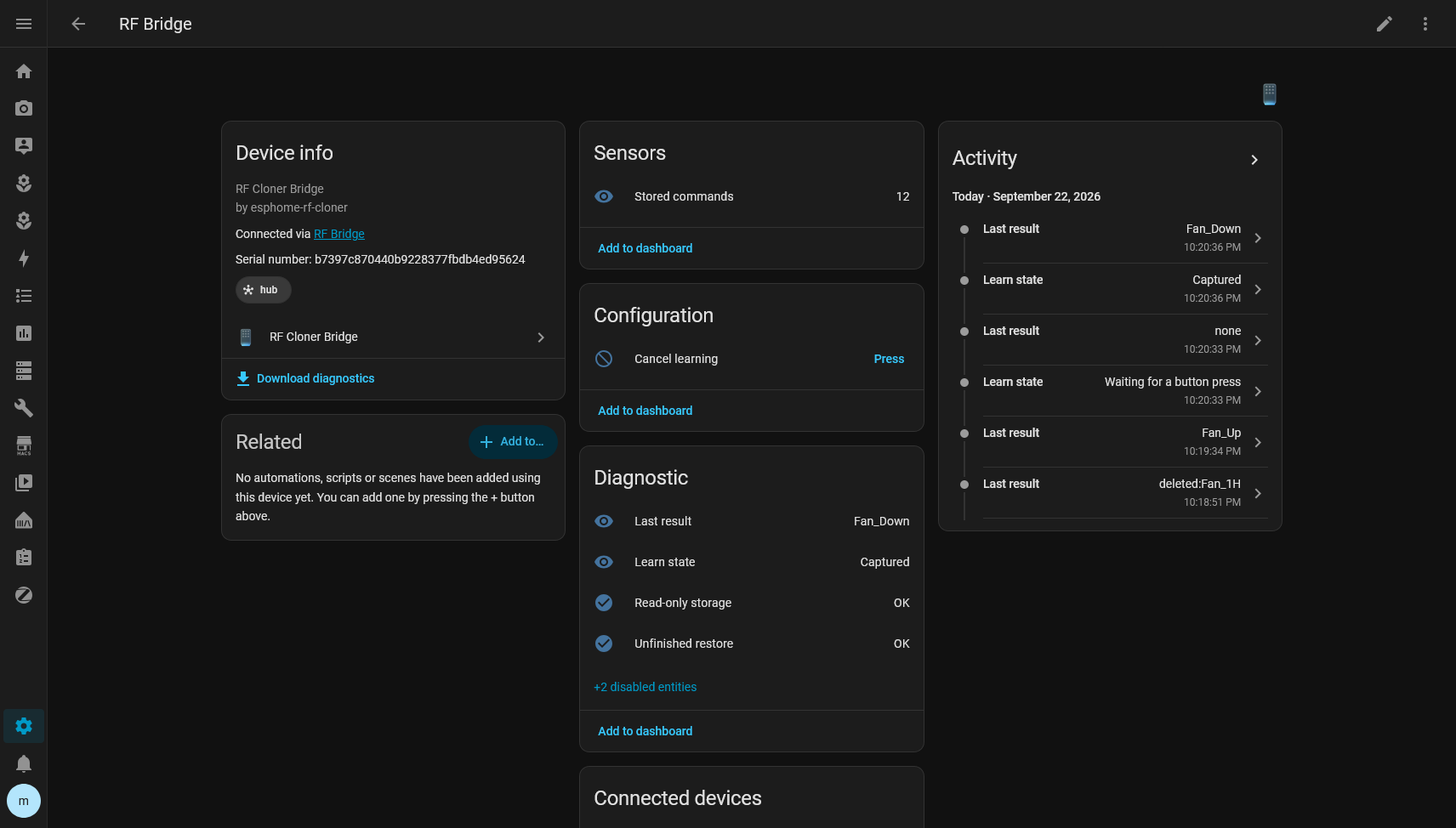
On Home Assistant
Home Assistant takes care of organization and experience:
- RF Devices;
- commands as entities;
- Areas;
- icons;
- automations;
- snapshots;
- replacement;
- migration;
- interface.
The firmware does not know that this signal turns on a fan’s light.
It knows there is a command_id 4 with a waveform. Home Assistant knows that same command_id 4 is the fan’s Light:
I really like that separation.
What I would do differently if I started today
Probably almost nothing in the first part.
I would still start with raw replay.
I would still avoid reverse engineering the protocol without need.
I would still validate the RF physically before thinking about Home Assistant.
What I would do earlier is test the product as a new user.
It is very easy to build an integration knowing exactly:
- which button to click;
- where the flow is;
- what each field means;
- which internal state should show up.
When you delete everything and try to install it again without shortcuts, you find a completely different category of bugs.
The empty modal was one of them.
The hidden Learn action was another.
On using AI in this project
A good part of the implementation and the investigation was done with coding agents, mostly to speed up things that would be extremely repetitive to do by hand.
But I did not treat it as:
I describe the project and wait for it to come out finished.
My process was much closer to:
hypothesis
implementation
hardware
measurement
failure
logs
new hypothesis
test
regression
real test
Several decisions that looked right were thrown out after testing on the hardware or on the real Home Assistant.
There were also tests that were green and proving the wrong thing.
AI speeds this kind of project up a lot, but hardware is still excellent at destroying any beautiful theory.
If the fan does not spin, the test failed.
The result
Today I have an ESP32 with a CC1101 that can learn RF commands at runtime, store them, survive reboots, export, restore and expose everything to Home Assistant without recompiling for every new button.
And the system did not get stuck to the Ventisol.
That was just the first device I used to prove the idea worked.
Any remote compatible with this way of capturing and transmitting can potentially be learned the same way.
I also intentionally left some things out of scope.
There is no attempt to:
- decode every RF protocol;
- support rolling codes;
- infer the device’s state;
- pretend an RF button is a stateful
fanentity with no feedback; - send data to the cloud;
- add IR just because commercial modules usually mix the two.
The project does one thing.
It learns raw RF and replays it faithfully.
The rest is organization.
Building your own
If you want to replicate my exact setup, these are the two main parts:
- ESP32 DevKit V1: USB-C or Micro-USB
- CC1101 / E07-M1101D 433 MHz
Wiring:
| CC1101 | ESP32 |
|---|---|
| GND | GND |
| VCC | 3V3 |
| GDO0 | GPIO22 |
| CSN | GPIO5 |
| SCK | GPIO18 |
| MOSI / SI | GPIO23 |
| MISO / SO | GPIO19 |
| GDO2 | GPIO4 |
The project, configurations and documentation are here:
github.com/codebyant/esphome-rf-cloner
The repository’s documentation is the reference for installation, because the interface is still evolving and I would rather not duplicate instructions that could go stale in this post.
A few notes before you buy anything
Not every 433 MHz RF signal is simply clonable.
There are remotes with rolling codes, different protocols, different frequencies and characteristics that may require another approach.
Garage doors are a classic example where I would not assume raw replay is going to work.
It is also worth checking your remote’s frequency before buying a specific module.
My case was 433.92 MHz, and that is where I validated the whole project.
Do not treat this project as a universal way to get around RF systems.
The idea is to automate devices you already control and that use signals compatible with replay.
The next step
The RF part has reached a point I consider very solid.
What I am refining most right now is the experience inside Home Assistant.
I want installing the integration and teaching it the first button to be obvious, without having to read the implementation or hunt for hidden options.
That is probably the best sign that the project stopped being just that initial hack.
At the start I was happy when the fan spun.
Now it bothers me when the learn command button is not in the most obvious place possible.
I think that is how a personal project starts turning into a real product.