# Antônio Miranda
> Antônio Miranda is a full stack developer from Belo Horizonte, Brazil. He builds products end to end, from the interface to the backend and the infrastructure, in whatever framework the project needs.
- Website: https://antmiranda.dev/
- Email: oi@antmiranda.dev
- GitHub: https://github.com/codebyant
- LinkedIn: https://www.linkedin.com/in/antmiranda/
- Location: Belo Horizonte, MG, Brazil
---
# About: Antônio Miranda
Full Stack developer and infrastructure enthusiast. I turn ideas into products that run in production, in whatever framework the project calls for, or plain vanilla when that fits better: interfaces, backends, desktop apps, scripts and the infrastructure underneath. Here you'll find my stack, my strengths and what I do beyond code.
## What I do
I work end to end across the product lifecycle, from the interface to the infrastructure. These are the areas I work on every day.
- **Modern Frontend**: React, Astro, Vite, Tailwind and integration with modern design libraries.
- **Robust Backend**: Scalable APIs with Bun, Elysia and Hono, and serverless functions on Cloudflare Workers, AWS Lambda and Azure.
- **Integrations**: Third-party APIs, payment systems and authentication solutions.
- **Performance**: Optimization and fluidity to craft exceptional experiences.
## Tech Stack
- **React** (Frontend): Building modern, interactive interfaces with reusable components
- **TypeScript** (Language): Development with strong typing for safer, more maintainable code
- **Python** (Language): Building complex algorithms and data analysis
- **Rust** (Language): Building fast, safe and memory-efficient software
- **Tailwind CSS** (Styling): Fast, consistent styling with utility classes
- **NestJS** (Backend): Framework for robust backends with an Angular-inspired architecture
- **Node.js** (Backend): JavaScript runtime for building servers and APIs
- **Bun** (Runtime): Fast JavaScript and TypeScript runtime with an integrated toolchain
- **Elysia** (Backend): TypeScript framework for fast, type-safe APIs running on Bun
- **Hono** (Backend): Lightweight web framework for APIs across multiple runtimes
- **Vite** (Framework): Fast build tool with Hot Module Replacement for agile development
- **Next.js** (Framework): Framework for building modern, scalable web applications
- **React Native** (Mobile): Building cross-platform mobile applications with React
- **Electron** (Desktop): Cross-platform desktop applications with web technologies
- **Tauri** (Desktop): Lightweight desktop applications with a web frontend and a Rust backend
- **Docker** (DevOps): Containerizing applications for consistent, isolated deployment
- **Amazon AWS** (Cloud): Scalable cloud infrastructure for hosting applications
- **Cloudflare** (Cloud): High-performance global network infrastructure
- **Railway** (Cloud): Cloud platform for quickly deploying and operating applications
- **Bunny Storage + CDN** (Cloud): Object storage and low-latency global content delivery
## AI tools I use
- **Claude Code**: Coding agent for exploring codebases, implementing changes and validating solutions from the terminal.
- **OpenCode**: Open source coding agent for the terminal, working with any model provider.
- **Google Stitch**: Google's AI tool for generating and iterating on interface designs.
- **Cursor**: AI editor for navigating, writing and refactoring code with project context.
## Tools & apps
- **HTTPie**: HTTP client for exploring, testing and debugging APIs.
- **Zed**: Fast, collaborative editor for software development.
- **Visual Studio Code**: Versatile editor for developing and maintaining projects.
- **Zen Browser**: Browser focused on a more organized research experience.
- **Orca**: Agent development environment for running AI tools in isolated worktrees.
- **OrbStack**: Lightweight desktop environment for running Docker containers.
- **Obsidian**: Notes, organization and preservation of AI project context.
## My strengths
I'm passionate about creating exceptional experiences, where technical excellence meets a fluid user experience. The best technology is the kind that simplifies, connects and transforms people's lives.
- **User experience**: Intuitive interfaces and streamlined user flows.
- **Elegant solutions**: Translating complex needs into clean code.
- **Attention to detail**: From pixel precision to performance optimization.
- **User-focused delivery**: Every delivery shaped around how people will actually use it.
## Beyond development
### Cloudflare
DNS, SSL certificates, firewall rules and cache optimization. Cloudflare Pages for hosting, Workers for edge computing and R2 for object storage. Security policies, DDoS protection and global performance. Zero Trust, WARP for device management and VPN, services exposed with Cloudflare Tunnel, proxying services behind NAT, and Cloudflare Access policies.
### Cloud & Infrastructure
AWS services such as EC2, S3, Lambda, ECS and CloudFront. Vercel and Railway for fast deployments, and custom VPS servers when more control is needed.
### Environments
Consistent environments with Docker and Docker Compose, and bare-bones VPSs set up from scratch when a project needs full control. Coolify, Portainer, Komodo and others for container management, and CI/CD pipelines with GitHub Actions, keeping development, staging and production uniform and reliable.
### UI/UX Design
Advanced prototypes in Figma with modern UI/UX principles, and Google Stitch and Claude Design to explore and iterate on interfaces with AI. Design systems for visual consistency and intuitive experiences, translated into code with Tailwind CSS, Motion and other modern front-end tools.
### DevOps
DevOps practices to automate deployments, tests and integrations. GitHub Actions for CI/CD pipelines, and monitoring with Prometheus and Grafana.
## Always learning
Technology keeps evolving, and continuous learning is essential for anyone striving for excellence.
- **Artificial Intelligence**: Integrating AI and machine learning into web applications to create smarter, more personalized experiences.
- **Distributed Architectures**: Scalable systems with microservices, API gateways and private networks that handle heavy loads securely.
- **User-Centered Design**: Refining interfaces through research, prototyping and usability testing to create intuitive, accessible experiences.
- **Mobile Development**: Native and hybrid apps with React Native, bringing web knowledge to high-quality mobile experiences.
---
# Antônio Miranda: Résumé
Software Engineer · Belo Horizonte, MG, Brazil
## Summary
Full Stack Systems Analyst focused on **Node.js**. Specialist in combining agile development with infrastructure to deliver robust, scalable solutions. Focused on reducing rework and optimizing the user experience.
## Experience
### IT Analyst, Terminal de Cargas de Sarzedo (Jun 2025 - Apr 2026)
Sarzedo/MG
- Development and maintenance of Full Stack applications in Node.js, React, Vite and NestJS, focused on scalable cloud solutions.
- **Architecture and development of the Client Portal:** a new solution (React/NestJS) replaced legacy systems, resulting in greater operational agility.
- **Design and delivery of the Integrator-TCSMG ecosystem:** migration of legacy, unstable processes to an automated architecture, optimizing the flow of data between clients and the company and eliminating performance bottlenecks.
- **Integration standardization:** implementation of a unified model via API Gateway, centralizing security and communication of internal and external services.
- **Cloudflare infrastructure:** full administration including DNS, secure tunneling (Tunnels/Connectors), Cloudflare Access and security and performance policies.
### IT Assistant, Terminal de Cargas de Sarzedo (Jan 2025 - Jun 2025 · 6 months)
Sarzedo/MG
- **DevOps and CI/CD implementation:** creation and management of automated pipelines with the AWS ecosystem (CodePipeline, ECS, ECR and Elastic Beanstalk), ensuring agile, reliable deliveries.
- **Infrastructure modernization:** migration of DNS to Cloudflare, implementing secure tunnels (Cloudflare Tunnels) and Zero Trust/Access policies to protect the corporate network.
- **Full Stack development:** growth into software engineering (TypeScript, React, Node.js), working on defining Back-end/Front-end architectures and system integration.
- **Internal systems:** development of new features and maintenance of applications with NestJS, MongoDB and MySQL, consolidating the foundation for scalable solutions.
### Apprentice, Terminal de Cargas de Sarzedo (Nov 2023 - Jan 2025 · 1 year and 3 months)
Sarzedo/MG
- **Process automation (Low-Code):** development of automated flows with N8N for self-service and ticket responses, reducing the team's response time.
- **Infrastructure monitoring:** creation and maintenance of Zabbix dashboards for proactive monitoring of server and network health.
- **Web and maintenance:** management of the corporate website (WordPress) and hardware and software technical support, ensuring operational continuity.
- **Getting started in development:** hands-on introduction to software development, performing small maintenance on internal tools with TypeScript.
## Education
- Technologist (CST), Systems Analysis and Development: Centro Universitário Una (Mar 2025 - Present)
## Skills
- TypeScript: Full Stack Dev
- React: Full Stack Dev
- NestJs: Backend Framework
- Vite: Frontend Framework
- Tailwind: Utility-first CSS framework
- ShadCN: Design System
- Ant Design: UI Library
- UX: Intuitive, user-centered interfaces
- DevOps & Cloud: AWS, Railway, Vercel and bare-metal VPS
- Microservices
- React Native: Mobile Development
## Languages
- Portuguese: Native
- English: Fluent
## Certifications
- Full-Stack Challenge with AI, Rocketseat (31/10/2025): https://app.rocketseat.com.br/certificates/e1f2f1d1-cd3d-4961-a8d2-f163aa1373c2
- Prompt Engineering, Rocketseat (26/10/2025): https://app.rocketseat.com.br/certificates/03e4aa49-8fc2-4ad2-9489-324a7cdd94a5
- Scalable Microservices Challenge, Rocketseat (06/06/2025): https://app.rocketseat.com.br/certificates/38783200-4628-43a9-a668-d290fc8951bf
- The Complete Full-Stack Web Development Bootcamp, Udemy (26/03/2025): https://www.udemy.com/certificate/UC-493060b7-28a8-40f8-a094-c152795dbdad/
---
# Work: Antônio Miranda
Some of the services and products I build, maintain or have contributed to. Each one links to the live product or its repository.
## Page Hoster
Host static HTML pages via API or AI agent. (In production, Products)
Hosted SaaS version of html-hoster: publish static HTML pages via REST API or MCP and get a public URL. No CMS, no deploy pipeline. API Key or OAuth 2.0 authentication, multi-tenant workspaces and native integration with AI agents.
### Highlights
- REST API authenticated by API Key or OAuth 2.0 (PKCE)
- Native MCP server: publish_page, upload_page_file, list_pages and more
- Multi-tenant workspaces with a free tier and a paid plan via Stripe
- Password protection on pages and a separate public origin for security
Built with: REST API, MCP, OAuth 2.0, Multi-tenant, Stripe
- Visit site: https://page-hoster.com
- Page: https://antmiranda.dev/work/page-hoster
## Tegra Launcher
A launcher built for Minecraft players. (In production, Products)
A launch client focused on performance, profile organization and a straightforward interface. Less friction to get into the game and more control over versions and modpacks.
### Highlights
- Instance and profile management
- Straightforward interface for players
- Community-driven updates and improvements
Built with: Minecraft, Launcher, Modpacks, Desktop
- Visit site: https://tegramc.com
- Documentation: https://tegramc.com/wiki
- Page: https://antmiranda.dev/work/tegra-launcher
## Zenimetric
Time metrics per task/issue with the clarity to make better decisions. (Discontinued, Products)
Built for development team managers: connect your Linear workspace and get an overview of time spent per task/issue per developer, with the clarity to make better decisions.
### Highlights
- Time-metric tracking with a focus on usability
- Simple, fast web experience
- Continuous improvement based on real feedback
- Linear integration
Built with: Linear, Metrics, Dashboard
- Page: https://antmiranda.dev/work/zenimetric
## Você Vem?
Event invitations with RSVP and guest management. (In production, Products)
Event invitation app, with RSVP and guest management features.
### Highlights
- RSVP and guest management
- Confirmations and reminders sent via WhatsApp
Built with: Events, RSVP, WhatsApp
- Visit site: https://vocevem.com
- Page: https://antmiranda.dev/work/vocevem
## Agiz ERP
Business management in one place. (In production, Products)
Web ERP system for day-to-day operations: records, finance, inventory and internal processes. Architecture built for teams that need consistency and traceability.
### Highlights
- Integrated modules for complete operations
- Access control and per-team roles
- Technical foundation ready for growth and integrations
Built with: ERP, Finance, Inventory, Multi-user
- Visit site: https://agiz.app
- Page: https://antmiranda.dev/work/agiz-erp
## esphome-rf-cloner
Learn and replay 433 MHz RF remotes from Home Assistant. (Beta, Open source)
Open source RF bridge built on an ESP32 and a CC1101 for ESPHome and Home Assistant. Point a remote at it, press a button and that command becomes a Home Assistant button. No YAML per command, no firmware recompile and no protocol to decode.
### Highlights
- Learns the raw waveform and validates it against repeats of the frame
- Commands stored on the ESP32, with immutable IDs that survive reboots and renames
- Native Home Assistant integration: RF Devices, icons and one button per command
- Portable backup and restore to replace the hardware without losing entities or automations
Built with: ESP32, CC1101, ESPHome, Home Assistant, C++, Python
- Repository: https://github.com/codebyant/esphome-rf-cloner
- Page: https://antmiranda.dev/work/esphome-rf-cloner
## html-hoster
Publish static HTML pages via API or AI. (In production, Open source)
Open source service to host static HTML pages via REST API or MCP. Send HTML, get a public URL. No CMS, no dashboard, no hassle. Native integration with Claude via MCP.
### Highlights
- REST API authenticated by API Key: PUT, POST upload, DELETE, GET
- Built-in MCP server: publish_page, delete_page, list_pages for Claude
- Local storage in dev, S3-compatible in production (AWS, MinIO, R2)
- Development, demo and production modes with integrated Swagger
Built with: REST API, MCP, S3, Swagger
- Visit site: https://html-hoster.antmiranda.dev
- Repository: https://github.com/codebyant/html-hoster
- Page: https://antmiranda.dev/work/html-hoster
## Everyone Should Know
A Discord bot that alerts you when someone joins monitored voice channels. (In production, Open source)
Open source Discord bot that notifies a text channel when someone joins monitored voice channels and keeps a lightweight activity history in SQLite. Built with discord.py and modern application commands.
### Highlights
- Automatic notification when someone joins a monitored voice channel
- Optional @everyone mention when the call was empty
- /leaders, /stats, /toggle and /help commands
- Activity history in SQLite with persistent state
Built with: discord.py, SQLite, Docker
- Repository: https://github.com/codebyant/EveryoneShouldKnow
- Page: https://antmiranda.dev/work/everyone-should-know
---
# How a ceiling fan remote turned into a full RF cloner with ESP32, ESPHome and Home Assistant
> It started as a hack to replace a Tuya bridge and clone my ceiling fan's remote. It became esphome-rf-cloner, an open source RF cloner with backup, restore and a native Home Assistant integration.
- By: Antônio Miranda (https://antmiranda.dev)
- Published: September 23, 2026
- URL: https://antmiranda.dev/blog/in-depht/building-esphome-rf-cloner
- Tags: esphome-rf-cloner, esp32, esphome, home-assistant, rf, hardware, iot, projetos
It all started because an RF remote I already used decided to stop working the way I needed it to.
I have a Ventisol ceiling fan controlled by a 433 MHz remote. For a while I used one of those Tuya bridges that mix RF and infrared. It did exactly what I wanted: I pressed a button on the remote, it learned the signal, and then I could replay it from Home Assistant.
Until it stopped being something I wanted to trust.
I started looking for a ready-made replacement. My initial idea was simple: find some Zigbee or Wi-Fi device that did RF learning the same way, pair it with Home Assistant and move on with my life.
In practice, that search went a lot worse than I expected.
Either the devices depended on the cloud, or the integration was limited, or they cost way too much in Brazil, or there was simply no guarantee at all that they could clone that specific remote.
After a while trying to find a finished product, I arrived at the obvious question:
> If what I need is to receive an RF signal, save it and transmit it later, why not build it myself?
And that is how `esphome-rf-cloner` was born.
Today it lives on GitHub:
[github.com/codebyant/esphome-rf-cloner](https://github.com/codebyant/esphome-rf-cloner)
But the project that exists today is very different from that first prototype.
## The problem I wanted to solve
My initial case was a Ventisol ceiling fan, using the model 13930 remote.
The original goal was pretty modest:
1. press a button on the remote;
2. capture the RF signal;
3. save it;
4. replay it with an ESP32;
5. control it from Home Assistant.
I did not want to understand the fan's protocol.
I did not want to figure out what each bit meant.
I did not want to write a Ventisol-specific driver.
I just wanted to clone what the remote already did.
That detail ended up shaping a good part of the project later on.
## The hardware
I already had Home Assistant running at home, and a good chunk of my automation was already integrated into it. So using an ESP32 as a bridge made a lot of sense.
For the first prototype I used:
* ESP32 DevKit V1
* CC1101 433 MHz module
* jumper wires
* the Ventisol remote itself
* Home Assistant
* ESPHome
These are the exact parts I used:
* The ESP32 DevKit V1 I used: [USB-C version](https://meli.la/1aAJke5) or [Micro-USB version](https://meli.la/11m5DHG)
* [The CC1101 433 MHz module I used](https://meli.la/1NQqv8n)
My module is an E07-M1101D, based on the CC1101.
The wiring that ended up validated was:
| CC1101 | ESP32 |
| --------- | ------ |
| GND | GND |
| VCC | 3V3 |
| GDO0 | GPIO22 |
| CSN | GPIO5 |
| SCK | GPIO18 |
| MOSI / SI | GPIO23 |
| MISO / SO | GPIO19 |
| GDO2 | GPIO4 |
One important point: the CC1101 runs at 3.3 V. I did not connect the module to 5 V.
{/* IMAGE: photo of the assembled ESP32 + CC1101 (not in the repo yet) */}
## Before transmitting anything, I needed to find out what was on the air
At the start I was not even sure the remote was transmitting exactly where I thought it was.
The nominal frequency was 433.92 MHz, but I wanted to confirm that in practice.
I first ran a wider sweep with the CC1101. The test went through a range of roughly 387 to 464 MHz looking for activity.
It was one of the most fun parts of the project, because that is where it stopped being theory. I pressed the remote and could literally watch spikes of RF activity.
Then I narrowed it down until I reached the right region.
The remote really was at 433.92 MHz.
The modulation was compatible with ASK/OOK.
From there I could stop looking for the signal and start looking at its shape.
## Capturing the raw signal
My first approach was deliberately simple.
Instead of trying to interpret the protocol, I started measuring the time between level changes of the signal received by the CC1101.
The result was basically a list of positive and negative pulses, in microseconds.
In the Ventisol captures I saw timings close to:
* short pulse: roughly 220 to 280 µs
* long pulse: roughly 700 to 760 µs
A typical capture had about 65 timings.
The gap between frames was around 8.6 to 9.4 ms, depending on the capture.
In one of the first stable tests, the equivalent frame I was looking at could be represented like this:
```text
00000001111110011000100000111110
```
But that bitstream never became the center of the project.
What really mattered was this:
```text
HIGH ~280 us
LOW ~710 us
HIGH ~280 us
LOW ~710 us
...
gap ~8660 us
```
If I could reproduce the same timings, maybe I would not even need to understand the protocol.
## The first transmission did not work
Capturing is one thing.
Getting the device to accept the transmitted signal is another.
The first replay attempt did absolutely nothing to the fan.
That is when I started looking more carefully at:
* pulse count;
* polarity;
* gap between frames;
* repetition;
* start and end of the capture;
* artificial timings introduced by the receiver.
One important thing that showed up in this process was an extra timing that was not part of the physical signal, but a consequence of the capture ending.
I also had to stop treating the gap between frames as something inferred from the time between callbacks.
The best data was the waveform itself.
If the remote transmitted:
```text
frame
gap
frame
gap
frame
```
I wanted to store that `gap` as a real part of what had been measured.
After those adjustments, I tried another replay.
This time the fan responded.
That was the moment the project really began.
## I did not need to figure out the protocol
Up to that point I still thought I might end up having to fully reverse engineer the remote.
Figure out the address, the command, the checksum, the frame structure and all of that.
But the raw replay worked perfectly.
So I stopped.
For the goal of this project, decoding the protocol would be extra work with no real benefit.
If I can store:
```text
frequency
modulation
timings
gap
repeat count
```
and then replay it faithfully, I already have a cloner.
That also made the project much more interesting.
It stopped being:
> a controller for a Ventisol fan
and became:
> a generic cloner for compatible RF commands.
That change looks small, but it was probably the most important decision of the whole project.
## The first prototype became a learner
The first working version was still very manual.
It captured a command, printed the timings, I pasted them into the code and transmitted again.
It worked, but it was a bench toy.
I wanted the behavior of the commercial bridges:
1. tell it to learn;
2. press the button on the remote;
3. give it a name;
4. store it;
5. never have to recompile firmware again.
So I implemented a real learner.
The ESP got a learning state.
When armed, it opens a window of roughly 15 seconds waiting for RF.
The receiver uses a filter for very short pulses, 100 µs in my case, and leaves a window large enough to observe complete repeats of the frame.
A remote usually transmits the same frame several times while the button is held down.
That is great for validation.
Instead of blindly trusting the first sequence received, I could compare repeats and check that I was really capturing something consistent.
{/* IMAGE: learner logs or capture (not in the repo yet) */}
## The first command truly learned
Once that part was ready, I stopped feeding the system known frames.
I armed the learner.
I held a button on the remote.
The ESP captured it.
Saved it.
Then I told it to transmit what it had learned on its own.
The fan responded.
At that point I was no longer testing an RF transmitter.
I had a cloner.
## Persistent storage
The next problem was obvious.
If I reboot the ESP and lose everything, it is useless for home automation.
So the commands had to survive reboots and reflashes.
I built a dedicated store on the device.
Each command got, among other things:
```text
command_id
name
frequency_hz
modulation
timings
gap_us
repeat_times
```
One important decision was separating the name from the identity.
The name can change.
The ID cannot.
So a command can start out like this:
```text
command_id: 2
name: light
```
and later become:
```text
command_id: 2
name: bedroom_light
```
without stopping being the same command.
That became even more important once I started integrating with Home Assistant.
## IDs that are never reused
I also decided that a `command_id` should never be used again after a command is deleted.
If I had:
```text
1
2
3
```
and deleted `3` and created another command, it should not become the new `3`.
It would become:
```text
4
```
That behavior simplifies identity outside the ESP a lot.
If Home Assistant knows `command_id = 3`, that ID will never represent anything else in the future.
It is a small rule that prevents a whole bunch of weird problems later.
## The bridge needed an identity too
The same reasoning applied to the device itself.
I created a persistent `bridge_id`, independent of IP, hostname or ESPHome.
In my case it is a 16-byte identifier represented in hexadecimal.
That means the bridge's logical identity does not depend on the physical hardware always being the same.
That decision ended up enabling a feature I was not even thinking about at the start: fully replacing the ESP32 without losing the relationship with Home Assistant.
## Revision
I also added a registry revision.
It works as a monotonic number that represents real changes to the set of commands.
Transmitting a command does not change the revision.
Renaming, learning or deleting does.
With that, if Home Assistant has a copy of the state at revision 5 and the ESP is still at 5, there is no reason to rebuild everything again.
I also had to think about the number's limit.
Since that value crosses the ESPHome API as a signed 32-bit integer, I explicitly defined the valid range and reserved the terminal value.
No silent overflow.
This would probably never be reached in a real installation, but it is exactly the kind of bug I prefer to eliminate while the format is still under my control.
## Portable backup
At this point there was already too much information on the ESP for me to accept that the only backup was that microcontroller's flash.
So I created an export format independent from the physical format used in storage.
An exported command looks conceptually like this:
```json
{
"schema": 1,
"found": true,
"bridge_id": "...",
"command_id": 2,
"name": "light",
"pulses": 65,
"gap_us": 8669,
"repeat_times": 20,
"frequency_hz": 433920000,
"modulation": 0,
"timings": [
280,
-710
]
}
```
The real timings obviously have many more values.
The point is that this file does not depend on the internal flash layout.
I can change the storage implementation in the future without necessarily invalidating the backup format.
## Restore and hardware replacement
After export, restore came almost naturally.
The protocol I implemented is split into steps:
```text
restore_begin
restore_commit
```
While a restore is open, normal operations are blocked.
If power goes out halfway through, the system can detect that there is an incomplete restore.
I did not want a state where half the commands came from the backup and the ESP simply pretended everything was fine.
### The test I really wanted to run
I ran a full replacement test.
First I had a bridge working normally.
I made a backup.
Then I did a factory reset so the device came back with a different identity.
Home Assistant detected that this hardware was no longer the logical bridge it knew.
Instead of silently adopting the new identity, the system froze reconciliation.
Then I ran the restore.
The old bridge came back to life logically, with the same command IDs.
The exported waveform came back bit for bit.
And, more importantly, after that I told it to transmit again.
The fan responded.
It was not just a pretty JSON.
It was a real backup.
## The ESPHome integration
From early on I wanted this to work with ESPHome, because that is how I already like to expose devices to Home Assistant.
But I did not want every learned command to require editing YAML.
That was a requirement from the very beginning.
Learning a new button on the remote had to be a runtime operation.
So the component exposes actions for things like:
```text
status
list
learn
send
send_id
delete
delete_id
rename
clear
cancel
factory_reset
export
restore_begin
import
restore_commit
```
The internal interface changed a lot during the project, but the idea stayed the same.
The ESP is the authority over the RF commands.
Home Assistant can organize, display, back up and restore.
It is not a second master of that registry.
## Home Assistant without a second ESPHome connection
When I started the native Home Assistant integration, one of the first temptations would be to open a dedicated connection using the ESPHome API.
I did not do that.
Home Assistant already has an ESPHome integration maintaining that connection.
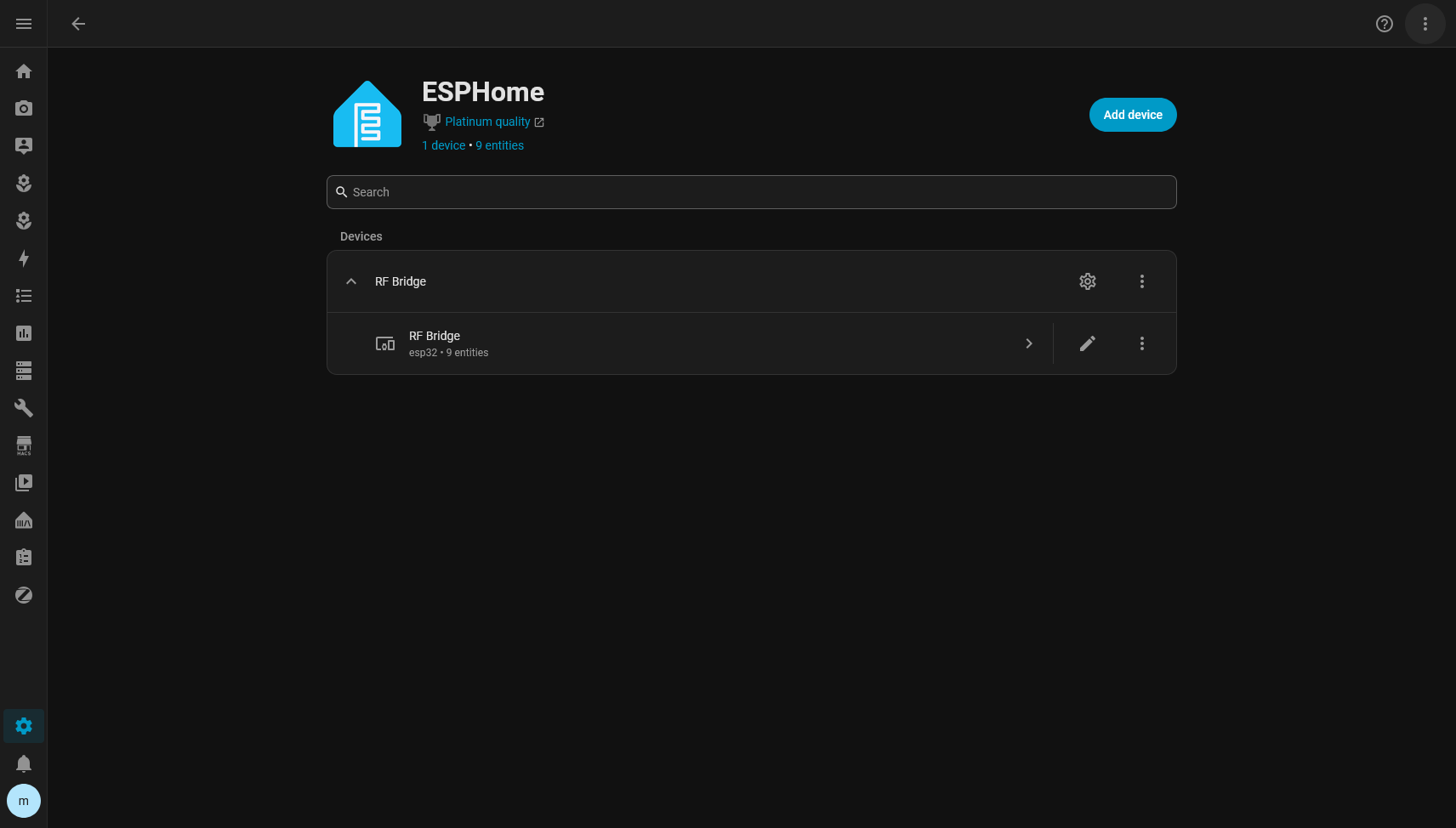
So the RF Cloner integration uses the services/actions layer that ESPHome already provides inside HA.
That avoids two concurrent connections to the same device and keeps RF Cloner tied to the ESPHome config entry, not to a fixed IP.
That decision got validated in an almost funny way during development.
DHCP changed the ESP's IP.
Nothing broke.
That was exactly what I wanted.
## The first Home Assistant version
In the first integration, every learned command became a `button` entity.
Something like:
```text
button.light
button.speed_1
button.power
```
The `unique_id` uses:
```text
{bridge_id}_{command_id}
```
So renaming a command does not recreate the entity.
Moving things around should not recreate it either.
The button stays the same button as far as Home Assistant is concerned.
That preserves:
* entity_id
* history
* automations
* dashboards
* customizations
In the initial version I made a deliberate decision: a command was not a Device.
A button on a remote is not a physical device.
Creating one Device per command would fill the Device Registry with meaningless things.
## v0.1.0
When that first cycle was solid, I published `v0.1.0`.
Before that, I ran an amount of tests I would never have imagined running when I wired up that first CC1101 on the bench.
The firmware suite reached:
```text
579 checks
0 failures
```
There were also integration logic tests and restore tests.
On top of that I ran live tests on a real Home Assistant, because some things are simply not worth much when simulated.
For example:
* restarting HA;
* restarting the ESP;
* renaming a command;
* deleting;
* restoring;
* changing hardware;
* transmitting real RF.
Whenever possible I ended the test by pressing a virtual button and looking at the physical device.
That avoids the classic situation where all the mocks are green while the fan stays still.
## v0.2 started with a simple question
After v0.1, an organization problem came up.
I had commands.
But commands for what?
If I have:
```text
light
speed_1
speed_2
power
```
they belong to the fan.
If I also have:
```text
open
close
stop
```
those might belong to the gate.
In Home Assistant it made a lot more sense to represent:
That is where the concept of RF Target came from, which became RF Device in the UI.
The ESP does not know a fan exists.
That is on purpose.
For the firmware there are still only RF commands.
Organizing them into equipment is Home Assistant's job.
## RF Device is a Device, a command is an entity
The separation ended up like this:
In practice, Home Assistant's entity list ends up grouped by equipment:
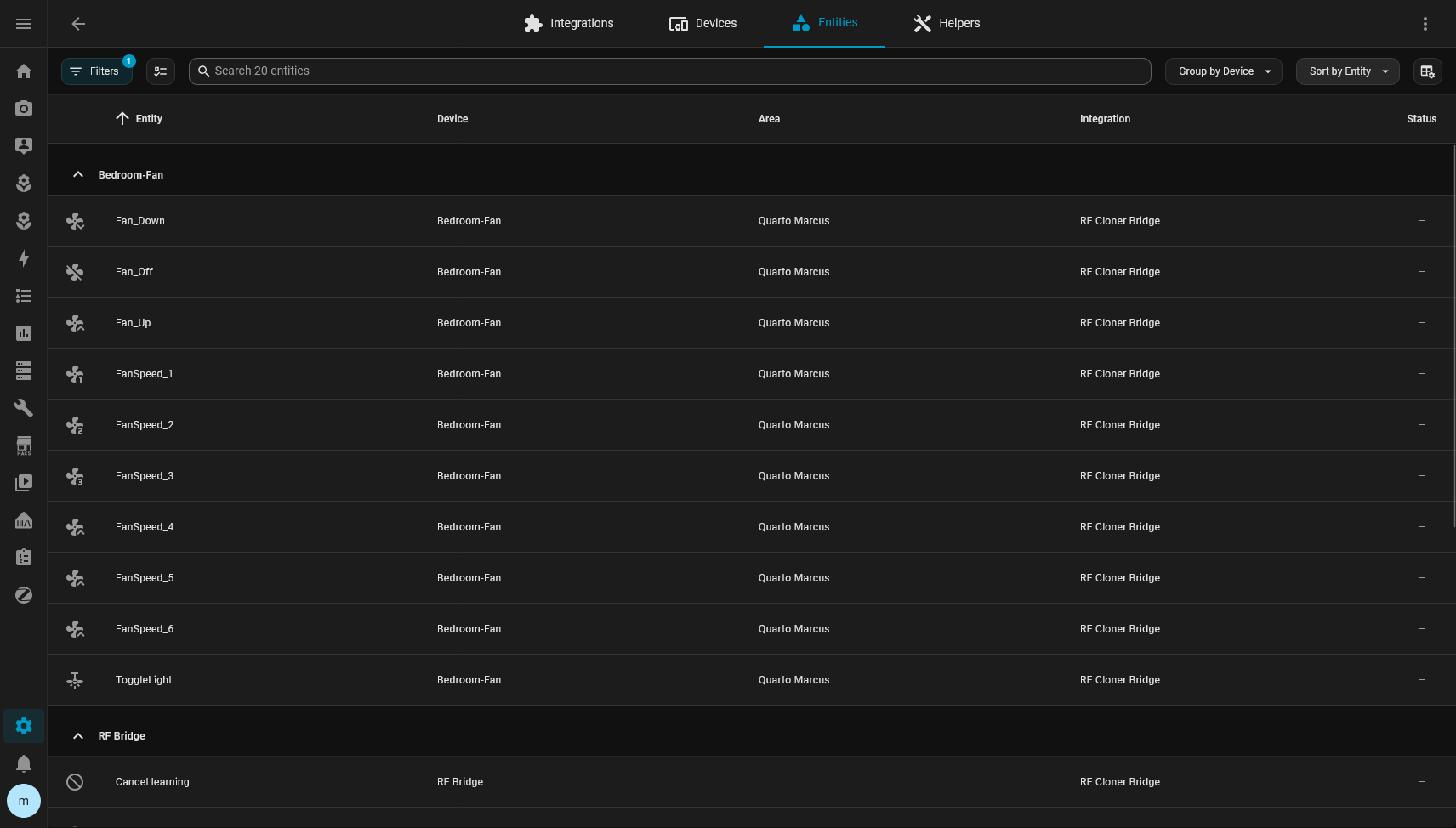
An RF Device has:
* its own `target_id`
* name
* type
* area
A command keeps the same `command_id`.
Moving `light` from one piece of equipment to another changes absolutely nothing on the ESP.
That was an important rule in v0.2.
Home Assistant organization must not cause unnecessary writes to the RF registry.
## Icons
I also added per-command icons.
It looks cosmetic, but it makes a big difference once the list starts growing.
RF Cloner can suggest something like:
```text
light -> mdi:lightbulb
power -> mdi:power
```
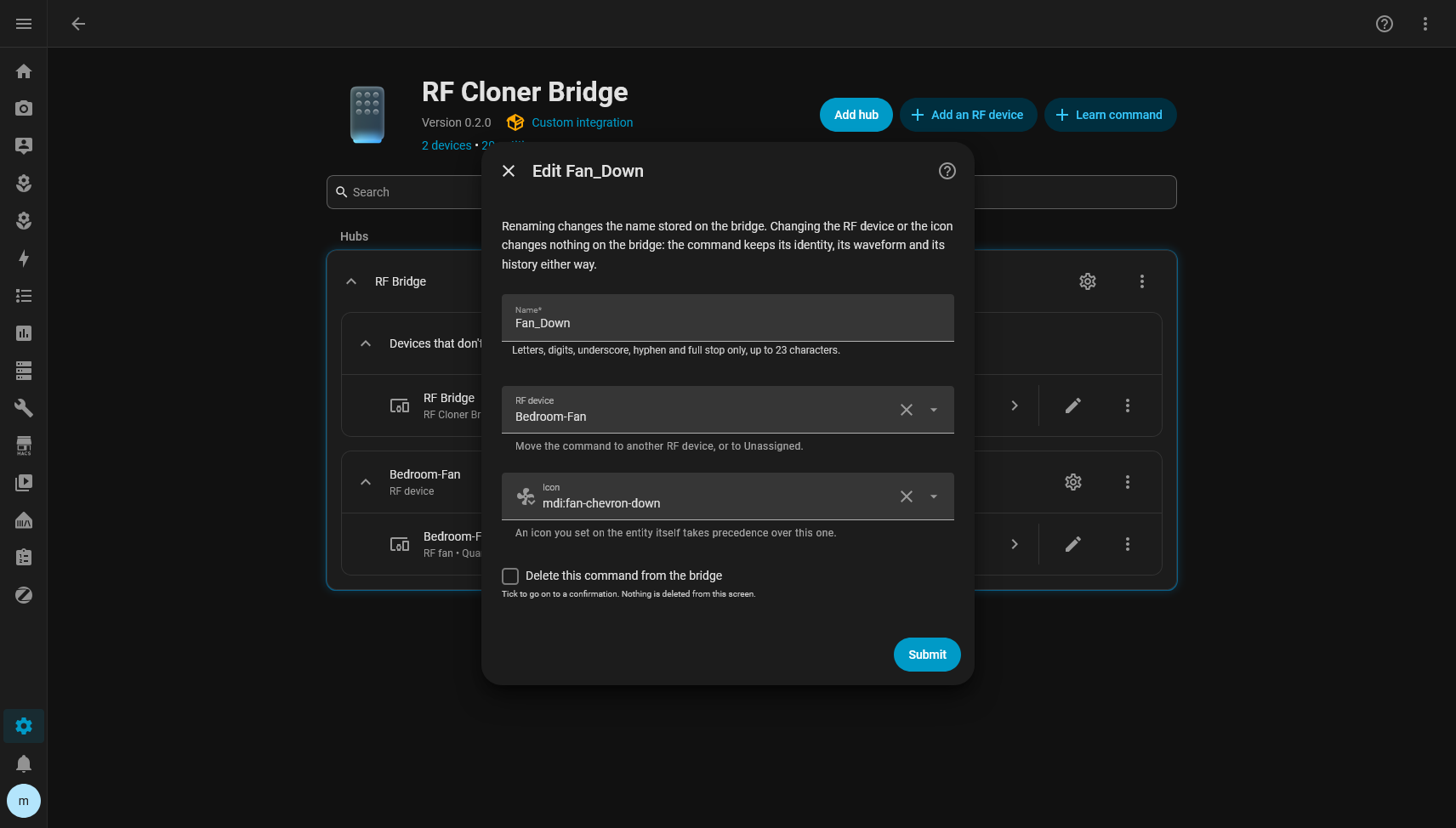
But if the user manually sets an icon in Home Assistant's own Entity Registry, the user's override wins.
That was tested explicitly.
RF Cloner can change the default icon underneath and Home Assistant keeps showing the one chosen manually.
If the override is removed, the integration's latest icon shows up again.
## Migrating from v0.1 to v0.2
This is where the project got more serious for me.
v0.1 was already public.
I could no longer just decide that the old format was inconvenient and wipe everything.
The migration had to preserve real installations.
v0.1 commands could already have:
* a customized entity_id;
* automations;
* history;
* an area;
* an icon;
* a name changed by the user.
So the migration test was not:
> did the commands show up afterwards?
It was:
> are they exactly the same entities?
On my real Home Assistant I validated:
```text
command_id
unique_id
entity_id
registry record id
```
before and after.
Everything stayed the same.
And the migration wrote nothing to the ESP.
The revision stayed exactly the same.
## Testing what the framework actually does
One thing this project reinforced for me is how much tests against Home Assistant's real implementation matter.
At one point I discovered that removing a Config Subentry makes HA remove the Devices and Entities belonging to that subentry before the integration's listeners get to do anything.
That directly affected the behavior of deleting an RF Device.
My rule was:
> deleting the fan must not delete the RF commands.
It should only remove the organization.
So I tested the recovery behavior using Home Assistant's own Deleted Entity Registry.
When deleting the target:
```text
Fan
```
the command:
```text
button.light
```
goes back to Unassigned.
But it keeps the same:
```text
unique_id
entity_id
registry record
icon
customizations
```
I did not want to believe that from the code alone.
I tested it live.
It worked.
## A bug my tests had approved
One of the most interesting bugs showed up with Area.
The RF Device had been created in the area:
```text
Quarto Marcus
```
Then I manually moved the Device in Home Assistant to:
```text
Sala de estar
```
RF Cloner correctly did not overwrite that choice on reload.
So far, great.
Then I opened the integration's form to put it back in Quarto Marcus.
The form was already showing Quarto Marcus, because that was the old value saved in the subentry.
So I selected Quarto Marcus, submitted, and nothing happened.
The Device stayed in Sala de estar.
The worst part is that there was a test covering exactly that.
And it passed.
The test was wrong for the same reason as the implementation.
Both compared the chosen area with the stored value.
But the truth at that moment was the Device Registry.
I fixed the form to use the Device's current area.
Then I rewrote the test with the real scenario:
```text
create in Quarto
manually move to Sala
open form
form must show Sala
choose Quarto
submit
Device must go back to Quarto
```
That test is probably worth more than several unit tests written straight from the implementation.
## Learning directly into a target
The next test was learning a command with the fan chosen as the RF Device.
The flow became:
```text
Name
RF Device
Icon
```
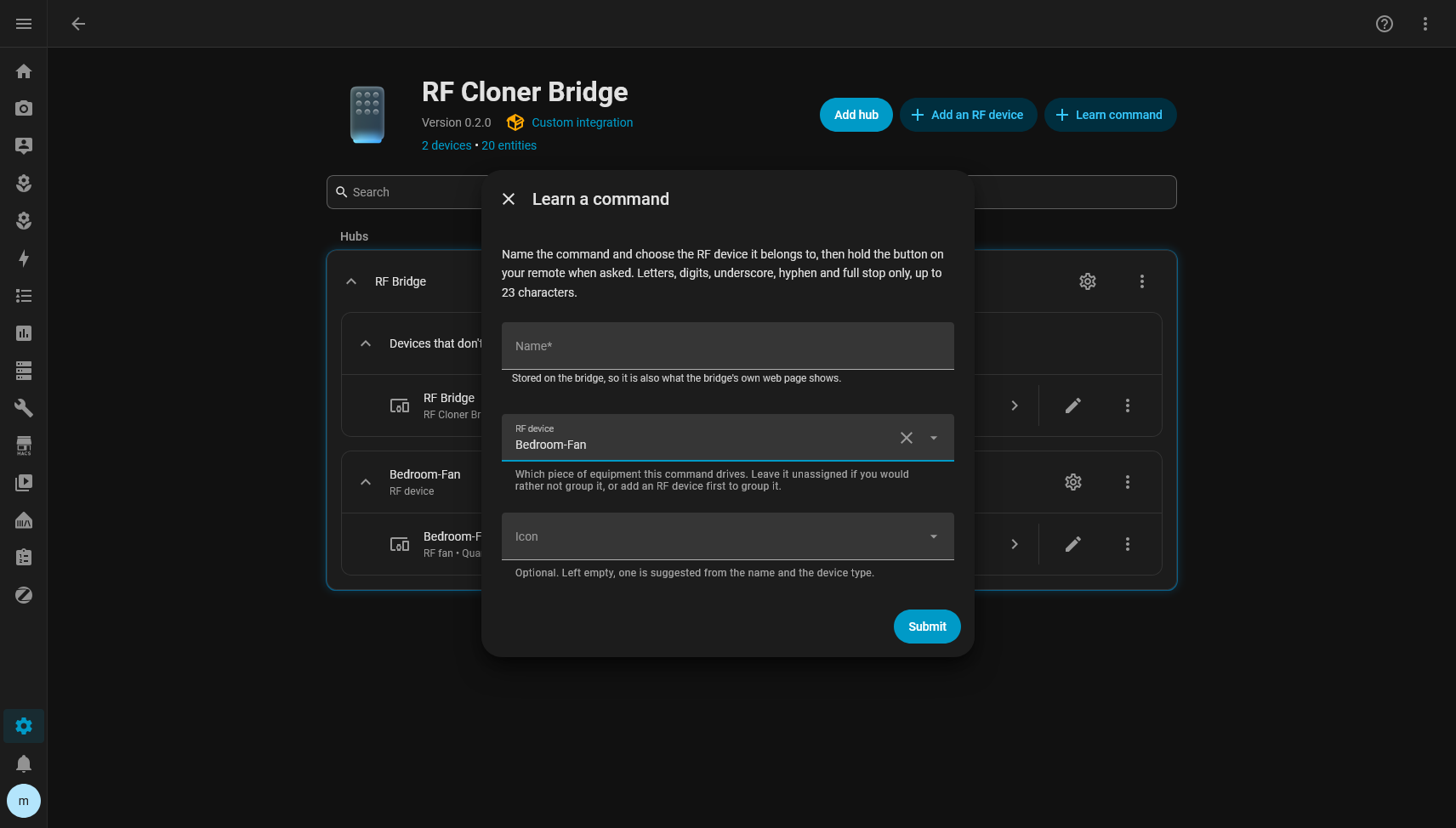
I armed the capture.
I held the remote.
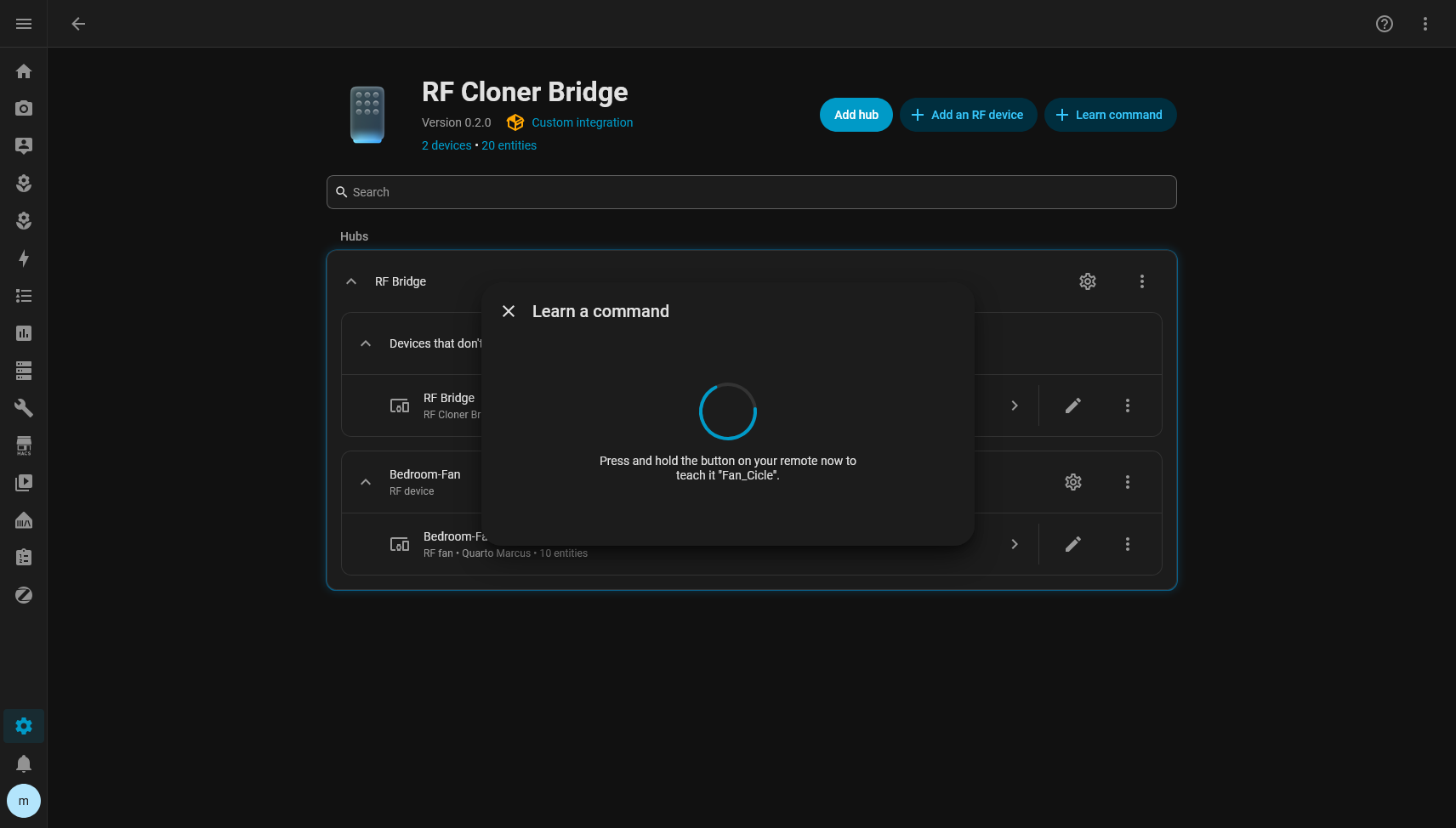
The ESP learned it.
The command got a new ID.
Home Assistant created the entity directly on the fan Device.
No temporary entity in Unassigned.
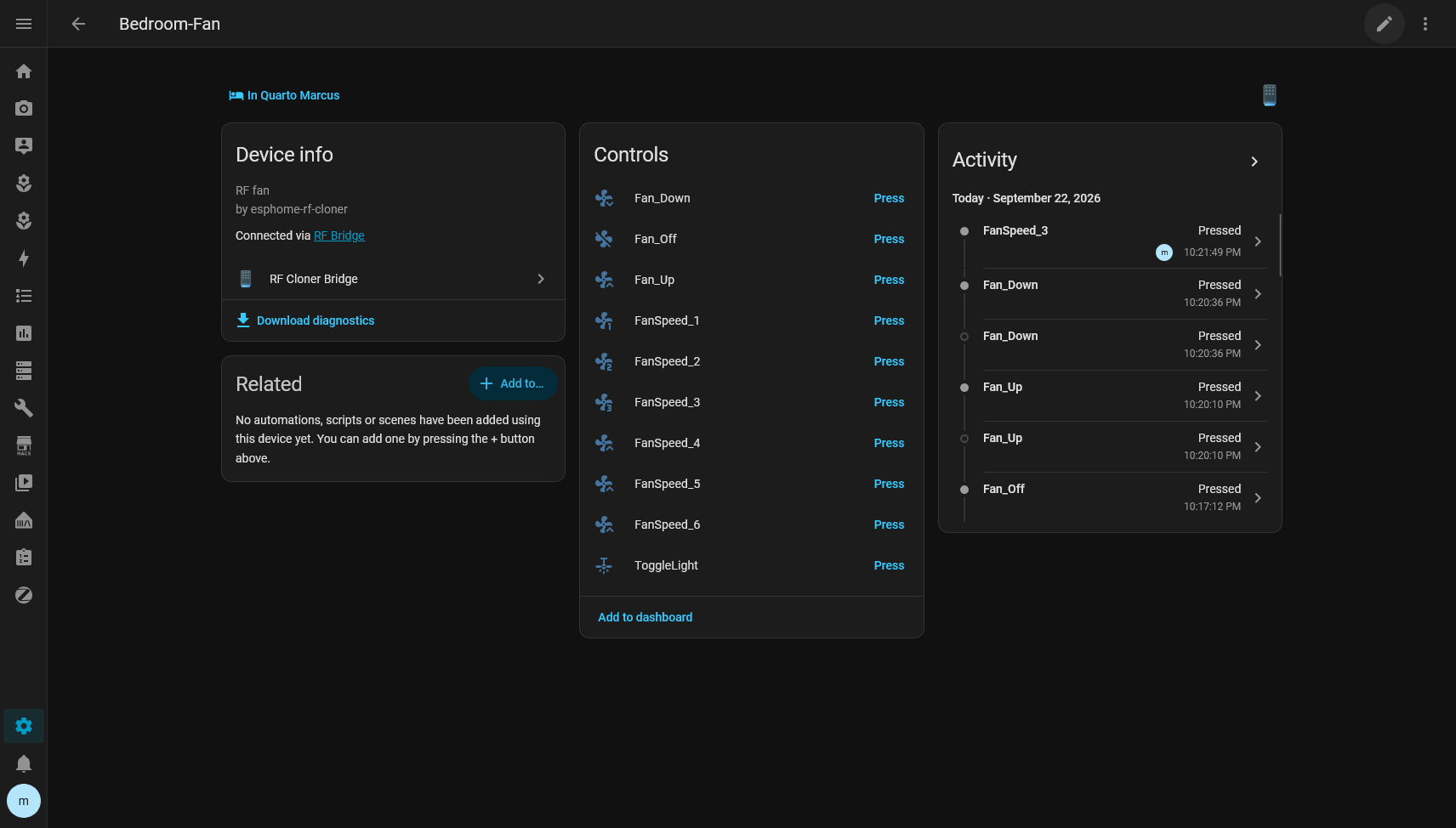
Then I told it to transmit from the freshly created button.
The fan responded.
Once again, the test ended in the physical world.
## And then I deleted the command
To close the loop, I deleted just that throwaway command.
I watched Home Assistant's event bus to make sure the integration was calling:
```text
rf_delete_id
```
with the immutable ID.
Not the name-based version.
The command disappeared from the ESP and from Home Assistant.
The revision advanced once.
The ID was retired.
The next ID did not go backwards.
The snapshot was updated.
The other commands stayed intact.
## v0.2.0
After that cycle I published v0.2.0.
By then the tests stood at:
```text
Firmware
579 checks
0 failures
Integration logic
24 checks
0 failures
Home Assistant
40 passed
```
On top of that I went through:
* compileall
* translation parity
* hassfest
* HACS validation
* CI on GitHub
* live tests with hardware
All green.
The v0.2.0 tag was published with the firmware and the RF backup format exactly the same as v0.1.
v0.2 was essentially an evolution of the Home Assistant integration.
## And of course I found a bug right after
After the release I decided to do something that looks ridiculously obvious in hindsight.
I deleted the configuration and tried to install it as if I had never seen the project before.
{/* IMAGE: empty "Connect an RF bridge" modal (no screenshot of it, only of the fixed version) */}
The initial screen showed up like this:
Title.
Submit button.
No fields.
The funny thing is that the backend was perfect.
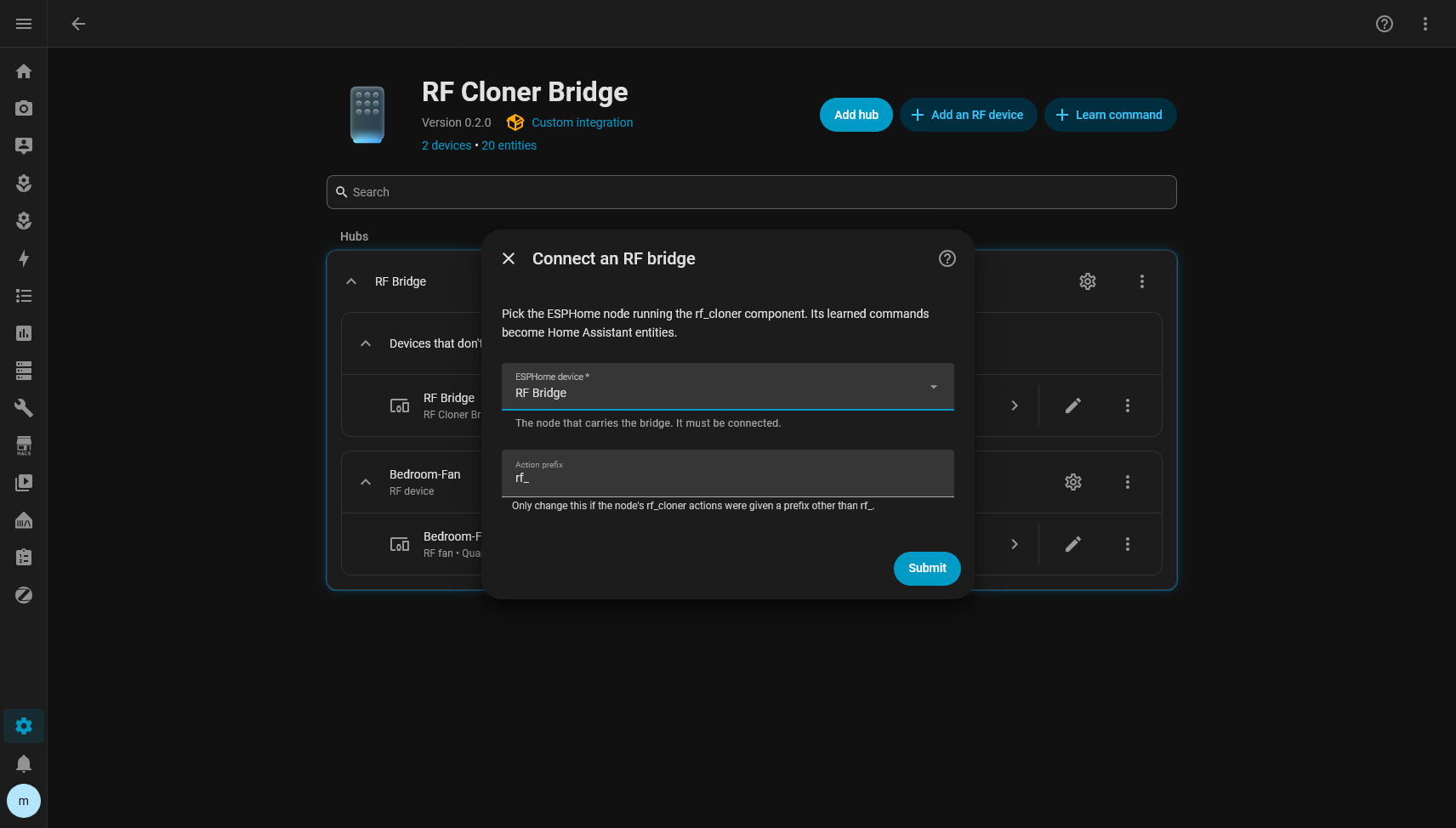
It returned:
```text
ESPHome device
Action prefix
```
The problem was in Home Assistant's frontend.
The selector used was a required `ConfigEntrySelector` with no initial value.
In the 2026.9 frontend, that went through a function that tried to produce the form's initial values and ended up throwing:
```text
Selector config_entry not supported in initial form data
```
The exception interrupted the render.
That is why only the title and the button were left, since they sat outside the broken subtree.
It was a particularly good bug to find, because any backend-only test would have passed.
The JSON was right.
Home Assistant was serializing it right.
The problem only existed in the browser.
The fix was to use a normal selector filled with the available ESPHome config entries, keeping the `config_entry_id` as the value.
After that, onboarding finally worked for real.
## Testing as a user showed another problem
With the form fixed, I kept using the integration as if I were someone installing it for the first time.
And I noticed another problem.
Not a technical one.
A UX one.
Creating an RF Device was easy.
The integration page already had:
```text
Add an RF device
```
I created:
```text
Ventilador
Fan
Quarto Marcus
```
But learning a command was hidden behind the bridge's gear icon.
The path was something like:
```text
RF Cloner
Bridge configuration
RF commands
Learn a command
```
The flow worked.
But I myself was looking around for where the product's main action was.
So the next fix was obvious.
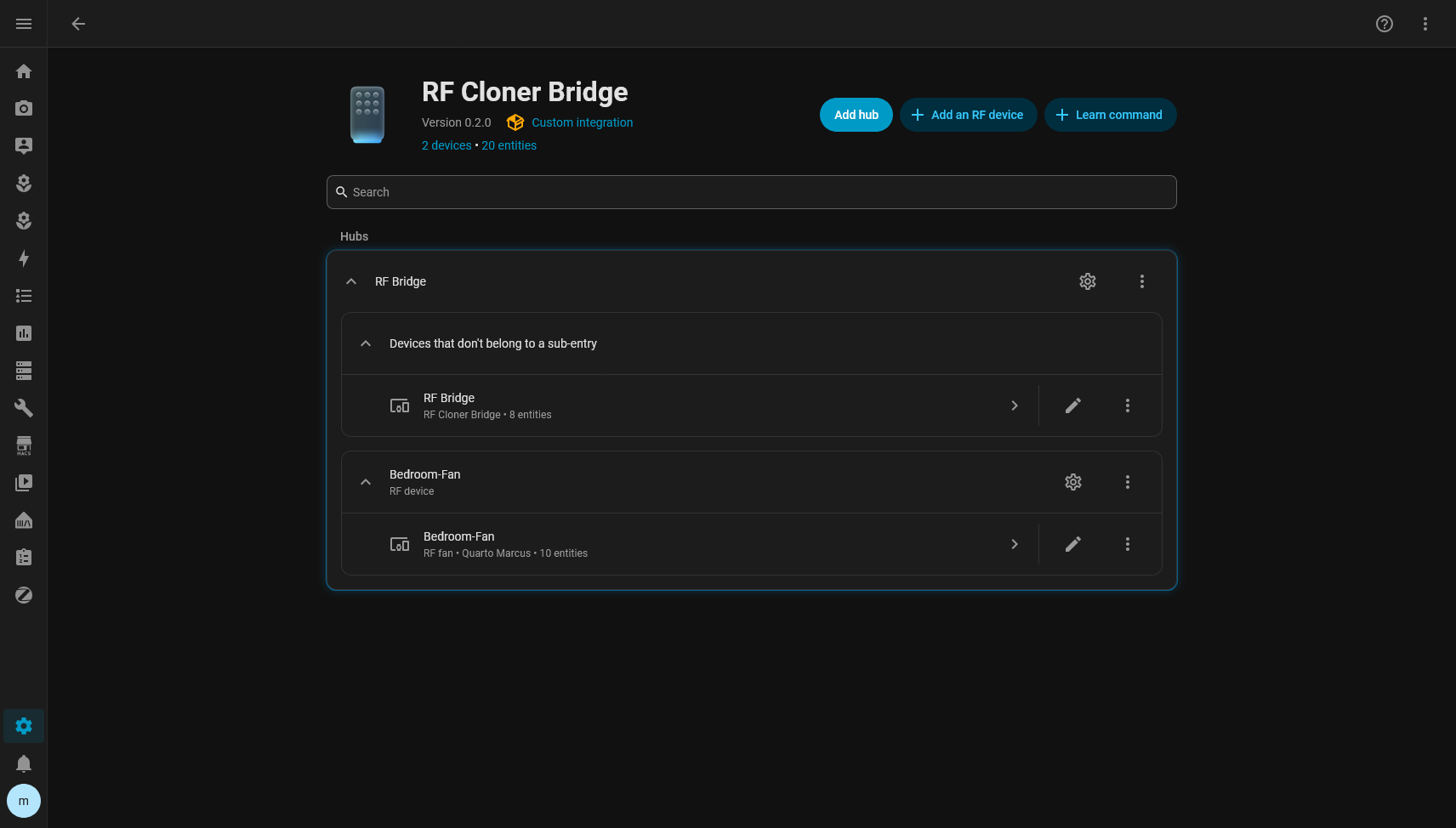
On the integration's main screen I want two actions:
```text
Add an RF device
Learn command
```
No custom dashboard.
No parallel frontend.
No fake admin entity.
Home Assistant already has almost all the pieces.
The problem was just making the main operation discoverable.
That was exactly where the project stood when I started writing this post. Before I finished the text, the button was already there, on the repository's main branch, waiting for the next release:
## What the project became
It is funny to look back, because I only wanted to replace a Tuya bridge.
Today the project has a very clear split.
### On the ESP
The ESP is responsible for what is really RF:
* learning;
* validating;
* storing;
* transmitting;
* deleting;
* renaming;
* exporting;
* restoring;
* keeping IDs;
* keeping the revision.
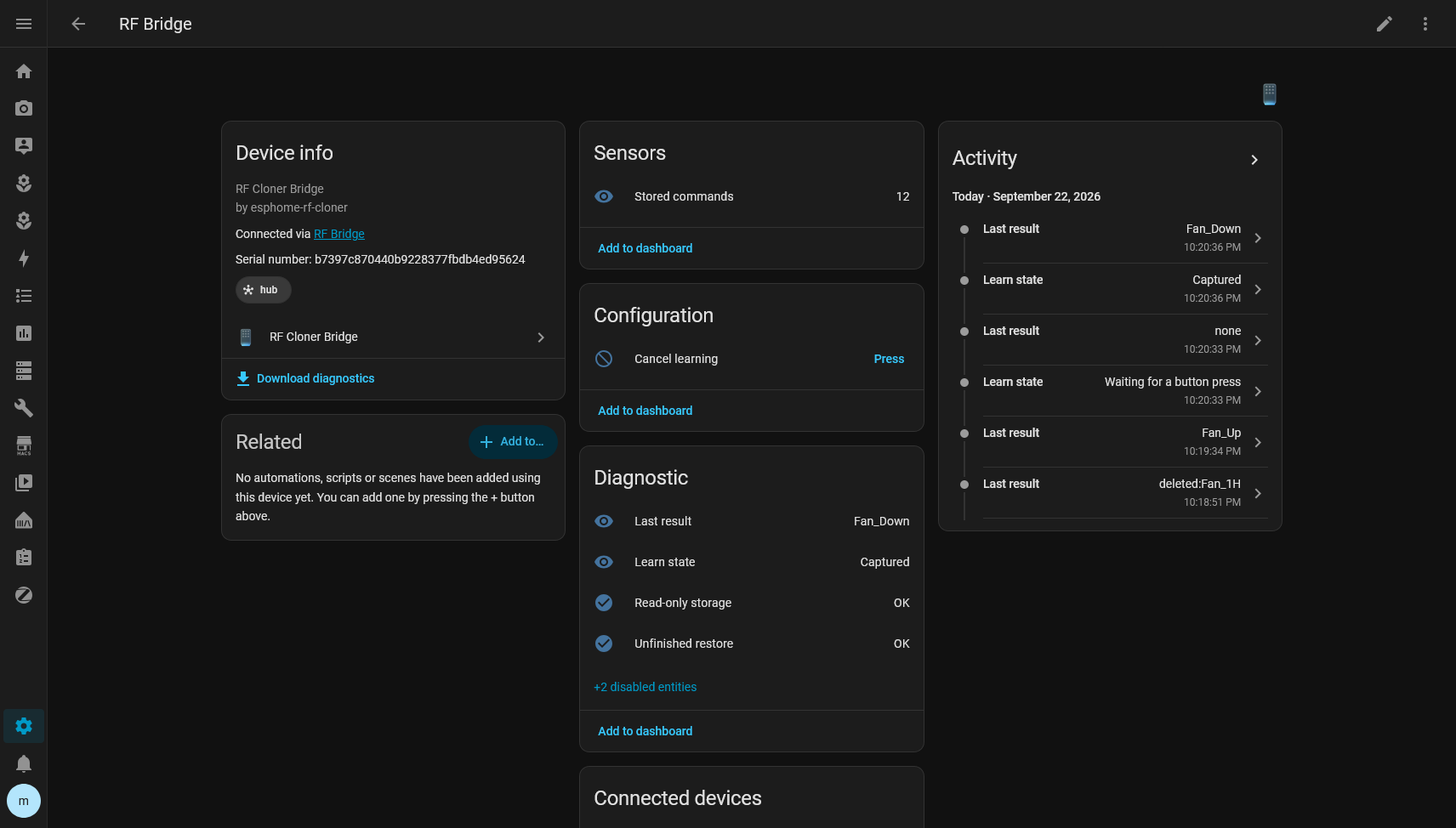
### On Home Assistant
Home Assistant takes care of organization and experience:
* RF Devices;
* commands as entities;
* Areas;
* icons;
* automations;
* snapshots;
* replacement;
* migration;
* interface.
The firmware does not know that this signal turns on a fan's light.
It knows there is a `command_id 4` with a waveform. Home Assistant knows that same `command_id 4` is the fan's Light:
I really like that separation.
## What I would do differently if I started today
Probably almost nothing in the first part.
I would still start with raw replay.
I would still avoid reverse engineering the protocol without need.
I would still validate the RF physically before thinking about Home Assistant.
What I would do earlier is test the product as a new user.
It is very easy to build an integration knowing exactly:
* which button to click;
* where the flow is;
* what each field means;
* which internal state should show up.
When you delete everything and try to install it again without shortcuts, you find a completely different category of bugs.
The empty modal was one of them.
The hidden Learn action was another.
## On using AI in this project
A good part of the implementation and the investigation was done with coding agents, mostly to speed up things that would be extremely repetitive to do by hand.
But I did not treat it as:
> I describe the project and wait for it to come out finished.
My process was much closer to:
```text
hypothesis
implementation
hardware
measurement
failure
logs
new hypothesis
test
regression
real test
```
Several decisions that looked right were thrown out after testing on the hardware or on the real Home Assistant.
There were also tests that were green and proving the wrong thing.
AI speeds this kind of project up a lot, but hardware is still excellent at destroying any beautiful theory.
If the fan does not spin, the test failed.
## The result
Today I have an ESP32 with a CC1101 that can learn RF commands at runtime, store them, survive reboots, export, restore and expose everything to Home Assistant without recompiling for every new button.
And the system did not get stuck to the Ventisol.
That was just the first device I used to prove the idea worked.
Any remote compatible with this way of capturing and transmitting can potentially be learned the same way.
I also intentionally left some things out of scope.
There is no attempt to:
* decode every RF protocol;
* support rolling codes;
* infer the device's state;
* pretend an RF button is a stateful `fan` entity with no feedback;
* send data to the cloud;
* add IR just because commercial modules usually mix the two.
The project does one thing.
It learns raw RF and replays it faithfully.
The rest is organization.
## Building your own
If you want to replicate my exact setup, these are the two main parts:
* ESP32 DevKit V1: [USB-C](https://meli.la/1aAJke5) or [Micro-USB](https://meli.la/11m5DHG)
* [CC1101 / E07-M1101D 433 MHz](https://meli.la/1NQqv8n)
Wiring:
| CC1101 | ESP32 |
| --------- | ------ |
| GND | GND |
| VCC | 3V3 |
| GDO0 | GPIO22 |
| CSN | GPIO5 |
| SCK | GPIO18 |
| MOSI / SI | GPIO23 |
| MISO / SO | GPIO19 |
| GDO2 | GPIO4 |
The project, configurations and documentation are here:
[github.com/codebyant/esphome-rf-cloner](https://github.com/codebyant/esphome-rf-cloner)
The repository's documentation is the reference for installation, because the interface is still evolving and I would rather not duplicate instructions that could go stale in this post.
## A few notes before you buy anything
Not every 433 MHz RF signal is simply clonable.
There are remotes with rolling codes, different protocols, different frequencies and characteristics that may require another approach.
Garage doors are a classic example where I would not assume raw replay is going to work.
It is also worth checking your remote's frequency before buying a specific module.
My case was 433.92 MHz, and that is where I validated the whole project.
Do not treat this project as a universal way to get around RF systems.
The idea is to automate devices you already control and that use signals compatible with replay.
## The next step
The RF part has reached a point I consider very solid.
What I am refining most right now is the experience inside Home Assistant.
I want installing the integration and teaching it the first button to be obvious, without having to read the implementation or hunt for hidden options.
That is probably the best sign that the project stopped being just that initial hack.
At the start I was happy when the fan spun.
Now it bothers me when the learn command button is not in the most obvious place possible.
I think that is how a personal project starts turning into a real product.
---
# Integrator: From Instability to a Microservices Architecture
> In this post I detail the journey of building one of the most complex projects I've ever worked on, migrating from an unstable system to a resilient architecture.
- By: Antônio Miranda (https://antmiranda.dev)
- Published: December 12, 2025
- URL: https://antmiranda.dev/blog/in-depht/integrador
- Tags: projetos, desenvolvimento, post-mortem, backend, arquitetura, microservices, nestjs
## What pain does the project solve?
Ever since I took over the development area at TCS [Terminal de Cargas de Sarzedo](https://tcsmg.com.br/), we had been facing almost "scheduled" problems in the invoice integration system with clients.
At least once a month, we had a severe instability or a total outage in the system. This directly impacted the terminal's operation, taking hours, or even days, to restore normal functioning.
## Initial proposal
Faced with this scenario, I began architecting a solution. At first, I tried to keep the existing system's foundation, but separating the three critical parts:
1. **Ingestion:** Reading the email inbox and processing XML attachments;
2. **Processing:** Handling and formatting the data for the internal operational system;
3. **Integration:** Active communication with the clients' systems.
However, this quickly proved unfeasible. The legacy architecture couldn't support that separation efficiently. Insisting on a monolith, with several other functions beyond integration, for this kind of processing would be a mistake; creating an "arm" of the monolith for each new client would turn maintenance into a nightmare of cyclopean complexity.
## The Turning Point
On August 28, 2025, the definitive breakdown happened. The system stopped completely.
At that moment, we still didn't have the solution ready, although I had already been mentally preparing for that day. After a few tense hours, I managed to get the system back up in a precarious way, but enough to put out the immediate fire.
With the solution already envisioned, I started the work. On September 2, 2025, the board gathered the department and gave us an ultimatum: we needed to solve the problem at its root.
With the full support of the IT department and the Operations Manager, I stopped work on all other projects, froze the backlog, and dove exclusively into building the definitive solution.
## Architecture
I opted for a microservices-based architecture using **NestJS Microservices**. The goal was to have extremely well-defined responsibilities, eliminating coupling.
For asynchronous communication and resilience, I adopted **RabbitMQ**. This ensures that if one end of the system goes down, messages stay queued and nothing is lost.
The main architecture was split into two cores:
- **Nfe Service:** Email reading and raw XML processing;
- **Operacional Service:** Formatting and sending to the internal system.
In addition, we adopted an isolation strategy for clients: each client has its own dedicated microservice.
To streamline development, I created base microservices (e.g., `XMINING-basic`), containing the essential code for repetitive integrations, allowing quick reuse for clients using the same ERP.
### Email Reading and Processing (Nfe Service)
This microservice monitors the Outlook inbox in real time. It automatically manages the folders, processes attachments asynchronously, and ensures the flow never stalls, regardless of the incoming volume.
We also implemented an intelligence layer: automatic identification of invalid emails or clients, with automatic classification and rejection. This data is stored for future Machine Learning model training. The goal is to shield the system: it doesn't matter if the layout of the government's XML changes or if garbage comes in, the system will know how to handle it.
### Processing for Operations (Operacional Service)
This is the heart of data translation. It receives inputs from both the client microservices and the *Nfe Service* and converts everything into the format of **OpenGTM** (a third-party system used by operations).
At first glance it seems simple, but the complexity is high. OpenGTM has a rigid structure based on SOAP, but done via JSON requests with extremely specific formatting. A single misplaced comma or data type results in rejection.
Unfortunately, for *compliance* reasons, I can't share the code, but it was a very interesting engineering and data-structuring challenge to solve.
### Client Microservices
The philosophy here is fault isolation. As long as the client's system has an endpoint that returns the data TCS needs, it gets its own microservice.
This ensures that if "Client A's" system goes down, "Client B" and the rest of the Integrator keep operating normally.
These services rely on standardized basic primitives:
- Send queue and retries;
- CRUD of integration data;
- Status monitoring.
When a new client comes in, you just "clone" the basic primitives' structure and adjust the specific business rule.
### Monitoring System
Getting out of the dark was a priority. The system has a monitoring microservice that dispatches alerts based on scope:
- **Code/infra errors:** Notify me and the IT team directly.
- **Business errors:** Notify the operators in real time (e.g., an invoice with no linked vehicle).
#### Prometheus and Grafana
We implemented detailed metrics for observability:
- Overall health of the Integrator flow;
- Resource consumption (CPU/RAM) per container;
- Success/failure statistics on the integration with OpenGTM;
- Throughput of each microservice and client.
## Frontend
The visual interface was split into two strategic fronts:
### 1. Module in the SIG (Integrated Management System)
The SIG is our corporate "super-app" that unified several legacy subsystems. (Deserving of its own dedicated post soon.) The Integrator got its own module inside it with two main screens:
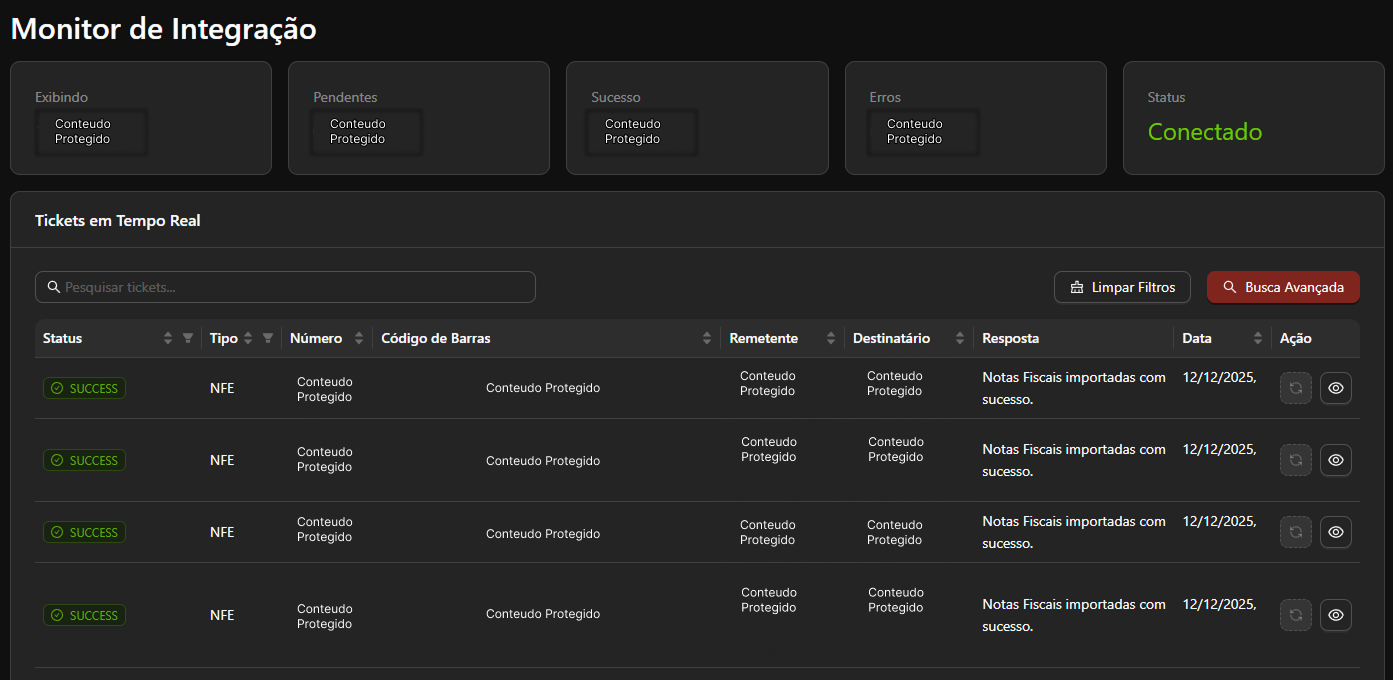
**Screen 1: Integration Monitor**
Used by operators (weighbridge staff) to follow the flow in real time: barcode, date, status and friendly error logs.
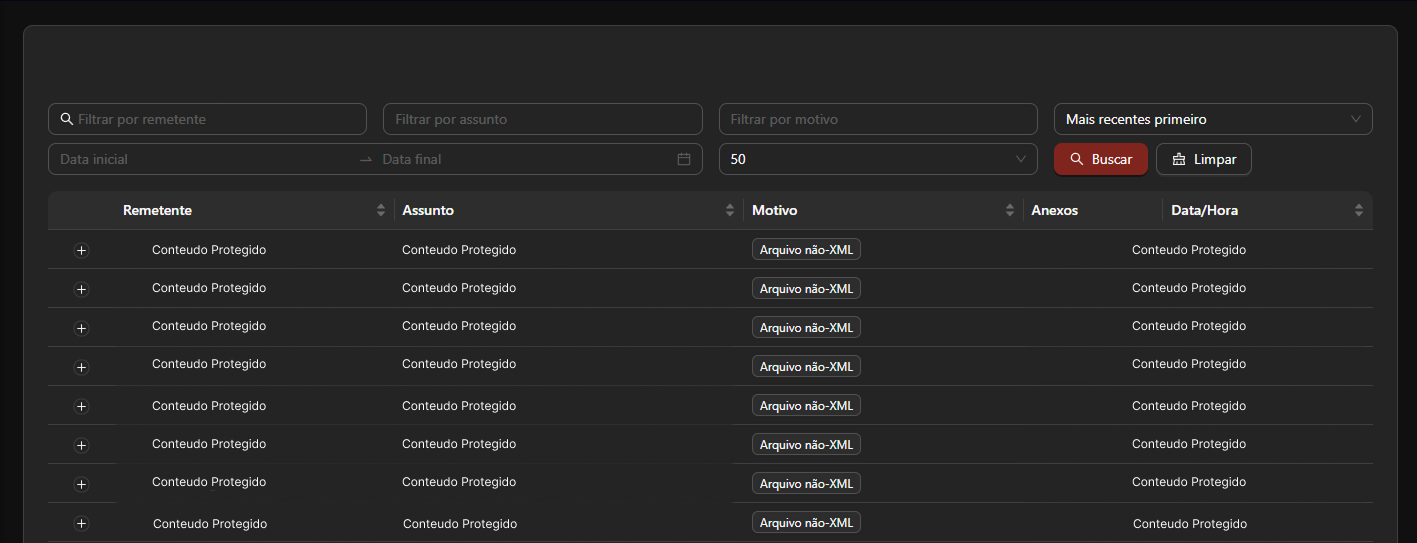
 **Screen 2: Invalid Emails**
Lets operations see what was automatically rejected and why.
**Screen 2: Invalid Emails**
Lets operations see what was automatically rejected and why.
 ### 2. Client Portal
A separate project (still under construction) where clients themselves will be able to follow their integration processes, reducing the support load on our team.
## Deployment and DevOps
The official switch happened on **September 12, 2025**. We retired the old system and migrated 100% of the flow.
To manage this complexity, I adopted a **Monorepo** strategy. Our CI is smart: it detects which folders/services changed and runs builds and tests only on the affected parts, drastically optimizing deploy time. Following industry standards.
## Benefits Achieved
The architecture change brought tangible gains:
* **Fault Isolation:** An error in one module doesn't bring down the entire system.
* **Cost Reduction:** Lower maintenance complexity and faster fixes mean fewer man-hours spent "firefighting" and less downtime.
* **High Performance:** Asynchronous processing allows handling load peaks without bottlenecks.
* **Horizontal Scalability:** What was once static now scales dynamically as demand requires.
* **Observability:** Before, we were flying blind; now we have a complete cockpit with metrics and dashboards.
## Personal Growth
Working so intensely on this project over the past 3 months was a technical deep dive. I got to put into practice advanced concepts of distributed systems and software architecture that I had been studying, going from theory to the "trenches" of production.
Especially because I had to put such a complex, distributed system into production without being able to exhaustively test every part of it.
## Conclusion
Today, we complete exactly 3 months since the "turning point". The system is stable, having gone through only two planned interruptions for scheduled maintenance.
Problems like "Error in the integration with Client X" still happen, but they are now handled, isolated and expected exceptions within the architecture, without stopping the company's operation.
It was, without a doubt, one of the most challenging and rewarding experiences of my career so far. I'm immensely grateful to the IT department for the coverage and support during this period of total focus.
The project isn't over. On the contrary, it's now ready to evolve.
---
# Why a Blog?!
> In this post I explain why I decided to start a blog in the middle of 2025
- By: Antônio Miranda (https://antmiranda.dev)
- Published: November 28, 2025
- URL: https://antmiranda.dev/blog/opening/creation-of-the-blog
- Tags: introducao
## Why start a blog in the middle of 2025?
Well, I've never really been one to consume blog content, but lately I've been trying to get off social media. As a result, I end up reading a lot of blogs...
I see this as an opportunity to have my own space, where I can say whatever I want, write however I want,
without worrying about algorithms, comments, or whatever else. Here, I'll share my knowledge, thoughts, cool projects, and much more...
## What was I trying to build?
I'm a huge fan of the format/layout of project documentation sites, à la [Better Auth](https://better-auth.com/docs).
So, before building my blog, I went on a long journey to figure out how those sites are made, and drawing inspiration from them,
I built my own version completely from scratch.
Complete with a sidebar menu, a Table of Contents (TOC), and much more, I wrote the documentation
for a few different projects, and in doing so, I tested the tool quite a bit, running it for
about 60 days at work.
In the future, I'll write a dedicated post about it.
Now, I decided to adapt the logic to work on a blog,
turning the documentation layout into a blog, which was actually as simple as
removing the sidebar and header.
From there, I started adding my fluid, personal visual signature, like that lovely page Navigation
on your right (if you're on a computer), with simple, fluid animations, that scroll
indicator on the left, super simple and fluid, as well as several other simple, fluid details and animations
that make all the difference. Want another example? Reload the page and watch that subtle blur
before the content is revealed.
## Which technologies did I use?
After all, this is a dev's blog, so I can't skip talking about the technology used to build it.
- **Vite**: Ultra-fast build tool for frontend development
- **React**: Library for user interfaces
- **Tailwind CSS**: Utility-first CSS framework
- **Motion**: Animation library for React
- **Shadcn UI**: Reusable UI components
- **Aceternity UI**: Modern visual components
- **MDX**: Markdown with JSX for rich content
Noticed there's no backend? That's because there really isn't one, and I'll explain why in a second.
## Are the posts dynamic?
Yes and no. All posts are written in Markdown using MDX, and are stored directly in the project's code,
much like the library docs I mentioned earlier.
Even though all the React content you're seeing right now was rendered at runtime,
they aren't dynamic in the sense that I can edit them instantly at any moment,
but they are dynamically processed at runtime.
### Why did I do it this way?
Simple: since this is a personal blog, and I'm the one writing the posts, I prefer to write this way. That way,
I also don't have to worry about login security, databases, etc., for a project that doesn't require those
features.
## How does reading and processing MDX files work?
**Writing the Posts**
Posts are written in `.mdx` files inside the `src/content/blog/` folder.
Each file contains frontmatter (metadata) and the content in Markdown with JSX.
**Automatic Importing**
During the build, Vite uses `import.meta.glob` to automatically import all `.mdx` files,
creating an object with all the available posts.
**Real-Time Processing**
When you visit a page, the MDX is processed by React at runtime,
converting Markdown + JSX into functional React components.
**Final Rendering**
The custom MDX components (like Note, Step, Card) are applied,
along with the Tailwind styles, resulting in the page you see.
This approach is perfect for personal blogs: simple, secure, and it lets you
use all the power of React in your posts without unnecessary complexity.
---
# Português (Brasil)
---
# Antônio Miranda
> Antônio Miranda é desenvolvedor full stack em Belo Horizonte. Constrói produtos de ponta a ponta, da interface ao backend e à infraestrutura, no framework que o projeto pedir.
- Site: https://antmiranda.dev/pt-br
- Email: oi@antmiranda.dev
- GitHub: https://github.com/codebyant
- LinkedIn: https://www.linkedin.com/in/antmiranda/
- Local: Belo Horizonte, MG, Brazil
---
# Sobre: Antônio Miranda
Desenvolvedor Full Stack e entusiasta de infraestrutura. Transformo ideias em produtos que rodam em produção, no framework que o projeto pedir, ou em vanilla quando faz mais sentido: interfaces, backends, apps desktop, scripts e a infraestrutura por baixo de tudo. Aqui você conhece minha stack, meus pontos fortes e o que faço além do código.
## O que eu faço
Atuo de ponta a ponta no ciclo de vida do produto, da interface à infraestrutura. Estas são as frentes em que trabalho no dia a dia.
- **Frontend moderno**: React, Astro, Vite, Tailwind e integração com bibliotecas de design modernas.
- **Backend robusto**: APIs escaláveis com Bun, Elysia e Hono, e funções serverless em Cloudflare Workers, AWS Lambda e Azure.
- **Integrações**: APIs de terceiros, sistemas de pagamento e soluções de autenticação.
- **Performance**: Otimização e fluidez para criar experiências excepcionais.
## Tech Stack
- **React** (Frontend): Construção de interfaces modernas e interativas com componentes reutilizáveis
- **TypeScript** (Linguagem): Desenvolvimento com tipagem forte para código mais seguro e manutenível
- **Python** (Linguagem): Construção de algoritmos complexos e análise de dados
- **Rust** (Linguagem): Desenvolvimento de software rápido, seguro e eficiente em memória
- **Tailwind CSS** (Estilo): Estilização rápida e consistente com utility classes
- **NestJS** (Backend): Framework para backends robustos com arquitetura inspirada no Angular
- **Node.js** (Backend): Ambiente de execução JavaScript para construção de servidores e APIs
- **Bun** (Runtime): Runtime JavaScript e TypeScript rápido, com ferramentas integradas
- **Elysia** (Backend): Framework TypeScript para APIs rápidas e tipadas sobre Bun
- **Hono** (Backend): Framework web leve para APIs executadas em múltiplos runtimes
- **Vite** (Framework): Build tool rápida com Hot Module Replacement para desenvolvimento ágil
- **Next.js** (Framework): Framework para construção de aplicações web modernas e escaláveis
- **React Native** (Mobile): Desenvolvimento de aplicativos multiplataforma com React
- **Electron** (Desktop): Aplicações desktop multiplataforma com tecnologias web
- **Tauri** (Desktop): Aplicações desktop leves com frontend web e backend em Rust
- **Docker** (DevOps): Containerização de aplicações para deploy consistente e isolado
- **Amazon AWS** (Cloud): Infraestrutura em nuvem escalável para hospedagem de aplicações
- **Cloudflare** (Cloud): Infraestrutura de rede global de alta performance
- **Railway** (Cloud): Plataforma cloud para deploy e operação rápida de aplicações
- **Bunny Storage + CDN** (Cloud): Armazenamento de objetos e entrega global de conteúdo com baixa latência
## IAs que utilizo
- **Claude Code**: Agente de código para explorar bases, implementar mudanças e validar soluções pelo terminal.
- **OpenCode**: Agente de código open source para o terminal, compatível com vários provedores de modelos.
- **Google Stitch**: Ferramenta de IA do Google para gerar e iterar designs de interface.
- **Cursor**: Editor com IA para navegar, escrever e refatorar código com contexto do projeto.
## Ferramentas & apps
- **HTTPie**: Cliente HTTP para explorar, testar e depurar APIs.
- **Zed**: Editor rápido e colaborativo para desenvolvimento de software.
- **Visual Studio Code**: Editor versátil para desenvolvimento e manutenção de projetos.
- **Zen Browser**: Navegador focado em uma experiência de pesquisa mais organizada.
- **Orca**: Ambiente de desenvolvimento de agentes para operar IAs em worktrees isoladas.
- **OrbStack**: Ambiente desktop leve para executar containers Docker.
- **Obsidian**: Notas, organização e preservação de contexto de projetos com IA.
## Meus pontos fortes
Sou apaixonado por criar experiências excepcionais, onde a excelência técnica encontra a fluidez na experiência do usuário. A melhor tecnologia é aquela que simplifica, conecta e transforma a vida das pessoas.
- **Experiência do usuário**: Interfaces intuitivas e fluxos de uso simplificados.
- **Soluções elegantes**: Traduzir necessidades complexas em código limpo.
- **Atenção aos detalhes**: Da precisão no pixel à otimização de performance.
- **Entregas focadas no usuário**: Cada entrega pensada em como as pessoas vão usar de verdade.
## Além do desenvolvimento
### Cloudflare
DNS, certificados SSL, regras de firewall e otimização de cache. Cloudflare Pages para hosting, Workers para edge computing e R2 para armazenamento de objetos. Políticas de segurança, proteção DDoS e performance global. Zero Trust, WARP para gerenciamento e VPN, exposição de serviços com Cloudflare Tunnel, proxy e exposição por trás de NAT, e políticas do Cloudflare Access.
### Cloud & Infraestrutura
Serviços AWS como EC2, S3, Lambda, ECS e CloudFront. Vercel e Railway para deploys rápidos, e servidores VPS customizados quando é preciso mais controle.
### Ambientes
Ambientes consistentes com Docker e Docker Compose, e VPSs bare-bones configuradas do zero quando o projeto pede controle total. Coolify, Portainer, Komodo e outros para gestão de containers, e pipelines de CI/CD com GitHub Actions, mantendo desenvolvimento, staging e produção uniformes e confiáveis.
### Design UI/UX
Protótipos avançados no Figma com princípios modernos de UI/UX, e Google Stitch e Claude Design para explorar e iterar interfaces com IA. Design systems para consistência visual e experiências intuitivas, traduzidos em código com Tailwind CSS, Motion e outras ferramentas front-end modernas.
### DevOps
Práticas DevOps para automatizar deploys, testes e integrações. GitHub Actions para pipelines de CI/CD e monitoramento com Prometheus e Grafana.
## Sempre aprendendo
A tecnologia evolui constantemente, e o aprendizado contínuo é essencial para quem busca excelência.
- **Inteligência Artificial**: Integrando IA e aprendizado de máquina em aplicações web para criar experiências mais inteligentes e personalizadas.
- **Arquiteturas Distribuídas**: Sistemas escaláveis com microsserviços, API gateways e redes privadas que suportam cargas pesadas com segurança.
- **Design Centrado no Usuário**: Aprimorando interfaces com pesquisa, prototipagem e testes de usabilidade para criar experiências intuitivas e acessíveis.
- **Desenvolvimento Mobile**: Apps nativos e híbridos com React Native, levando o conhecimento web para experiências móveis de qualidade.
---
# Antônio Miranda: Currículo
Software Engineer · Belo Horizonte, MG, Brasil
## Resumo
Full Stack Systems Analyst focado em **Node.js**. Especialista em unir desenvolvimento ágil com infraestrutura para entregar soluções robustas e escaláveis. Foco em reduzir retrabalho e otimizar a experiência do usuário.
## Experiência
### IT Analyst, Terminal de Cargas de Sarzedo (Jun 2025 - Abr 2026)
Sarzedo/MG
- Desenvolvimento e manutenção de aplicações Full Stack em Node.js, React, Vite e NestJS, focadas em soluções escaláveis em nuvem.
- **Arquitetura e desenvolvimento do Portal do Cliente:** nova solução (React/NestJS) substituiu sistemas legados, resultando em maior agilidade operacional.
- **Concepção e entrega do ecossistema Integrator-TCSMG:** migração de processos legados e instáveis para uma arquitetura automatizada, otimizando o fluxo de dados entre clientes e a empresa, eliminando gargalos de performance.
- **Padronização de integrações:** implementação de modelo unificado via API Gateway, centralizando segurança e comunicação de serviços internos e externos.
- **Infraestrutura Cloudflare:** administração completa incluindo DNS, tunneling seguro (Tunnels/Connectors), Cloudflare Access e políticas de segurança e performance.
### IT Assistant, Terminal de Cargas de Sarzedo (Jan 2025 - Jun 2025 · 6 meses)
Sarzedo/MG
- **DevOps e implementação de CI/CD:** criação e gestão de pipelines automatizados com o ecossistema AWS (CodePipeline, ECS, ECR e Elastic Beanstalk), garantindo entregas ágeis e confiáveis.
- **Modernização de infraestrutura:** migração de DNS para Cloudflare, implementando túneis seguros (Cloudflare Tunnels) e políticas Zero Trust/Access para proteger a rede corporativa.
- **Desenvolvimento Full Stack:** evolução para engenharia de software (TypeScript, React, Node.js), atuando na definição de arquiteturas Back-end/Front-end e integração de sistemas.
- **Sistemas internos:** desenvolvimento de novas features e manutenção de aplicações com NestJS, MongoDB e MySQL, consolidando a base para soluções escaláveis.
### Apprentice, Terminal de Cargas de Sarzedo (Nov 2023 - Jan 2025 · 1 ano e 3 meses)
Sarzedo/MG
- **Automação de processos (Low-Code):** desenvolvimento de fluxos automatizados com N8N para autoatendimento e resposta de tickets, reduzindo o tempo de resposta da equipe.
- **Monitoramento de infraestrutura:** criação e manutenção de dashboards no Zabbix para monitoramento proativo da saúde de servidores e rede.
- **Web e manutenção:** gestão do site corporativo (WordPress) e suporte técnico de hardware e software, garantindo continuidade operacional.
- **Início no desenvolvimento:** introdução prática ao desenvolvimento de software, realizando pequenas manutenções em ferramentas internas com TypeScript.
## Formação
- Tecnólogo (CST), Análise e Desenvolvimento de Sistemas: Centro Universitário Una (Mar 2025 - Atual)
## Skills
- TypeScript: Full Stack Dev
- React: Full Stack Dev
- NestJs: Framework Backend
- Vite: Framework Frontend
- Tailwind: Utility-first CSS framework
- ShadCN: Design System
- Ant Design: UI Library
- UX: Interfaces intuitivas e centradas no usuário
- DevOps & Cloud: AWS, Railway, Vercel e VPS bare metal
- Microservices
- React Native: Mobile Development
## Idiomas
- Português: Nativo
- Inglês: Fluente
## Certificações
- Full-Stack Challenge with AI, Rocketseat (31/10/2025): https://app.rocketseat.com.br/certificates/e1f2f1d1-cd3d-4961-a8d2-f163aa1373c2
- Prompt Engineering, Rocketseat (26/10/2025): https://app.rocketseat.com.br/certificates/03e4aa49-8fc2-4ad2-9489-324a7cdd94a5
- Scalable Microservices Challenge, Rocketseat (06/06/2025): https://app.rocketseat.com.br/certificates/38783200-4628-43a9-a668-d290fc8951bf
- The Complete Full-Stack Web Development Bootcamp, Udemy (26/03/2025): https://www.udemy.com/certificate/UC-493060b7-28a8-40f8-a094-c152795dbdad/
---
# Projetos: Antônio Miranda
Alguns dos serviços e produtos que construo, mantenho ou nos quais colaborei. Cada um leva ao produto no ar ou ao repositório.
## Page Hoster
Hospede páginas HTML estáticas via API ou agente de IA. (Em produção, Produtos)
Versão SaaS hospedada do html-hoster: publique páginas HTML estáticas via API REST ou MCP e receba uma URL pública. Sem CMS, sem pipeline de deploy. Autenticação por API Key ou OAuth 2.0, workspaces multi-tenant e integração nativa com agentes de IA.
### Destaques
- API REST autenticada por API Key ou OAuth 2.0 (PKCE)
- Servidor MCP nativo: publish_page, upload_page_file, list_pages e mais
- Workspaces multi-tenant com tier gratuito e plano pago via Stripe
- Proteção por senha em páginas e origem pública separada para segurança
Feito com: REST API, MCP, OAuth 2.0, Multi-tenant, Stripe
- Visitar site: https://page-hoster.com
- Página: https://antmiranda.dev/pt-br/work/page-hoster
## Tegra Launcher
Launcher pensado para quem joga Minecraft. (Em produção, Produtos)
Cliente de inicialização com ênfase em performance, organização de perfis e uma interface direta. Menos fricção para entrar no jogo e mais controle sobre versões e modpacks.
### Destaques
- Gestão de instâncias e perfis
- Interface objetiva para jogadores
- Atualizações e melhorias orientadas à comunidade
Feito com: Minecraft, Launcher, Modpacks, Desktop
- Visitar site: https://tegramc.com
- Documentação: https://tegramc.com/wiki
- Página: https://antmiranda.dev/pt-br/work/tegra-launcher
## Zenimetric
Métricas de tempo por tarefa/issue com clareza para decisões melhores. (Descontinuado, Produtos)
Pensado para gestores de equipes de desenvolvimento: conecte seu workspace do Linear e tenha uma visão geral do tempo gasto por tarefa/issue por dev, com clareza para decisões melhores.
### Destaques
- Acompanhamento de métricas de tempo com foco em usabilidade
- Experiência web simples e rápida
- Evolução contínua com base em feedback real
- Integração com Linear
Feito com: Linear, Metrics, Dashboard
- Página: https://antmiranda.dev/pt-br/work/zenimetric
## Você Vem?
Convites para eventos com confirmação de presença e gerenciamento de convidados. (Em produção, Produtos)
App de convites para eventos, com confirmação de presença e gerenciamento de convidados.
### Destaques
- Confirmação de presença e gerenciamento de convidados
- Envio de confirmações e lembretes por WhatsApp
Feito com: Events, RSVP, WhatsApp
- Visitar site: https://vocevem.com
- Página: https://antmiranda.dev/pt-br/work/vocevem
## Agiz ERP
Gestão empresarial em um só lugar. (Em produção, Produtos)
Sistema ERP web para operações do dia a dia: cadastros, financeiro, estoque e processos internos. Arquitetura pensada para times que precisam de consistência e rastreabilidade.
### Destaques
- Módulos integrados para operação completa
- Controle de acesso e papéis por equipe
- Base técnica preparada para crescimento e integrações
Feito com: ERP, Finance, Inventory, Multi-user
- Visitar site: https://agiz.app
- Página: https://antmiranda.dev/pt-br/work/agiz-erp
## esphome-rf-cloner
Aprenda e reproduza controles RF de 433 MHz pelo Home Assistant. (Beta, Open source)
Bridge RF open source com ESP32 e CC1101 para ESPHome e Home Assistant. Aponte um controle, aperte o botão e o comando vira um botão no Home Assistant. Sem YAML por comando, sem recompilar firmware e sem precisar decodificar o protocolo.
### Destaques
- Aprende o waveform bruto e valida comparando as repetições do frame
- Comandos guardados no ESP32, com IDs imutáveis que sobrevivem a reboot e renomeação
- Integração nativa com o Home Assistant: RF Devices, ícones e um botão por comando
- Backup e restore portáteis para trocar o hardware sem perder entidades nem automações
Feito com: ESP32, CC1101, ESPHome, Home Assistant, C++, Python
- Repositório: https://github.com/codebyant/esphome-rf-cloner
- Página: https://antmiranda.dev/pt-br/work/esphome-rf-cloner
## html-hoster
Publique páginas HTML estáticas via API ou IA. (Em produção, Open source)
Serviço open source para hospedar páginas HTML estáticas via API REST ou MCP. Envie HTML, receba uma URL pública. Sem CMS, sem painel, sem complicação. Integração nativa com o Claude via MCP.
### Destaques
- API REST autenticada por API Key: PUT, POST upload, DELETE, GET
- Servidor MCP embutido: publish_page, delete_page, list_pages para o Claude
- Storage local em dev, S3 compatível em produção (AWS, MinIO, R2)
- Modos development, demo e production com Swagger integrado
Feito com: REST API, MCP, S3, Swagger
- Visitar site: https://html-hoster.antmiranda.dev
- Repositório: https://github.com/codebyant/html-hoster
- Página: https://antmiranda.dev/pt-br/work/html-hoster
## Everyone Should Know
Bot de Discord que avisa quando alguém entra em canais de voz monitorados. (Em produção, Open source)
Bot open source para Discord que notifica um canal de texto quando alguém entra em canais de voz monitorados e mantém um histórico leve de atividade em SQLite. Construído com discord.py e comandos de aplicação modernos.
### Destaques
- Notificação automática ao entrar em canal de voz monitorado
- Menção opcional a @everyone quando a call estava vazia
- Comandos /leaders, /stats, /toggle e /help
- Histórico de atividade em SQLite com estado persistente
Feito com: discord.py, SQLite, Docker
- Repositório: https://github.com/codebyant/EveryoneShouldKnow
- Página: https://antmiranda.dev/pt-br/work/everyone-should-know
---
# Como um controle de ventilador virou um clonador RF completo com ESP32, ESPHome e Home Assistant
> Começou como um hack para substituir uma bridge Tuya e clonar o controle do meu ventilador. Virou o esphome-rf-cloner, um clonador RF open source com backup, restore e integração nativa com o Home Assistant.
- Por: Antônio Miranda (https://antmiranda.dev)
- Publicado em: 23 de setembro de 2026
- URL: https://antmiranda.dev/pt-br/blog/in-depht/building-esphome-rf-cloner
- Tags: esphome-rf-cloner, esp32, esphome, home-assistant, rf, hardware, iot, projetos
Tudo isso começou porque um controle RF que eu já usava resolveu parar de funcionar do jeito que eu precisava.
Eu tenho um ventilador de teto Ventisol controlado por um controle remoto de 433 MHz. Durante um tempo eu usava uma daquelas bridges Tuya que misturam RF e infravermelho. Ela fazia exatamente o que eu queria: eu apertava um botão no controle, ela aprendia o sinal e depois eu conseguia reproduzir aquilo pelo Home Assistant.
Até deixar de ser uma solução em que eu queria confiar.
Comecei procurando uma substituta pronta. Minha ideia inicial era simples: encontrar algum dispositivo Zigbee ou Wi-Fi que fizesse aprendizado RF da mesma forma, parear no Home Assistant e seguir a vida.
Na prática, essa busca foi bem pior do que eu esperava.
Ou os dispositivos eram dependentes de cloud, ou a integração era limitada, ou custavam caro demais no Brasil, ou simplesmente não havia garantia nenhuma de que conseguiriam clonar aquele controle específico.
Depois de algum tempo tentando achar um produto pronto, cheguei na pergunta óbvia:
> Se o que eu preciso é receber um sinal RF, salvar e transmitir depois, por que não fazer eu mesmo?
E foi daí que nasceu o `esphome-rf-cloner`.
Hoje ele está no GitHub:
[github.com/codebyant/esphome-rf-cloner](https://github.com/codebyant/esphome-rf-cloner)
Mas o projeto que existe hoje é bem diferente daquele primeiro protótipo.
## O problema que eu queria resolver
Meu caso inicial era um ventilador de teto Ventisol, usando o controle modelo 13930.
O objetivo original era bem modesto:
1. apertar um botão no controle;
2. capturar o sinal RF;
3. salvar;
4. reproduzir usando um ESP32;
5. controlar pelo Home Assistant.
Eu não queria entender o protocolo do ventilador.
Não queria descobrir o significado de cada bit.
Não queria implementar um driver específico para Ventisol.
Eu só queria clonar o que o controle já fazia.
Esse detalhe acabou definindo boa parte do projeto depois.
## O hardware
Eu já tinha Home Assistant rodando em casa e boa parte da minha automação já estava integrada nele. Então a ideia de usar um ESP32 como ponte fazia bastante sentido.
Para o primeiro protótipo usei:
* ESP32 DevKit V1
* módulo CC1101 433 MHz
* jumpers
* o próprio controle Ventisol
* Home Assistant
* ESPHome
Os componentes exatos que usei foram estes:
* ESP32 DevKit V1 que usei: [versão USB-C](https://meli.la/1aAJke5) ou [versão Micro-USB](https://meli.la/11m5DHG)
* [Módulo CC1101 433 MHz que usei](https://meli.la/1NQqv8n)
O meu módulo é um E07-M1101D baseado no CC1101.
A ligação que acabou ficando validada foi:
| CC1101 | ESP32 |
| --------- | ------ |
| GND | GND |
| VCC | 3V3 |
| GDO0 | GPIO22 |
| CSN | GPIO5 |
| SCK | GPIO18 |
| MOSI / SI | GPIO23 |
| MISO / SO | GPIO19 |
| GDO2 | GPIO4 |
Um ponto importante: o CC1101 trabalha em 3,3 V. Não liguei o módulo em 5 V.
{/* IMAGEM: foto do ESP32 + CC1101 montados (ainda não existe no repo) */}
## Antes de transmitir qualquer coisa, eu precisava descobrir o que estava no ar
No começo eu nem tinha certeza de que aquele controle estava realmente transmitindo exatamente onde eu imaginava.
A frequência nominal era 433,92 MHz, mas eu queria confirmar isso na prática.
Fiz primeiro uma varredura mais ampla com o CC1101. O teste passou por uma faixa de aproximadamente 387 a 464 MHz procurando atividade.
Foi uma das partes mais divertidas do projeto porque ali deixou de ser teoria. Eu apertava o controle e conseguia literalmente observar picos de atividade RF.
Depois fui estreitando até chegar na região correta.
O controle estava mesmo em 433,92 MHz.
A modulação era compatível com ASK/OOK.
A partir daí dava para parar de procurar pelo sinal e começar a olhar para o formato dele.
## Capturando o sinal bruto
Minha primeira abordagem foi deliberadamente simples.
Em vez de tentar interpretar o protocolo, comecei medindo o tempo entre as mudanças de nível do sinal recebido pelo CC1101.
O resultado era basicamente uma lista de pulsos positivos e negativos, em microssegundos.
Nas capturas do Ventisol apareciam tempos próximos de:
* pulso curto: aproximadamente 220 a 280 µs
* pulso longo: aproximadamente 700 a 760 µs
Uma captura típica tinha cerca de 65 timings.
O intervalo entre frames ficava por volta de 8,6 a 9,4 ms, dependendo da captura.
Em um dos primeiros testes estáveis, o frame equivalente que eu estava observando podia ser representado assim:
```text
00000001111110011000100000111110
```
Mas esse bitstream nunca virou o centro do projeto.
O que realmente importava era isto:
```text
HIGH ~280 us
LOW ~710 us
HIGH ~280 us
LOW ~710 us
...
gap ~8660 us
```
Se eu conseguia reproduzir os mesmos tempos, talvez nem precisasse entender o protocolo.
## A primeira transmissão não funcionou
Capturar é uma coisa.
Fazer o aparelho aceitar o sinal transmitido é outra.
A primeira tentativa de replay não fez absolutamente nada no ventilador.
Foi aí que comecei a olhar com mais cuidado para:
* quantidade de pulsos;
* polaridade;
* intervalo entre frames;
* repetição;
* início e fim da captura;
* timings artificiais introduzidos pelo receiver.
Uma coisa importante que apareceu nesse processo foi um timing extra que não fazia parte do sinal físico, mas era consequência do fim da captura.
Também precisei parar de tratar o intervalo entre frames como algo inferido pelo tempo entre callbacks.
O melhor dado era o próprio waveform.
Se o controle transmitia:
```text
frame
gap
frame
gap
frame
```
eu queria guardar esse `gap` como parte real daquilo que tinha sido medido.
Depois desses ajustes, fiz outro replay.
Dessa vez o ventilador respondeu.
Esse foi o momento em que o projeto realmente começou.
## Eu não precisava descobrir o protocolo
Até ali eu ainda pensava que talvez acabasse tendo que fazer engenharia reversa completa no controle.
Descobrir endereço, comando, checksum, estrutura do frame e todas essas coisas.
Só que o replay bruto funcionou perfeitamente.
Então parei.
Para o objetivo daquele projeto, decodificar o protocolo seria trabalho extra sem benefício real.
Se eu consigo armazenar:
```text
frequência
modulação
timings
gap
quantidade de repetições
```
e depois reproduzir aquilo de forma fiel, eu já tenho um clonador.
Isso também tornava o projeto muito mais interessante.
Ele deixava de ser:
> controlador para ventilador Ventisol
e passava a ser:
> clonador genérico de comandos RF compatíveis.
Essa mudança parece pequena, mas foi provavelmente a decisão mais importante do projeto inteiro.
## O primeiro protótipo virou um learner
A primeira versão funcional ainda era bem manual.
Capturava um comando, imprimia timings, eu colocava aquilo no código e transmitia novamente.
Funcionava, mas era um brinquedo de bancada.
Eu queria o comportamento das bridges comerciais:
1. mandar aprender;
2. apertar o botão do controle;
3. dar um nome;
4. guardar;
5. nunca mais precisar recompilar firmware.
Então implementei um learner de verdade.
O ESP passou a ter um estado de aprendizado.
Quando armado, ele abre uma janela de aproximadamente 15 segundos aguardando RF.
O receiver usa um filtro de pulsos muito curtos, no meu caso 100 µs, e deixa uma janela suficientemente grande para observar repetições completas do frame.
O controle remoto normalmente transmite o mesmo frame várias vezes enquanto o botão fica pressionado.
Isso é ótimo para validação.
Em vez de confiar cegamente na primeira sequência recebida, eu podia comparar repetições e verificar se estava realmente capturando algo consistente.
{/* IMAGEM: logs ou captura do learner (ainda não existe no repo) */}
## O primeiro comando aprendido de verdade
Depois que essa parte ficou pronta, eu parei de alimentar o sistema com frames conhecidos.
Armei o learner.
Segurei um botão do controle.
O ESP capturou.
Salvou.
Depois mandei transmitir o que ele mesmo tinha aprendido.
O ventilador respondeu.
Nesse ponto eu já não estava mais testando um transmissor RF.
Eu tinha um clonador.
## Armazenamento persistente
O próximo problema era óbvio.
Se eu reiniciar o ESP e perder tudo, isso não serve como automação residencial.
Então os comandos precisavam sobreviver a reboot e reflash.
Criei um armazenamento próprio no dispositivo.
Cada comando passou a ter, entre outras coisas:
```text
command_id
name
frequency_hz
modulation
timings
gap_us
repeat_times
```
Uma decisão importante foi separar o nome da identidade.
O nome pode mudar.
O ID não.
Então um comando pode começar assim:
```text
command_id: 2
name: light
```
e depois virar:
```text
command_id: 2
name: luz_quarto
```
sem deixar de ser o mesmo comando.
Isso ficou ainda mais importante quando comecei a integrar com Home Assistant.
## IDs que nunca são reutilizados
Também decidi que `command_id` não deveria voltar a ser usado depois que um comando fosse apagado.
Se eu tivesse:
```text
1
2
3
```
apagasse o `3` e criasse outro comando, ele não deveria se tornar o novo `3`.
Viraria:
```text
4
```
Esse comportamento simplifica bastante a identidade fora do ESP.
Se Home Assistant conhece `command_id = 3`, aquele ID nunca vai representar outra coisa no futuro.
É uma regra pequena que evita um monte de problemas estranhos depois.
## O bridge também precisava de identidade
O mesmo raciocínio se aplicou ao próprio dispositivo.
Criei um `bridge_id` persistente, independente de IP, hostname ou do ESPHome.
No meu caso ele é um identificador de 16 bytes representado em hexadecimal.
Isso significa que a identidade lógica do bridge não depende do hardware físico estar sempre igual.
Essa decisão acabou permitindo uma funcionalidade que eu nem estava pensando no começo: substituição completa do ESP32 sem perder o relacionamento com Home Assistant.
## Revision
Também adicionei uma revision do registry.
Ela funciona como um número monotônico que representa mudanças reais no conjunto de comandos.
Transmitir um comando não altera revision.
Renomear, aprender ou apagar altera.
Com isso, se Home Assistant tem uma cópia do estado da revision 5 e o ESP continua em 5, não existe motivo para reconstruir tudo novamente.
Também tive que pensar no limite do número.
Como esse valor atravessa a API do ESPHome como inteiro assinado de 32 bits, defini explicitamente a faixa válida e reservei o valor terminal.
Nada de overflow silencioso.
Provavelmente isso nunca seria atingido numa instalação real, mas esse é exatamente o tipo de bug que prefiro eliminar quando o formato ainda está sob meu controle.
## Backup portátil
Nesse ponto já existia informação demais no ESP para eu aceitar que o único backup fosse a flash daquele microcontrolador.
Criei então um formato de exportação independente do formato físico usado no storage.
Um comando exportado se parece conceitualmente com isto:
```json
{
"schema": 1,
"found": true,
"bridge_id": "...",
"command_id": 2,
"name": "light",
"pulses": 65,
"gap_us": 8669,
"repeat_times": 20,
"frequency_hz": 433920000,
"modulation": 0,
"timings": [
280,
-710
]
}
```
Os timings reais obviamente têm muito mais valores.
O ponto é que esse arquivo não depende do layout interno da flash.
Eu consigo mudar a implementação do storage no futuro sem invalidar necessariamente o formato de backup.
## Restore e troca de hardware
Depois do export, o restore veio quase naturalmente.
O protocolo que implementei ficou dividido em etapas:
```text
restore_begin
restore_commit
```
Enquanto um restore está aberto, operações normais ficam bloqueadas.
Se faltar energia no meio, o sistema consegue detectar que existe um restore incompleto.
Eu não queria um estado em que metade dos comandos viesse do backup e o ESP simplesmente fingisse que estava tudo certo.
### O teste que eu realmente queria fazer
Eu fiz um teste completo de substituição.
Primeiro tinha um bridge funcionando normalmente.
Fiz backup.
Depois fiz factory reset para o dispositivo nascer com outra identidade.
Home Assistant detectou que aquele hardware não era mais o bridge lógico que ele conhecia.
Em vez de adotar silenciosamente a identidade nova, o sistema congelou a reconciliação.
Depois fiz o restore.
O bridge antigo voltou a existir logicamente, com os mesmos IDs dos comandos.
O waveform exportado voltou bit por bit.
E, mais importante, depois disso eu mandei transmitir novamente.
O ventilador respondeu.
Não era só um JSON bonito.
Era backup de verdade.
## A integração com ESPHome
Desde cedo eu queria que isso funcionasse com ESPHome porque é como eu já gosto de expor dispositivos para Home Assistant.
Mas eu não queria que cada comando aprendido exigisse alterar YAML.
Esse era um requisito desde o início.
Aprender um novo botão do controle precisava ser uma operação de runtime.
Então o component expõe ações para coisas como:
```text
status
list
learn
send
send_id
delete
delete_id
rename
clear
cancel
factory_reset
export
restore_begin
import
restore_commit
```
A interface interna foi mudando bastante durante o projeto, mas a ideia permaneceu essa.
O ESP é a autoridade sobre os comandos RF.
Home Assistant pode organizar, exibir, fazer backup e restaurar.
Ele não é um segundo master daquele registry.
## Home Assistant sem uma segunda conexão ESPHome
Quando comecei a integração nativa com Home Assistant, uma das primeiras tentações seria abrir uma conexão própria usando a API do ESPHome.
Eu não fiz isso.
Home Assistant já tem uma integração ESPHome mantendo aquela conexão.

Então a integração RF Cloner usa a própria camada de services/actions que o ESPHome já disponibiliza dentro do HA.
Isso evita duas conexões concorrentes com o mesmo dispositivo e mantém o RF Cloner acoplado ao config entry do ESPHome, não a IP fixo.
Essa decisão foi validada de um jeito quase engraçado durante o desenvolvimento.
O DHCP mudou o IP do ESP.
Nada quebrou.
Era exatamente isso que eu queria.
## A primeira versão do Home Assistant
Na primeira integração, cada comando aprendido virava uma entidade `button`.
Algo como:
```text
button.light
button.speed_1
button.power
```
O `unique_id` usa:
```text
{bridge_id}_{command_id}
```
Então renomear um comando não recria a entidade.
Mover coisas também não deveria recriar.
O botão continua sendo o mesmo botão para o Home Assistant.
Isso preserva:
* entity_id
* histórico
* automações
* dashboards
* customizações
Na versão inicial eu tomei uma decisão deliberada: comando não era Device.
Um botão do controle remoto não é um dispositivo físico.
Criar um Device por comando deixaria o Device Registry cheio de coisas sem significado.
## A v0.1.0
Quando esse primeiro ciclo ficou sólido, publiquei a `v0.1.0`.
Antes disso, fiz uma quantidade de testes que eu nunca imaginaria fazer quando liguei aquele primeiro CC1101 na bancada.
A suíte do firmware chegou a:
```text
579 checks
0 failures
```
Também existiam testes da lógica de integração e testes de restore.
Além disso eu fazia testes live no Home Assistant real porque algumas coisas simplesmente não valem muito quando simuladas.
Por exemplo:
* reiniciar HA;
* reiniciar ESP;
* renomear comando;
* apagar;
* restaurar;
* mudar hardware;
* transmitir RF de verdade.
Sempre que possível eu terminava o teste apertando um botão virtual e olhando para o aparelho físico.
Isso evita a situação clássica em que todos os mocks ficam verdes enquanto o ventilador continua parado.
## A v0.2 começou com uma pergunta simples
Depois da v0.1 surgiu um problema de organização.
Eu tinha comandos.
Mas comandos de quê?
Se eu tiver:
```text
light
speed_1
speed_2
power
```
eles pertencem ao ventilador.
Se eu também tiver:
```text
open
close
stop
```
esses podem pertencer ao portão.
No Home Assistant fazia muito mais sentido representar:
Foi daí que nasceu o conceito de RF Target, que na interface virou RF Device.
O ESP não sabe que existe um ventilador.
Isso é proposital.
Para o firmware continuam existindo apenas comandos RF.
A organização em equipamentos é responsabilidade do Home Assistant.
## RF Device é Device, comando é entidade
Essa separação ficou:
Na prática, a lista de entidades do Home Assistant fica agrupada pelo equipamento:

Um RF Device tem:
* `target_id` próprio
* nome
* tipo
* área
Um comando continua tendo o mesmo `command_id`.
Mover `light` de um equipamento para outro não altera absolutamente nada no ESP.
Foi uma regra importante da v0.2.
Organização do Home Assistant não deve causar escrita desnecessária no registry RF.
## Ícones
Também adicionei ícones por comando.
Isso parece cosmético, mas faz muita diferença quando a lista começa a crescer.
O RF Cloner pode sugerir algo como:
```text
light -> mdi:lightbulb
power -> mdi:power
```

Mas se o usuário configurar manualmente um ícone no Entity Registry do próprio Home Assistant, o override do usuário ganha.
Isso foi testado explicitamente.
O RF Cloner pode trocar o ícone padrão por baixo e o Home Assistant continua mostrando o escolhido manualmente.
Se o override for removido, o ícone mais recente da integração volta a aparecer.
## A migração da v0.1 para v0.2
Aqui o projeto ficou mais sério para mim.
A v0.1 já estava pública.
Eu não podia mais simplesmente decidir que o formato antigo era inconveniente e apagar tudo.
A migração precisava preservar instalações reais.
Os comandos da v0.1 já podiam ter:
* entity_id customizado;
* automações;
* histórico;
* área;
* ícone;
* nome alterado pelo usuário.
Então o teste de migração não era:
> os comandos apareceram depois?
Era:
> são exatamente as mesmas entidades?
No meu Home Assistant real validei:
```text
command_id
unique_id
entity_id
registry record id
```
antes e depois.
Tudo permaneceu igual.
E a migration não escreveu nada no ESP.
A revision continuou exatamente a mesma.
## Testar o que o framework realmente faz
Uma das coisas que esse projeto reforçou para mim foi o quanto testes contra a implementação real do Home Assistant importam.
Em um momento descobri que remover uma Config Subentry faz o HA remover os Devices e Entities pertencentes àquela subentry antes dos listeners da integração conseguirem fazer qualquer coisa.
Isso influenciava diretamente o comportamento de apagar um RF Device.
Minha regra era:
> apagar Ventilador não pode apagar os comandos RF.
Só deve remover a organização.
Então testei o comportamento de recuperação usando o próprio Deleted Entity Registry do Home Assistant.
Ao apagar o target:
```text
Ventilador
```
o comando:
```text
button.light
```
volta para Unassigned.
Mas continua com o mesmo:
```text
unique_id
entity_id
registry record
icon
customizações
```
Eu não quis acreditar nisso apenas pelo código.
Testei ao vivo.
Funcionou.
## Um bug que meus testes tinham aprovado
Um dos bugs mais interessantes apareceu com Area.
O RF Device tinha sido criado em:
```text
Quarto Marcus
```
Depois eu movi manualmente o Device pelo Home Assistant para:
```text
Sala de estar
```
O RF Cloner corretamente não sobrescrevia essa escolha no reload.
Até aí ótimo.
Depois abri o formulário da integração para colocá-lo de volta no Quarto Marcus.
O formulário já mostrava Quarto Marcus porque esse era o valor antigo salvo na subentry.
Então eu selecionava Quarto Marcus, enviava e nada acontecia.
O Device continuava na Sala.
O pior é que existia um teste cobrindo exatamente aquilo.
E ele passava.
O teste estava errado pela mesma razão que a implementação.
Os dois comparavam a área escolhida com o valor armazenado.
Mas a verdade naquele momento era o Device Registry.
Corrigi o formulário para usar a área atual do Device.
Depois escrevi o teste novamente com o cenário real:
```text
criar em Quarto
mover manualmente para Sala
abrir formulário
form deve mostrar Sala
escolher Quarto
submit
Device deve voltar para Quarto
```
Esse teste provavelmente vale mais que vários testes unitários escritos diretamente a partir da implementação.
## Aprender diretamente dentro de um target
O próximo teste foi aprender um comando escolhendo o `Ventilador` como RF Device.
O fluxo ficou:
```text
Name
RF Device
Icon
```

Armei o capture.
Segurei o controle.

O ESP aprendeu.
O command recebeu um ID novo.
Home Assistant criou a entidade diretamente no Device Ventilador.
Sem entidade temporária em Unassigned.

Depois mandei transmitir pelo botão recém-criado.
O ventilador respondeu.
Mais uma vez, o teste terminava no mundo físico.
## E depois eu deletei o comando
Para fechar o ciclo, apaguei só aquele comando descartável.
Eu acompanhei o event bus do Home Assistant para ter certeza de que a integração estava chamando:
```text
rf_delete_id
```
com o ID imutável.
Não a versão baseada em nome.
O command sumiu do ESP e do Home Assistant.
A revision avançou uma vez.
O ID foi aposentado.
O próximo ID não voltou atrás.
O snapshot foi atualizado.
Os outros comandos continuaram intactos.
## A v0.2.0
Depois desse ciclo publiquei a v0.2.0.
Nessa altura os testes estavam em:
```text
Firmware
579 checks
0 failures
Integration logic
24 checks
0 failures
Home Assistant
40 passed
```
Além disso passei por:
* compileall
* translation parity
* hassfest
* HACS validation
* CI no GitHub
* testes live com hardware
Tudo verde.
A tag da v0.2.0 foi publicada com o firmware e o formato de backup RF exatamente iguais aos da v0.1.
A v0.2 era essencialmente uma evolução da integração com Home Assistant.
## E obviamente encontrei um bug logo depois
Depois da release resolvi fazer uma coisa que parece ridiculamente óbvia em retrospecto.
Apaguei a configuração e tentei instalar como se eu nunca tivesse visto o projeto antes.
{/* IMAGEM: modal vazio "Connect an RF bridge" (não há print dele, só da versão corrigida) */}
A tela inicial apareceu assim:
Título.
Botão de enviar.
Nenhum campo.
O curioso é que o backend estava perfeito.
Ele retornava:
```text
ESPHome device
Action prefix
```
O problema estava no frontend do Home Assistant.
O selector usado era um `ConfigEntrySelector` obrigatório sem valor inicial.
No frontend 2026.9 isso passava por uma função que tentava produzir os valores iniciais do formulário e acabava lançando:
```text
Selector config_entry not supported in initial form data
```
A exceção interrompia o render.
Por isso sobravam apenas o título e o botão, que estavam fora da subtree quebrada.
Foi um bug particularmente bom de encontrar porque qualquer teste apenas no backend teria passado.
O JSON estava certo.
O Home Assistant estava serializando certo.
O problema só existia no browser.
A correção foi usar um selector normal preenchido com as config entries ESPHome disponíveis, mantendo como valor o `config_entry_id`.
Depois disso o onboarding finalmente passou a funcionar de verdade.

## Testando como usuário mostrou outro problema
Com o formulário consertado, continuei usando a integração como se fosse alguém instalando pela primeira vez.
E percebi outro problema.
Não técnico.
De UX.
Criar um RF Device era fácil.
A página da integração já tinha:
```text
Add an RF device
```
Criei:
```text
Ventilador
Fan
Quarto Marcus
```
Só que aprender um comando estava escondido na engrenagem da bridge.
O caminho era algo como:
```text
RF Cloner
Configuração da bridge
RF commands
Learn a command
```
O fluxo funcionava.
Mas eu mesmo fiquei procurando onde estava a ação principal do produto.
Então a próxima correção ficou óbvia.
Na tela principal da integração eu quero duas ações:
```text
Add an RF device
Learn command
```
Sem inventar dashboard customizado.
Sem criar frontend paralelo.
Sem criar entidade falsa de administração.
O Home Assistant já tem quase todas as peças.
O problema era só tornar a operação principal descobrível.
Esse era exatamente o estágio do projeto quando comecei a escrever este post. Antes de terminar o texto, o botão já estava lá, no main do repositório, esperando a próxima release:

## O que o projeto virou
É engraçado olhar para trás porque eu só queria substituir uma bridge Tuya.
Hoje o projeto tem uma divisão bem clara.
### No ESP
O ESP é responsável pelo que é RF de verdade:
* aprender;
* validar;
* armazenar;
* transmitir;
* apagar;
* renomear;
* exportar;
* restaurar;
* manter IDs;
* manter revision.

### No Home Assistant
Home Assistant cuida da organização e da experiência:
* RF Devices;
* commands como entities;
* Areas;
* icons;
* automations;
* snapshots;
* replacement;
* migration;
* interface.
O firmware não sabe que aquele sinal liga a luz de um ventilador.
Ele sabe que existe um `command_id 4` com um waveform. Home Assistant sabe que aquele mesmo `command_id 4` é a Luz do Ventilador:
Eu gosto bastante dessa separação.
## O que eu faria diferente se começasse hoje
Provavelmente quase nada na primeira parte.
Eu ainda começaria pelo replay bruto.
Ainda evitaria engenharia reversa do protocolo sem necessidade.
Ainda validaria o RF fisicamente antes de pensar em Home Assistant.
O que eu faria mais cedo seria testar o produto como usuário novo.
É muito fácil desenvolver uma integração sabendo exatamente:
* qual botão clicar;
* onde está o flow;
* qual campo significa o quê;
* qual estado interno deveria aparecer.
Quando você apaga tudo e tenta instalar de novo sem usar atalhos, encontra uma categoria completamente diferente de bugs.
O modal vazio foi um deles.
A ação de Learn escondida foi outro.
## Sobre usar IA nesse projeto
Boa parte da implementação e da investigação foi feita com agentes de código, principalmente para acelerar coisas que seriam extremamente repetitivas de fazer manualmente.
Mas eu não tratei isso como:
> descrevo o projeto e espero sair pronto.
Meu processo foi muito mais próximo de:
```text
hipótese
implementação
hardware
medição
falha
logs
nova hipótese
teste
regressão
teste real
```
Várias decisões que pareciam corretas foram descartadas depois de testar no hardware ou no Home Assistant real.
Também teve teste que estava verde e estava provando a coisa errada.
IA acelera bastante esse tipo de projeto, mas hardware continua tendo uma habilidade excelente de destruir qualquer teoria bonita.
Se o ventilador não gira, o teste falhou.
## O resultado
Hoje eu tenho um ESP32 com CC1101 que consegue aprender comandos RF em runtime, salvar, sobreviver a reboot, exportar, restaurar e expor tudo para Home Assistant sem precisar recompilar a cada botão novo.
E o sistema não ficou preso ao Ventisol.
Esse foi só o primeiro aparelho que usei para provar que a ideia funcionava.
Qualquer controle compatível com a forma de captura e transmissão pode potencialmente ser aprendido da mesma forma.
Eu também deixei intencionalmente algumas coisas fora do escopo.
Não existe tentativa de:
* decodificar todos os protocolos RF;
* suportar rolling code;
* inferir estado do aparelho;
* fingir que um botão RF é uma entidade `fan` stateful sem feedback;
* mandar dados para cloud;
* adicionar IR só porque módulos comerciais normalmente misturam os dois.
O projeto faz uma coisa.
Aprende RF bruto e reproduz com fidelidade.
O restante é organização.
## Montando o seu
Se você quiser repetir exatamente o meu setup, os dois componentes principais são estes:
* ESP32 DevKit V1: [USB-C](https://meli.la/1aAJke5) ou [Micro-USB](https://meli.la/11m5DHG)
* [CC1101 / E07-M1101D 433 MHz](https://meli.la/1NQqv8n)
Ligação:
| CC1101 | ESP32 |
| --------- | ------ |
| GND | GND |
| VCC | 3V3 |
| GDO0 | GPIO22 |
| CSN | GPIO5 |
| SCK | GPIO18 |
| MOSI / SI | GPIO23 |
| MISO / SO | GPIO19 |
| GDO2 | GPIO4 |
O projeto, configurações e documentação estão aqui:
[github.com/codebyant/esphome-rf-cloner](https://github.com/codebyant/esphome-rf-cloner)
A documentação do repositório é a referência para instalação porque a interface ainda está evoluindo e eu prefiro não duplicar instruções que podem ficar desatualizadas neste post.
## Algumas observações antes de comprar qualquer coisa
Nem todo RF de 433 MHz é simplesmente clonável.
Existem controles com rolling code, protocolos diferentes, frequências diferentes e características que podem exigir outra abordagem.
Portão de garagem é um exemplo clássico em que eu não assumiria que replay bruto vai funcionar.
Também vale conferir a frequência do seu controle antes de comprar um módulo específico.
O meu caso era 433,92 MHz e foi nele que validei todo o projeto.
Não trate este projeto como uma forma universal de burlar sistemas RF.
A ideia é automatizar dispositivos que você já controla e que usam sinais compatíveis com replay.
## O próximo passo
A parte RF chegou num ponto em que eu considero muito sólida.
O que mais estou refinando agora é a experiência dentro do Home Assistant.
Quero que instalar a integração e ensinar o primeiro botão seja óbvio sem precisar ler a implementação ou caçar opções escondidas.
Esse é provavelmente o melhor sinal de que o projeto deixou de ser só aquele hack inicial.
No começo eu estava satisfeito quando o ventilador girava.
Agora eu fico incomodado quando o botão de aprender comando não está no lugar mais óbvio possível.
Acho que é assim que um projeto pessoal começa a virar um produto de verdade.
---
# Integrador: Da Instabilidade à Arquitetura de Microsserviços
> Neste post detalho a jornada de construção de um dos projetos mais complexos que já trabalhei, migrando de um sistema instável para uma arquitetura resiliente.
- Por: Antônio Miranda (https://antmiranda.dev)
- Publicado em: 12 de dezembro de 2025
- URL: https://antmiranda.dev/pt-br/blog/in-depht/integrador
- Tags: projetos, desenvolvimento, post-mortem, backend, arquitetura, microservices, nestjs
## Qual a dor que o projeto resolve?
Desde que assumi a área de desenvolvimento do TCS [Terminal de Cargas de Sarzedo](https://tcsmg.com.br/), vínhamos enfrentando problemas quase "agendados" no sistema de integração de notas fiscais com os clientes.
Ao menos uma vez por mês, tínhamos uma instabilidade severa ou parada total no sistema. Isso impactava diretamente a operação do terminal, levando horas, ou até dias para conseguirmos restabelecer o funcionamento normal.
## Proposta inicial
Diante desse cenário, comecei a arquitetar uma solução. Inicialmente, tentei manter a base do sistema existente, mas separando as três partes críticas:
1. **Ingestão:** Leitura da caixa de entrada de e-mail e processamento de anexos XML;
2. **Tratamento:** Processamento e formatação dos dados para o sistema interno operacional;
3. **Integração:** Comunicação ativa com os sistemas dos clientes.
Entretanto, isso rapidamente se provou inviável. A arquitetura legada não comportava essa separação de forma eficiente. Insistir em um monolito, com varias outras funções além da integração, para esse tipo de processamento seria um erro; criar um "braço" do monolito para cada novo cliente tornaria a manutenção um pesadelo de complexidade ciclopica.
## O Ponto de Virada
Em 28 de Agosto de 2025, houve a quebra definitiva. O sistema parou totalmente.
Naquele momento, ainda não tínhamos a solução pronta, embora eu já viesse me preparando mentalmente para esse dia. Após algumas horas de tensão, consegui colocar o sistema no ar de forma precária, mas suficiente para apagar o incêndio imediato.
Já com a solução idealizada, comecei os trabalhos. No dia 2 de setembro de 2025, a diretoria reuniu o setor e nos deu o ultimato: precisávamos resolver o problema pela raiz.
Com o apoio total do setor de TI e do Gerente Operacional, interrompi o trabalho em todos os outros projetos, congelando o backlog, e mergulhei exclusivamente na construção da solução definitiva.
## Arquitetura
Optei por uma arquitetura baseada em microsserviços utilizando **NestJS Microservices**. O objetivo era ter responsabilidades extremamente bem definidas, eliminando o acoplamento.
Para a comunicação assíncrona e resiliência, adotei o **RabbitMQ**. Isso garante que, se uma ponta do sistema cair, as mensagens fiquem enfileiradas e nada se perca.
A arquitetura principal foi dividida em dois núcleos:
- **Nfe Service:** Leitura de e-mail e processamento bruto de XML;
- **Operacional Service:** Formatação e envio para o sistema interno.
Além disso, adotamos uma estratégia de isolamento para os clientes: cada cliente possui seu próprio microsserviço dedicado.
Para otimizar o desenvolvimento, criei microsserviços base (ex: `XMINING-basic`), contendo o código essencial para integrações repetitivas, permitindo reutilização rápida para clientes que usam o mesmo ERP.
### Leitura de E-mail e Processamento (Nfe Service)
Este microsserviço monitora a caixa de entrada do Outlook em tempo real. Ele gerencia automaticamente as pastas, processa anexos de forma assíncrona e garante que o fluxo não trave, independentemente do volume de entrada.
Implementamos também uma camada de inteligência: identificação automática de e-mails ou clientes inválidos, com classificação e rejeição automática. Esses dados são armazenados para futuro treinamento de modelos de Machine Learning. O objetivo é blindar o sistema: não importa se o layout do XML da receita mudar ou se chegar lixo, o sistema saberá lidar.
### Processamento para o Operacional (Operacional Service)
Este é o coração da tradução de dados. Ele recebe inputs tanto dos microsserviços dos clientes quanto do *Nfe Service* e converte tudo para o formato do **OpenGTM** (sistema terceiro utilizado pelo operacional).
À primeira vista parece simples, mas a complexidade é alta. O OpenGTM possui uma estrutura rígida baseada em SOAP, mas feita via requisições JSON com formatação extremamente específica. Um erro de vírgula ou tipo de dado resulta em recusa.
Infelizmente, por questões de *compliance*, não posso compartilhar o código, mas foi um desafio de engenharia e estruturação de dados muito interessante de resolver.
### Microsserviços de Clientes
A filosofia aqui é o isolamento de falhas. Desde que o sistema do cliente tenha um endpoint que retorne os dados que o TCS precisa, ele ganha um microsserviço próprio.
Isso garante que, se o sistema do "Cliente A" sair do ar, o "Cliente B" e o resto do Integrador continuam operando normalmente.
Esses serviços contam com primitivos básicos padronizados:
- Fila de envio e retentativas;
- CRUD de dados de integração;
- Monitoramento de status.
Quando chega um novo cliente, basta "clonar" a estrutura dos primitivos básicos e ajustar a regra de negócio específica.
### Sistema de Monitoramento
Sair do escuro era uma prioridade. O sistema conta com um microsserviço de monitoramento que despacha alertas baseados no escopo:
- **Erros de código/infra:** Notificam diretamente a mim e ao time de TI.
- **Erros de negócio:** Notificam os operadores em tempo real (ex: nota fiscal sem veiculo vinculado).
#### Prometheus e Grafana
Implementamos métricas detalhadas para observabilidade:
- Saúde geral do fluxo do Integrador;
- Consumo de recursos (CPU/RAM) por contêiner;
- Estatísticas de sucesso/falha na integração com o OpenGTM;
- Throughput de cada microsserviço e cliente.
## Frontend
A interface visual foi dividida em duas frentes estratégicas:
### 1. Módulo no SIG (Sistema Integrado de Gestão)
O SIG é o nosso "super-app" corporativo que unificou diversos subsistemas legados. (Merecedor de um post proprio e breve) O Integrador ganhou seu próprio módulo dentro dele com duas telas principais:
**Tela 1: Monitor de Integração**
Utilizada pelos operadores (balanceiros) para acompanhar o fluxo em tempo real: código de barras, data, status e logs de erro amigáveis.
**Tela 2: E-mails Inválidos**
Permite que a operação veja o que foi rejeitado automaticamente e o motivo.
### 2. Portal do Cliente
Um projeto separado (ainda em construção) onde os próprios clientes poderão acompanhar seus processos de integração, reduzindo a carga de suporte sobre o nosso time.
## Implantação e DevOps
A virada de chave oficial ocorreu dia **12 de setembro de 2025**. Aposentamos o sistema antigo e migramos 100% do fluxo.
Para gerenciar essa complexidade, adotei uma estratégia de **Monorepo**. O nosso CI é inteligente: detecta quais pastas/serviços foram alterados e executa builds e testes apenas nas partes afetadas, otimizando drasticamente o tempo de deploy. Seguindo padrões de mercado.
## Benefícios Conquistados
A mudança de arquitetura trouxe ganhos tangíveis:
* **Isolamento de Falhas:** Um erro em um módulo não derruba o sistema inteiro.
* **Redução de Custos:** Menor complexidade de manutenção e correções mais rápidas significam menos horas-homem gastas em "apagar incêndios" e menos horas de operação parada.
* **Alta Performance:** O processamento assíncrono permite lidar com picos de carga sem gargalos.
* **Escalabilidade Horizontal:** O que antes era estático, agora escala dinamicamente conforme a demanda.
* **Observabilidade:** Antes voávamos no escuro; agora temos um cockpit completo com métricas e dashboards.
## Crescimento Pessoal
Trabalhar nesse projeto de forma tão intensa nesses últimos 3 meses foi uma imersão técnica. Pude colocar em prática conceitos avançados de sistemas distribuídos e arquitetura de software que vinha estudando, saindo da teoria para a "guerra" da produção.
Especialmente por ter que colocar um sistema tão complexo e distribuido em produção sem poder testar exaustivamente cada parte do sistema.
## Conclusão
Hoje, completamos exatamente 3 meses desde o "ponto de virada". O sistema está estável, tendo passado por apenas duas interrupções planejadas para manutenção programada.
Problemas como "Erro na integração com Cliente X" ainda ocorrem, mas agora são exceções tratadas, isoladas e esperadas dentro da arquitetura, sem parar a operação da empresa.
Foi, sem dúvidas, uma das experiências mais desafiadoras e gratificantes da minha carreira até agora. Agradeço imensamente ao setor de TI pela cobertura e suporte durante esse período de foco total.
O projeto não acabou. Pelo contrário, agora ele está pronto para evoluir.
---
# Por que um Blog?!
> Nesse post te explico por que eu resolvi criar um blog em pleno 2025
- Por: Antônio Miranda (https://antmiranda.dev)
- Publicado em: 28 de novembro de 2025
- URL: https://antmiranda.dev/pt-br/blog/opening/creation-of-the-blog
- Tags: introducao
## Por que criar um blog em pleno 2025?
Bem, eu mesmo nunca fui de consumir conteúdo de blogs, mas nesses últimos tempos, tenho tentado sair das redes sociais. Por consequência, acabo lendo bastante blogs...
Enxergo essa como uma oportunidade de ter meu próprio espaço, onde posso falar o que eu quiser, escrever como quiser,
sem me preocupar com algoritmos, comentários ou seja lá o quê. Aqui, vou compartilhar meu conhecimento, pensamentos, projetos legais, e muito mais...
## O que estava buscando construir?
Eu sou extremamente fã do formato/layout dos sites de documentação de projetos, à lá [Better Auth](https://better-auth.com/docs).
Então, antes de construir meu blog, fui em uma longa jornada para descobrir como esses sites são feitos, e me inspirando neles,
fiz minha própria versão do absoluto zero.
Com direito a menu lateral, Tabela de Conteúdos (TOC) e muito mais, escrevi a documentação
de alguns projetos diversos, e com isso, testei bastante a ferramenta, rodando ela já por
cerca de 60 dias onde trabalho.
No futuro, farei um post dedicado a ela.
Agora, resolvi adaptar a lógica para funcionar em um blog,
transformando o layout de documentação em blog, o que na verdade foi tão simples quanto
remover a barra lateral e header.
Daí pra frente, comecei a adicionar minha assinatura visual e fluída, como essa linda Navegação
da página na sua direita (se estiver no computador), com animações simples e fluidas, esse
indicador de scroll na esquerda, super simples e fluído, bem como vários outros detalhes e animações
simples e fluidas que fazem toda diferença. Mais um exemplo? Recarregue a página e veja esse sutil blur
antes de revelar o conteúdo.
## Quais tecnologias usei?
Afinal, esse é o blog de um dev, não pode faltar falar sobre a tecnologia usada na sua construção.
- **Vite**: Build tool ultrarrápido para desenvolvimento frontend
- **React**: Biblioteca para interfaces de usuário
- **Tailwind CSS**: Framework CSS utilitário
- **Motion**: Biblioteca de animações para React
- **Shadcn UI**: Componentes de UI reutilizáveis
- **Aceternity UI**: Componentes visuais modernos
- **MDX**: Markdown com JSX para conteúdo rico
Observou que está faltando backend? É porque realmente não tem, e já te explico o porquê.
## Os posts são dinâmicos?
Sim e não. Todos os posts são escritos em Markdown usando MDX, e são armazenados diretamente no código do projeto,
muito semelhante às docs de libs que falei antes.
Embora todo o conteúdo em React que você está vendo agora tenha sido renderizado em tempo de execução,
não são dinâmicos no sentido de que eu posso editar instantaneamente a qualquer momento,
mas são dinamicamente processados em tempo de execução.
### Por que fiz dessa maneira?
Simples: como esse é um blog pessoal, e eu mesmo que vou escrever os posts, eu prefiro escrever dessa forma. Assim,
também não preciso me preocupar com segurança de login, bancos de dados, etc., de um projeto que não exige esses
recursos.
## Como funciona a leitura e processamento de arquivos MDX?
**Escrita dos Posts**
Os posts são escritos em arquivos `.mdx` dentro da pasta `src/content/blog/`.
Cada arquivo contém frontmatter (metadados) e o conteúdo em Markdown com JSX.
**Importação Automática**
Durante o build, o Vite usa `import.meta.glob` para importar todos os arquivos `.mdx`
de forma automática, criando um objeto com todos os posts disponíveis.
**Processamento em Tempo Real**
Quando você acessa uma página, o MDX é processado pelo React em tempo de execução,
convertendo Markdown + JSX em componentes React funcionais.
**Renderização Final**
Os componentes MDX customizados (como Note, Step, Card) são aplicados,
juntamente com os estilos Tailwind, resultando na página que você vê.
Essa abordagem é perfeita para blogs pessoais: simples, segura e permite
usar todo o poder do React nos posts sem complexidade desnecessária.
### 2. Client Portal
A separate project (still under construction) where clients themselves will be able to follow their integration processes, reducing the support load on our team.
## Deployment and DevOps
The official switch happened on **September 12, 2025**. We retired the old system and migrated 100% of the flow.
To manage this complexity, I adopted a **Monorepo** strategy. Our CI is smart: it detects which folders/services changed and runs builds and tests only on the affected parts, drastically optimizing deploy time. Following industry standards.
## Benefits Achieved
The architecture change brought tangible gains:
* **Fault Isolation:** An error in one module doesn't bring down the entire system.
* **Cost Reduction:** Lower maintenance complexity and faster fixes mean fewer man-hours spent "firefighting" and less downtime.
* **High Performance:** Asynchronous processing allows handling load peaks without bottlenecks.
* **Horizontal Scalability:** What was once static now scales dynamically as demand requires.
* **Observability:** Before, we were flying blind; now we have a complete cockpit with metrics and dashboards.
## Personal Growth
Working so intensely on this project over the past 3 months was a technical deep dive. I got to put into practice advanced concepts of distributed systems and software architecture that I had been studying, going from theory to the "trenches" of production.
Especially because I had to put such a complex, distributed system into production without being able to exhaustively test every part of it.
## Conclusion
Today, we complete exactly 3 months since the "turning point". The system is stable, having gone through only two planned interruptions for scheduled maintenance.
Problems like "Error in the integration with Client X" still happen, but they are now handled, isolated and expected exceptions within the architecture, without stopping the company's operation.
It was, without a doubt, one of the most challenging and rewarding experiences of my career so far. I'm immensely grateful to the IT department for the coverage and support during this period of total focus.
The project isn't over. On the contrary, it's now ready to evolve.
---
# Why a Blog?!
> In this post I explain why I decided to start a blog in the middle of 2025
- By: Antônio Miranda (https://antmiranda.dev)
- Published: November 28, 2025
- URL: https://antmiranda.dev/blog/opening/creation-of-the-blog
- Tags: introducao
## Why start a blog in the middle of 2025?
Well, I've never really been one to consume blog content, but lately I've been trying to get off social media. As a result, I end up reading a lot of blogs...
I see this as an opportunity to have my own space, where I can say whatever I want, write however I want,
without worrying about algorithms, comments, or whatever else. Here, I'll share my knowledge, thoughts, cool projects, and much more...
## What was I trying to build?
I'm a huge fan of the format/layout of project documentation sites, à la [Better Auth](https://better-auth.com/docs).
So, before building my blog, I went on a long journey to figure out how those sites are made, and drawing inspiration from them,
I built my own version completely from scratch.
Complete with a sidebar menu, a Table of Contents (TOC), and much more, I wrote the documentation
for a few different projects, and in doing so, I tested the tool quite a bit, running it for
about 60 days at work.
In the future, I'll write a dedicated post about it.
Now, I decided to adapt the logic to work on a blog,
turning the documentation layout into a blog, which was actually as simple as
removing the sidebar and header.
From there, I started adding my fluid, personal visual signature, like that lovely page Navigation
on your right (if you're on a computer), with simple, fluid animations, that scroll
indicator on the left, super simple and fluid, as well as several other simple, fluid details and animations
that make all the difference. Want another example? Reload the page and watch that subtle blur
before the content is revealed.
## Which technologies did I use?
After all, this is a dev's blog, so I can't skip talking about the technology used to build it.
- **Vite**: Ultra-fast build tool for frontend development
- **React**: Library for user interfaces
- **Tailwind CSS**: Utility-first CSS framework
- **Motion**: Animation library for React
- **Shadcn UI**: Reusable UI components
- **Aceternity UI**: Modern visual components
- **MDX**: Markdown with JSX for rich content
Noticed there's no backend? That's because there really isn't one, and I'll explain why in a second.
## Are the posts dynamic?
Yes and no. All posts are written in Markdown using MDX, and are stored directly in the project's code,
much like the library docs I mentioned earlier.
Even though all the React content you're seeing right now was rendered at runtime,
they aren't dynamic in the sense that I can edit them instantly at any moment,
but they are dynamically processed at runtime.
### Why did I do it this way?
Simple: since this is a personal blog, and I'm the one writing the posts, I prefer to write this way. That way,
I also don't have to worry about login security, databases, etc., for a project that doesn't require those
features.
## How does reading and processing MDX files work?
**Writing the Posts**
Posts are written in `.mdx` files inside the `src/content/blog/` folder.
Each file contains frontmatter (metadata) and the content in Markdown with JSX.
**Automatic Importing**
During the build, Vite uses `import.meta.glob` to automatically import all `.mdx` files,
creating an object with all the available posts.
**Real-Time Processing**
When you visit a page, the MDX is processed by React at runtime,
converting Markdown + JSX into functional React components.
**Final Rendering**
The custom MDX components (like Note, Step, Card) are applied,
along with the Tailwind styles, resulting in the page you see.
This approach is perfect for personal blogs: simple, secure, and it lets you
use all the power of React in your posts without unnecessary complexity.
---
# Português (Brasil)
---
# Antônio Miranda
> Antônio Miranda é desenvolvedor full stack em Belo Horizonte. Constrói produtos de ponta a ponta, da interface ao backend e à infraestrutura, no framework que o projeto pedir.
- Site: https://antmiranda.dev/pt-br
- Email: oi@antmiranda.dev
- GitHub: https://github.com/codebyant
- LinkedIn: https://www.linkedin.com/in/antmiranda/
- Local: Belo Horizonte, MG, Brazil
---
# Sobre: Antônio Miranda
Desenvolvedor Full Stack e entusiasta de infraestrutura. Transformo ideias em produtos que rodam em produção, no framework que o projeto pedir, ou em vanilla quando faz mais sentido: interfaces, backends, apps desktop, scripts e a infraestrutura por baixo de tudo. Aqui você conhece minha stack, meus pontos fortes e o que faço além do código.
## O que eu faço
Atuo de ponta a ponta no ciclo de vida do produto, da interface à infraestrutura. Estas são as frentes em que trabalho no dia a dia.
- **Frontend moderno**: React, Astro, Vite, Tailwind e integração com bibliotecas de design modernas.
- **Backend robusto**: APIs escaláveis com Bun, Elysia e Hono, e funções serverless em Cloudflare Workers, AWS Lambda e Azure.
- **Integrações**: APIs de terceiros, sistemas de pagamento e soluções de autenticação.
- **Performance**: Otimização e fluidez para criar experiências excepcionais.
## Tech Stack
- **React** (Frontend): Construção de interfaces modernas e interativas com componentes reutilizáveis
- **TypeScript** (Linguagem): Desenvolvimento com tipagem forte para código mais seguro e manutenível
- **Python** (Linguagem): Construção de algoritmos complexos e análise de dados
- **Rust** (Linguagem): Desenvolvimento de software rápido, seguro e eficiente em memória
- **Tailwind CSS** (Estilo): Estilização rápida e consistente com utility classes
- **NestJS** (Backend): Framework para backends robustos com arquitetura inspirada no Angular
- **Node.js** (Backend): Ambiente de execução JavaScript para construção de servidores e APIs
- **Bun** (Runtime): Runtime JavaScript e TypeScript rápido, com ferramentas integradas
- **Elysia** (Backend): Framework TypeScript para APIs rápidas e tipadas sobre Bun
- **Hono** (Backend): Framework web leve para APIs executadas em múltiplos runtimes
- **Vite** (Framework): Build tool rápida com Hot Module Replacement para desenvolvimento ágil
- **Next.js** (Framework): Framework para construção de aplicações web modernas e escaláveis
- **React Native** (Mobile): Desenvolvimento de aplicativos multiplataforma com React
- **Electron** (Desktop): Aplicações desktop multiplataforma com tecnologias web
- **Tauri** (Desktop): Aplicações desktop leves com frontend web e backend em Rust
- **Docker** (DevOps): Containerização de aplicações para deploy consistente e isolado
- **Amazon AWS** (Cloud): Infraestrutura em nuvem escalável para hospedagem de aplicações
- **Cloudflare** (Cloud): Infraestrutura de rede global de alta performance
- **Railway** (Cloud): Plataforma cloud para deploy e operação rápida de aplicações
- **Bunny Storage + CDN** (Cloud): Armazenamento de objetos e entrega global de conteúdo com baixa latência
## IAs que utilizo
- **Claude Code**: Agente de código para explorar bases, implementar mudanças e validar soluções pelo terminal.
- **OpenCode**: Agente de código open source para o terminal, compatível com vários provedores de modelos.
- **Google Stitch**: Ferramenta de IA do Google para gerar e iterar designs de interface.
- **Cursor**: Editor com IA para navegar, escrever e refatorar código com contexto do projeto.
## Ferramentas & apps
- **HTTPie**: Cliente HTTP para explorar, testar e depurar APIs.
- **Zed**: Editor rápido e colaborativo para desenvolvimento de software.
- **Visual Studio Code**: Editor versátil para desenvolvimento e manutenção de projetos.
- **Zen Browser**: Navegador focado em uma experiência de pesquisa mais organizada.
- **Orca**: Ambiente de desenvolvimento de agentes para operar IAs em worktrees isoladas.
- **OrbStack**: Ambiente desktop leve para executar containers Docker.
- **Obsidian**: Notas, organização e preservação de contexto de projetos com IA.
## Meus pontos fortes
Sou apaixonado por criar experiências excepcionais, onde a excelência técnica encontra a fluidez na experiência do usuário. A melhor tecnologia é aquela que simplifica, conecta e transforma a vida das pessoas.
- **Experiência do usuário**: Interfaces intuitivas e fluxos de uso simplificados.
- **Soluções elegantes**: Traduzir necessidades complexas em código limpo.
- **Atenção aos detalhes**: Da precisão no pixel à otimização de performance.
- **Entregas focadas no usuário**: Cada entrega pensada em como as pessoas vão usar de verdade.
## Além do desenvolvimento
### Cloudflare
DNS, certificados SSL, regras de firewall e otimização de cache. Cloudflare Pages para hosting, Workers para edge computing e R2 para armazenamento de objetos. Políticas de segurança, proteção DDoS e performance global. Zero Trust, WARP para gerenciamento e VPN, exposição de serviços com Cloudflare Tunnel, proxy e exposição por trás de NAT, e políticas do Cloudflare Access.
### Cloud & Infraestrutura
Serviços AWS como EC2, S3, Lambda, ECS e CloudFront. Vercel e Railway para deploys rápidos, e servidores VPS customizados quando é preciso mais controle.
### Ambientes
Ambientes consistentes com Docker e Docker Compose, e VPSs bare-bones configuradas do zero quando o projeto pede controle total. Coolify, Portainer, Komodo e outros para gestão de containers, e pipelines de CI/CD com GitHub Actions, mantendo desenvolvimento, staging e produção uniformes e confiáveis.
### Design UI/UX
Protótipos avançados no Figma com princípios modernos de UI/UX, e Google Stitch e Claude Design para explorar e iterar interfaces com IA. Design systems para consistência visual e experiências intuitivas, traduzidos em código com Tailwind CSS, Motion e outras ferramentas front-end modernas.
### DevOps
Práticas DevOps para automatizar deploys, testes e integrações. GitHub Actions para pipelines de CI/CD e monitoramento com Prometheus e Grafana.
## Sempre aprendendo
A tecnologia evolui constantemente, e o aprendizado contínuo é essencial para quem busca excelência.
- **Inteligência Artificial**: Integrando IA e aprendizado de máquina em aplicações web para criar experiências mais inteligentes e personalizadas.
- **Arquiteturas Distribuídas**: Sistemas escaláveis com microsserviços, API gateways e redes privadas que suportam cargas pesadas com segurança.
- **Design Centrado no Usuário**: Aprimorando interfaces com pesquisa, prototipagem e testes de usabilidade para criar experiências intuitivas e acessíveis.
- **Desenvolvimento Mobile**: Apps nativos e híbridos com React Native, levando o conhecimento web para experiências móveis de qualidade.
---
# Antônio Miranda: Currículo
Software Engineer · Belo Horizonte, MG, Brasil
## Resumo
Full Stack Systems Analyst focado em **Node.js**. Especialista em unir desenvolvimento ágil com infraestrutura para entregar soluções robustas e escaláveis. Foco em reduzir retrabalho e otimizar a experiência do usuário.
## Experiência
### IT Analyst, Terminal de Cargas de Sarzedo (Jun 2025 - Abr 2026)
Sarzedo/MG
- Desenvolvimento e manutenção de aplicações Full Stack em Node.js, React, Vite e NestJS, focadas em soluções escaláveis em nuvem.
- **Arquitetura e desenvolvimento do Portal do Cliente:** nova solução (React/NestJS) substituiu sistemas legados, resultando em maior agilidade operacional.
- **Concepção e entrega do ecossistema Integrator-TCSMG:** migração de processos legados e instáveis para uma arquitetura automatizada, otimizando o fluxo de dados entre clientes e a empresa, eliminando gargalos de performance.
- **Padronização de integrações:** implementação de modelo unificado via API Gateway, centralizando segurança e comunicação de serviços internos e externos.
- **Infraestrutura Cloudflare:** administração completa incluindo DNS, tunneling seguro (Tunnels/Connectors), Cloudflare Access e políticas de segurança e performance.
### IT Assistant, Terminal de Cargas de Sarzedo (Jan 2025 - Jun 2025 · 6 meses)
Sarzedo/MG
- **DevOps e implementação de CI/CD:** criação e gestão de pipelines automatizados com o ecossistema AWS (CodePipeline, ECS, ECR e Elastic Beanstalk), garantindo entregas ágeis e confiáveis.
- **Modernização de infraestrutura:** migração de DNS para Cloudflare, implementando túneis seguros (Cloudflare Tunnels) e políticas Zero Trust/Access para proteger a rede corporativa.
- **Desenvolvimento Full Stack:** evolução para engenharia de software (TypeScript, React, Node.js), atuando na definição de arquiteturas Back-end/Front-end e integração de sistemas.
- **Sistemas internos:** desenvolvimento de novas features e manutenção de aplicações com NestJS, MongoDB e MySQL, consolidando a base para soluções escaláveis.
### Apprentice, Terminal de Cargas de Sarzedo (Nov 2023 - Jan 2025 · 1 ano e 3 meses)
Sarzedo/MG
- **Automação de processos (Low-Code):** desenvolvimento de fluxos automatizados com N8N para autoatendimento e resposta de tickets, reduzindo o tempo de resposta da equipe.
- **Monitoramento de infraestrutura:** criação e manutenção de dashboards no Zabbix para monitoramento proativo da saúde de servidores e rede.
- **Web e manutenção:** gestão do site corporativo (WordPress) e suporte técnico de hardware e software, garantindo continuidade operacional.
- **Início no desenvolvimento:** introdução prática ao desenvolvimento de software, realizando pequenas manutenções em ferramentas internas com TypeScript.
## Formação
- Tecnólogo (CST), Análise e Desenvolvimento de Sistemas: Centro Universitário Una (Mar 2025 - Atual)
## Skills
- TypeScript: Full Stack Dev
- React: Full Stack Dev
- NestJs: Framework Backend
- Vite: Framework Frontend
- Tailwind: Utility-first CSS framework
- ShadCN: Design System
- Ant Design: UI Library
- UX: Interfaces intuitivas e centradas no usuário
- DevOps & Cloud: AWS, Railway, Vercel e VPS bare metal
- Microservices
- React Native: Mobile Development
## Idiomas
- Português: Nativo
- Inglês: Fluente
## Certificações
- Full-Stack Challenge with AI, Rocketseat (31/10/2025): https://app.rocketseat.com.br/certificates/e1f2f1d1-cd3d-4961-a8d2-f163aa1373c2
- Prompt Engineering, Rocketseat (26/10/2025): https://app.rocketseat.com.br/certificates/03e4aa49-8fc2-4ad2-9489-324a7cdd94a5
- Scalable Microservices Challenge, Rocketseat (06/06/2025): https://app.rocketseat.com.br/certificates/38783200-4628-43a9-a668-d290fc8951bf
- The Complete Full-Stack Web Development Bootcamp, Udemy (26/03/2025): https://www.udemy.com/certificate/UC-493060b7-28a8-40f8-a094-c152795dbdad/
---
# Projetos: Antônio Miranda
Alguns dos serviços e produtos que construo, mantenho ou nos quais colaborei. Cada um leva ao produto no ar ou ao repositório.
## Page Hoster
Hospede páginas HTML estáticas via API ou agente de IA. (Em produção, Produtos)
Versão SaaS hospedada do html-hoster: publique páginas HTML estáticas via API REST ou MCP e receba uma URL pública. Sem CMS, sem pipeline de deploy. Autenticação por API Key ou OAuth 2.0, workspaces multi-tenant e integração nativa com agentes de IA.
### Destaques
- API REST autenticada por API Key ou OAuth 2.0 (PKCE)
- Servidor MCP nativo: publish_page, upload_page_file, list_pages e mais
- Workspaces multi-tenant com tier gratuito e plano pago via Stripe
- Proteção por senha em páginas e origem pública separada para segurança
Feito com: REST API, MCP, OAuth 2.0, Multi-tenant, Stripe
- Visitar site: https://page-hoster.com
- Página: https://antmiranda.dev/pt-br/work/page-hoster
## Tegra Launcher
Launcher pensado para quem joga Minecraft. (Em produção, Produtos)
Cliente de inicialização com ênfase em performance, organização de perfis e uma interface direta. Menos fricção para entrar no jogo e mais controle sobre versões e modpacks.
### Destaques
- Gestão de instâncias e perfis
- Interface objetiva para jogadores
- Atualizações e melhorias orientadas à comunidade
Feito com: Minecraft, Launcher, Modpacks, Desktop
- Visitar site: https://tegramc.com
- Documentação: https://tegramc.com/wiki
- Página: https://antmiranda.dev/pt-br/work/tegra-launcher
## Zenimetric
Métricas de tempo por tarefa/issue com clareza para decisões melhores. (Descontinuado, Produtos)
Pensado para gestores de equipes de desenvolvimento: conecte seu workspace do Linear e tenha uma visão geral do tempo gasto por tarefa/issue por dev, com clareza para decisões melhores.
### Destaques
- Acompanhamento de métricas de tempo com foco em usabilidade
- Experiência web simples e rápida
- Evolução contínua com base em feedback real
- Integração com Linear
Feito com: Linear, Metrics, Dashboard
- Página: https://antmiranda.dev/pt-br/work/zenimetric
## Você Vem?
Convites para eventos com confirmação de presença e gerenciamento de convidados. (Em produção, Produtos)
App de convites para eventos, com confirmação de presença e gerenciamento de convidados.
### Destaques
- Confirmação de presença e gerenciamento de convidados
- Envio de confirmações e lembretes por WhatsApp
Feito com: Events, RSVP, WhatsApp
- Visitar site: https://vocevem.com
- Página: https://antmiranda.dev/pt-br/work/vocevem
## Agiz ERP
Gestão empresarial em um só lugar. (Em produção, Produtos)
Sistema ERP web para operações do dia a dia: cadastros, financeiro, estoque e processos internos. Arquitetura pensada para times que precisam de consistência e rastreabilidade.
### Destaques
- Módulos integrados para operação completa
- Controle de acesso e papéis por equipe
- Base técnica preparada para crescimento e integrações
Feito com: ERP, Finance, Inventory, Multi-user
- Visitar site: https://agiz.app
- Página: https://antmiranda.dev/pt-br/work/agiz-erp
## esphome-rf-cloner
Aprenda e reproduza controles RF de 433 MHz pelo Home Assistant. (Beta, Open source)
Bridge RF open source com ESP32 e CC1101 para ESPHome e Home Assistant. Aponte um controle, aperte o botão e o comando vira um botão no Home Assistant. Sem YAML por comando, sem recompilar firmware e sem precisar decodificar o protocolo.
### Destaques
- Aprende o waveform bruto e valida comparando as repetições do frame
- Comandos guardados no ESP32, com IDs imutáveis que sobrevivem a reboot e renomeação
- Integração nativa com o Home Assistant: RF Devices, ícones e um botão por comando
- Backup e restore portáteis para trocar o hardware sem perder entidades nem automações
Feito com: ESP32, CC1101, ESPHome, Home Assistant, C++, Python
- Repositório: https://github.com/codebyant/esphome-rf-cloner
- Página: https://antmiranda.dev/pt-br/work/esphome-rf-cloner
## html-hoster
Publique páginas HTML estáticas via API ou IA. (Em produção, Open source)
Serviço open source para hospedar páginas HTML estáticas via API REST ou MCP. Envie HTML, receba uma URL pública. Sem CMS, sem painel, sem complicação. Integração nativa com o Claude via MCP.
### Destaques
- API REST autenticada por API Key: PUT, POST upload, DELETE, GET
- Servidor MCP embutido: publish_page, delete_page, list_pages para o Claude
- Storage local em dev, S3 compatível em produção (AWS, MinIO, R2)
- Modos development, demo e production com Swagger integrado
Feito com: REST API, MCP, S3, Swagger
- Visitar site: https://html-hoster.antmiranda.dev
- Repositório: https://github.com/codebyant/html-hoster
- Página: https://antmiranda.dev/pt-br/work/html-hoster
## Everyone Should Know
Bot de Discord que avisa quando alguém entra em canais de voz monitorados. (Em produção, Open source)
Bot open source para Discord que notifica um canal de texto quando alguém entra em canais de voz monitorados e mantém um histórico leve de atividade em SQLite. Construído com discord.py e comandos de aplicação modernos.
### Destaques
- Notificação automática ao entrar em canal de voz monitorado
- Menção opcional a @everyone quando a call estava vazia
- Comandos /leaders, /stats, /toggle e /help
- Histórico de atividade em SQLite com estado persistente
Feito com: discord.py, SQLite, Docker
- Repositório: https://github.com/codebyant/EveryoneShouldKnow
- Página: https://antmiranda.dev/pt-br/work/everyone-should-know
---
# Como um controle de ventilador virou um clonador RF completo com ESP32, ESPHome e Home Assistant
> Começou como um hack para substituir uma bridge Tuya e clonar o controle do meu ventilador. Virou o esphome-rf-cloner, um clonador RF open source com backup, restore e integração nativa com o Home Assistant.
- Por: Antônio Miranda (https://antmiranda.dev)
- Publicado em: 23 de setembro de 2026
- URL: https://antmiranda.dev/pt-br/blog/in-depht/building-esphome-rf-cloner
- Tags: esphome-rf-cloner, esp32, esphome, home-assistant, rf, hardware, iot, projetos
Tudo isso começou porque um controle RF que eu já usava resolveu parar de funcionar do jeito que eu precisava.
Eu tenho um ventilador de teto Ventisol controlado por um controle remoto de 433 MHz. Durante um tempo eu usava uma daquelas bridges Tuya que misturam RF e infravermelho. Ela fazia exatamente o que eu queria: eu apertava um botão no controle, ela aprendia o sinal e depois eu conseguia reproduzir aquilo pelo Home Assistant.
Até deixar de ser uma solução em que eu queria confiar.
Comecei procurando uma substituta pronta. Minha ideia inicial era simples: encontrar algum dispositivo Zigbee ou Wi-Fi que fizesse aprendizado RF da mesma forma, parear no Home Assistant e seguir a vida.
Na prática, essa busca foi bem pior do que eu esperava.
Ou os dispositivos eram dependentes de cloud, ou a integração era limitada, ou custavam caro demais no Brasil, ou simplesmente não havia garantia nenhuma de que conseguiriam clonar aquele controle específico.
Depois de algum tempo tentando achar um produto pronto, cheguei na pergunta óbvia:
> Se o que eu preciso é receber um sinal RF, salvar e transmitir depois, por que não fazer eu mesmo?
E foi daí que nasceu o `esphome-rf-cloner`.
Hoje ele está no GitHub:
[github.com/codebyant/esphome-rf-cloner](https://github.com/codebyant/esphome-rf-cloner)
Mas o projeto que existe hoje é bem diferente daquele primeiro protótipo.
## O problema que eu queria resolver
Meu caso inicial era um ventilador de teto Ventisol, usando o controle modelo 13930.
O objetivo original era bem modesto:
1. apertar um botão no controle;
2. capturar o sinal RF;
3. salvar;
4. reproduzir usando um ESP32;
5. controlar pelo Home Assistant.
Eu não queria entender o protocolo do ventilador.
Não queria descobrir o significado de cada bit.
Não queria implementar um driver específico para Ventisol.
Eu só queria clonar o que o controle já fazia.
Esse detalhe acabou definindo boa parte do projeto depois.
## O hardware
Eu já tinha Home Assistant rodando em casa e boa parte da minha automação já estava integrada nele. Então a ideia de usar um ESP32 como ponte fazia bastante sentido.
Para o primeiro protótipo usei:
* ESP32 DevKit V1
* módulo CC1101 433 MHz
* jumpers
* o próprio controle Ventisol
* Home Assistant
* ESPHome
Os componentes exatos que usei foram estes:
* ESP32 DevKit V1 que usei: [versão USB-C](https://meli.la/1aAJke5) ou [versão Micro-USB](https://meli.la/11m5DHG)
* [Módulo CC1101 433 MHz que usei](https://meli.la/1NQqv8n)
O meu módulo é um E07-M1101D baseado no CC1101.
A ligação que acabou ficando validada foi:
| CC1101 | ESP32 |
| --------- | ------ |
| GND | GND |
| VCC | 3V3 |
| GDO0 | GPIO22 |
| CSN | GPIO5 |
| SCK | GPIO18 |
| MOSI / SI | GPIO23 |
| MISO / SO | GPIO19 |
| GDO2 | GPIO4 |
Um ponto importante: o CC1101 trabalha em 3,3 V. Não liguei o módulo em 5 V.
{/* IMAGEM: foto do ESP32 + CC1101 montados (ainda não existe no repo) */}
## Antes de transmitir qualquer coisa, eu precisava descobrir o que estava no ar
No começo eu nem tinha certeza de que aquele controle estava realmente transmitindo exatamente onde eu imaginava.
A frequência nominal era 433,92 MHz, mas eu queria confirmar isso na prática.
Fiz primeiro uma varredura mais ampla com o CC1101. O teste passou por uma faixa de aproximadamente 387 a 464 MHz procurando atividade.
Foi uma das partes mais divertidas do projeto porque ali deixou de ser teoria. Eu apertava o controle e conseguia literalmente observar picos de atividade RF.
Depois fui estreitando até chegar na região correta.
O controle estava mesmo em 433,92 MHz.
A modulação era compatível com ASK/OOK.
A partir daí dava para parar de procurar pelo sinal e começar a olhar para o formato dele.
## Capturando o sinal bruto
Minha primeira abordagem foi deliberadamente simples.
Em vez de tentar interpretar o protocolo, comecei medindo o tempo entre as mudanças de nível do sinal recebido pelo CC1101.
O resultado era basicamente uma lista de pulsos positivos e negativos, em microssegundos.
Nas capturas do Ventisol apareciam tempos próximos de:
* pulso curto: aproximadamente 220 a 280 µs
* pulso longo: aproximadamente 700 a 760 µs
Uma captura típica tinha cerca de 65 timings.
O intervalo entre frames ficava por volta de 8,6 a 9,4 ms, dependendo da captura.
Em um dos primeiros testes estáveis, o frame equivalente que eu estava observando podia ser representado assim:
```text
00000001111110011000100000111110
```
Mas esse bitstream nunca virou o centro do projeto.
O que realmente importava era isto:
```text
HIGH ~280 us
LOW ~710 us
HIGH ~280 us
LOW ~710 us
...
gap ~8660 us
```
Se eu conseguia reproduzir os mesmos tempos, talvez nem precisasse entender o protocolo.
## A primeira transmissão não funcionou
Capturar é uma coisa.
Fazer o aparelho aceitar o sinal transmitido é outra.
A primeira tentativa de replay não fez absolutamente nada no ventilador.
Foi aí que comecei a olhar com mais cuidado para:
* quantidade de pulsos;
* polaridade;
* intervalo entre frames;
* repetição;
* início e fim da captura;
* timings artificiais introduzidos pelo receiver.
Uma coisa importante que apareceu nesse processo foi um timing extra que não fazia parte do sinal físico, mas era consequência do fim da captura.
Também precisei parar de tratar o intervalo entre frames como algo inferido pelo tempo entre callbacks.
O melhor dado era o próprio waveform.
Se o controle transmitia:
```text
frame
gap
frame
gap
frame
```
eu queria guardar esse `gap` como parte real daquilo que tinha sido medido.
Depois desses ajustes, fiz outro replay.
Dessa vez o ventilador respondeu.
Esse foi o momento em que o projeto realmente começou.
## Eu não precisava descobrir o protocolo
Até ali eu ainda pensava que talvez acabasse tendo que fazer engenharia reversa completa no controle.
Descobrir endereço, comando, checksum, estrutura do frame e todas essas coisas.
Só que o replay bruto funcionou perfeitamente.
Então parei.
Para o objetivo daquele projeto, decodificar o protocolo seria trabalho extra sem benefício real.
Se eu consigo armazenar:
```text
frequência
modulação
timings
gap
quantidade de repetições
```
e depois reproduzir aquilo de forma fiel, eu já tenho um clonador.
Isso também tornava o projeto muito mais interessante.
Ele deixava de ser:
> controlador para ventilador Ventisol
e passava a ser:
> clonador genérico de comandos RF compatíveis.
Essa mudança parece pequena, mas foi provavelmente a decisão mais importante do projeto inteiro.
## O primeiro protótipo virou um learner
A primeira versão funcional ainda era bem manual.
Capturava um comando, imprimia timings, eu colocava aquilo no código e transmitia novamente.
Funcionava, mas era um brinquedo de bancada.
Eu queria o comportamento das bridges comerciais:
1. mandar aprender;
2. apertar o botão do controle;
3. dar um nome;
4. guardar;
5. nunca mais precisar recompilar firmware.
Então implementei um learner de verdade.
O ESP passou a ter um estado de aprendizado.
Quando armado, ele abre uma janela de aproximadamente 15 segundos aguardando RF.
O receiver usa um filtro de pulsos muito curtos, no meu caso 100 µs, e deixa uma janela suficientemente grande para observar repetições completas do frame.
O controle remoto normalmente transmite o mesmo frame várias vezes enquanto o botão fica pressionado.
Isso é ótimo para validação.
Em vez de confiar cegamente na primeira sequência recebida, eu podia comparar repetições e verificar se estava realmente capturando algo consistente.
{/* IMAGEM: logs ou captura do learner (ainda não existe no repo) */}
## O primeiro comando aprendido de verdade
Depois que essa parte ficou pronta, eu parei de alimentar o sistema com frames conhecidos.
Armei o learner.
Segurei um botão do controle.
O ESP capturou.
Salvou.
Depois mandei transmitir o que ele mesmo tinha aprendido.
O ventilador respondeu.
Nesse ponto eu já não estava mais testando um transmissor RF.
Eu tinha um clonador.
## Armazenamento persistente
O próximo problema era óbvio.
Se eu reiniciar o ESP e perder tudo, isso não serve como automação residencial.
Então os comandos precisavam sobreviver a reboot e reflash.
Criei um armazenamento próprio no dispositivo.
Cada comando passou a ter, entre outras coisas:
```text
command_id
name
frequency_hz
modulation
timings
gap_us
repeat_times
```
Uma decisão importante foi separar o nome da identidade.
O nome pode mudar.
O ID não.
Então um comando pode começar assim:
```text
command_id: 2
name: light
```
e depois virar:
```text
command_id: 2
name: luz_quarto
```
sem deixar de ser o mesmo comando.
Isso ficou ainda mais importante quando comecei a integrar com Home Assistant.
## IDs que nunca são reutilizados
Também decidi que `command_id` não deveria voltar a ser usado depois que um comando fosse apagado.
Se eu tivesse:
```text
1
2
3
```
apagasse o `3` e criasse outro comando, ele não deveria se tornar o novo `3`.
Viraria:
```text
4
```
Esse comportamento simplifica bastante a identidade fora do ESP.
Se Home Assistant conhece `command_id = 3`, aquele ID nunca vai representar outra coisa no futuro.
É uma regra pequena que evita um monte de problemas estranhos depois.
## O bridge também precisava de identidade
O mesmo raciocínio se aplicou ao próprio dispositivo.
Criei um `bridge_id` persistente, independente de IP, hostname ou do ESPHome.
No meu caso ele é um identificador de 16 bytes representado em hexadecimal.
Isso significa que a identidade lógica do bridge não depende do hardware físico estar sempre igual.
Essa decisão acabou permitindo uma funcionalidade que eu nem estava pensando no começo: substituição completa do ESP32 sem perder o relacionamento com Home Assistant.
## Revision
Também adicionei uma revision do registry.
Ela funciona como um número monotônico que representa mudanças reais no conjunto de comandos.
Transmitir um comando não altera revision.
Renomear, aprender ou apagar altera.
Com isso, se Home Assistant tem uma cópia do estado da revision 5 e o ESP continua em 5, não existe motivo para reconstruir tudo novamente.
Também tive que pensar no limite do número.
Como esse valor atravessa a API do ESPHome como inteiro assinado de 32 bits, defini explicitamente a faixa válida e reservei o valor terminal.
Nada de overflow silencioso.
Provavelmente isso nunca seria atingido numa instalação real, mas esse é exatamente o tipo de bug que prefiro eliminar quando o formato ainda está sob meu controle.
## Backup portátil
Nesse ponto já existia informação demais no ESP para eu aceitar que o único backup fosse a flash daquele microcontrolador.
Criei então um formato de exportação independente do formato físico usado no storage.
Um comando exportado se parece conceitualmente com isto:
```json
{
"schema": 1,
"found": true,
"bridge_id": "...",
"command_id": 2,
"name": "light",
"pulses": 65,
"gap_us": 8669,
"repeat_times": 20,
"frequency_hz": 433920000,
"modulation": 0,
"timings": [
280,
-710
]
}
```
Os timings reais obviamente têm muito mais valores.
O ponto é que esse arquivo não depende do layout interno da flash.
Eu consigo mudar a implementação do storage no futuro sem invalidar necessariamente o formato de backup.
## Restore e troca de hardware
Depois do export, o restore veio quase naturalmente.
O protocolo que implementei ficou dividido em etapas:
```text
restore_begin
restore_commit
```
Enquanto um restore está aberto, operações normais ficam bloqueadas.
Se faltar energia no meio, o sistema consegue detectar que existe um restore incompleto.
Eu não queria um estado em que metade dos comandos viesse do backup e o ESP simplesmente fingisse que estava tudo certo.
### O teste que eu realmente queria fazer
Eu fiz um teste completo de substituição.
Primeiro tinha um bridge funcionando normalmente.
Fiz backup.
Depois fiz factory reset para o dispositivo nascer com outra identidade.
Home Assistant detectou que aquele hardware não era mais o bridge lógico que ele conhecia.
Em vez de adotar silenciosamente a identidade nova, o sistema congelou a reconciliação.
Depois fiz o restore.
O bridge antigo voltou a existir logicamente, com os mesmos IDs dos comandos.
O waveform exportado voltou bit por bit.
E, mais importante, depois disso eu mandei transmitir novamente.
O ventilador respondeu.
Não era só um JSON bonito.
Era backup de verdade.
## A integração com ESPHome
Desde cedo eu queria que isso funcionasse com ESPHome porque é como eu já gosto de expor dispositivos para Home Assistant.
Mas eu não queria que cada comando aprendido exigisse alterar YAML.
Esse era um requisito desde o início.
Aprender um novo botão do controle precisava ser uma operação de runtime.
Então o component expõe ações para coisas como:
```text
status
list
learn
send
send_id
delete
delete_id
rename
clear
cancel
factory_reset
export
restore_begin
import
restore_commit
```
A interface interna foi mudando bastante durante o projeto, mas a ideia permaneceu essa.
O ESP é a autoridade sobre os comandos RF.
Home Assistant pode organizar, exibir, fazer backup e restaurar.
Ele não é um segundo master daquele registry.
## Home Assistant sem uma segunda conexão ESPHome
Quando comecei a integração nativa com Home Assistant, uma das primeiras tentações seria abrir uma conexão própria usando a API do ESPHome.
Eu não fiz isso.
Home Assistant já tem uma integração ESPHome mantendo aquela conexão.

Então a integração RF Cloner usa a própria camada de services/actions que o ESPHome já disponibiliza dentro do HA.
Isso evita duas conexões concorrentes com o mesmo dispositivo e mantém o RF Cloner acoplado ao config entry do ESPHome, não a IP fixo.
Essa decisão foi validada de um jeito quase engraçado durante o desenvolvimento.
O DHCP mudou o IP do ESP.
Nada quebrou.
Era exatamente isso que eu queria.
## A primeira versão do Home Assistant
Na primeira integração, cada comando aprendido virava uma entidade `button`.
Algo como:
```text
button.light
button.speed_1
button.power
```
O `unique_id` usa:
```text
{bridge_id}_{command_id}
```
Então renomear um comando não recria a entidade.
Mover coisas também não deveria recriar.
O botão continua sendo o mesmo botão para o Home Assistant.
Isso preserva:
* entity_id
* histórico
* automações
* dashboards
* customizações
Na versão inicial eu tomei uma decisão deliberada: comando não era Device.
Um botão do controle remoto não é um dispositivo físico.
Criar um Device por comando deixaria o Device Registry cheio de coisas sem significado.
## A v0.1.0
Quando esse primeiro ciclo ficou sólido, publiquei a `v0.1.0`.
Antes disso, fiz uma quantidade de testes que eu nunca imaginaria fazer quando liguei aquele primeiro CC1101 na bancada.
A suíte do firmware chegou a:
```text
579 checks
0 failures
```
Também existiam testes da lógica de integração e testes de restore.
Além disso eu fazia testes live no Home Assistant real porque algumas coisas simplesmente não valem muito quando simuladas.
Por exemplo:
* reiniciar HA;
* reiniciar ESP;
* renomear comando;
* apagar;
* restaurar;
* mudar hardware;
* transmitir RF de verdade.
Sempre que possível eu terminava o teste apertando um botão virtual e olhando para o aparelho físico.
Isso evita a situação clássica em que todos os mocks ficam verdes enquanto o ventilador continua parado.
## A v0.2 começou com uma pergunta simples
Depois da v0.1 surgiu um problema de organização.
Eu tinha comandos.
Mas comandos de quê?
Se eu tiver:
```text
light
speed_1
speed_2
power
```
eles pertencem ao ventilador.
Se eu também tiver:
```text
open
close
stop
```
esses podem pertencer ao portão.
No Home Assistant fazia muito mais sentido representar:
Foi daí que nasceu o conceito de RF Target, que na interface virou RF Device.
O ESP não sabe que existe um ventilador.
Isso é proposital.
Para o firmware continuam existindo apenas comandos RF.
A organização em equipamentos é responsabilidade do Home Assistant.
## RF Device é Device, comando é entidade
Essa separação ficou:
Na prática, a lista de entidades do Home Assistant fica agrupada pelo equipamento:

Um RF Device tem:
* `target_id` próprio
* nome
* tipo
* área
Um comando continua tendo o mesmo `command_id`.
Mover `light` de um equipamento para outro não altera absolutamente nada no ESP.
Foi uma regra importante da v0.2.
Organização do Home Assistant não deve causar escrita desnecessária no registry RF.
## Ícones
Também adicionei ícones por comando.
Isso parece cosmético, mas faz muita diferença quando a lista começa a crescer.
O RF Cloner pode sugerir algo como:
```text
light -> mdi:lightbulb
power -> mdi:power
```

Mas se o usuário configurar manualmente um ícone no Entity Registry do próprio Home Assistant, o override do usuário ganha.
Isso foi testado explicitamente.
O RF Cloner pode trocar o ícone padrão por baixo e o Home Assistant continua mostrando o escolhido manualmente.
Se o override for removido, o ícone mais recente da integração volta a aparecer.
## A migração da v0.1 para v0.2
Aqui o projeto ficou mais sério para mim.
A v0.1 já estava pública.
Eu não podia mais simplesmente decidir que o formato antigo era inconveniente e apagar tudo.
A migração precisava preservar instalações reais.
Os comandos da v0.1 já podiam ter:
* entity_id customizado;
* automações;
* histórico;
* área;
* ícone;
* nome alterado pelo usuário.
Então o teste de migração não era:
> os comandos apareceram depois?
Era:
> são exatamente as mesmas entidades?
No meu Home Assistant real validei:
```text
command_id
unique_id
entity_id
registry record id
```
antes e depois.
Tudo permaneceu igual.
E a migration não escreveu nada no ESP.
A revision continuou exatamente a mesma.
## Testar o que o framework realmente faz
Uma das coisas que esse projeto reforçou para mim foi o quanto testes contra a implementação real do Home Assistant importam.
Em um momento descobri que remover uma Config Subentry faz o HA remover os Devices e Entities pertencentes àquela subentry antes dos listeners da integração conseguirem fazer qualquer coisa.
Isso influenciava diretamente o comportamento de apagar um RF Device.
Minha regra era:
> apagar Ventilador não pode apagar os comandos RF.
Só deve remover a organização.
Então testei o comportamento de recuperação usando o próprio Deleted Entity Registry do Home Assistant.
Ao apagar o target:
```text
Ventilador
```
o comando:
```text
button.light
```
volta para Unassigned.
Mas continua com o mesmo:
```text
unique_id
entity_id
registry record
icon
customizações
```
Eu não quis acreditar nisso apenas pelo código.
Testei ao vivo.
Funcionou.
## Um bug que meus testes tinham aprovado
Um dos bugs mais interessantes apareceu com Area.
O RF Device tinha sido criado em:
```text
Quarto Marcus
```
Depois eu movi manualmente o Device pelo Home Assistant para:
```text
Sala de estar
```
O RF Cloner corretamente não sobrescrevia essa escolha no reload.
Até aí ótimo.
Depois abri o formulário da integração para colocá-lo de volta no Quarto Marcus.
O formulário já mostrava Quarto Marcus porque esse era o valor antigo salvo na subentry.
Então eu selecionava Quarto Marcus, enviava e nada acontecia.
O Device continuava na Sala.
O pior é que existia um teste cobrindo exatamente aquilo.
E ele passava.
O teste estava errado pela mesma razão que a implementação.
Os dois comparavam a área escolhida com o valor armazenado.
Mas a verdade naquele momento era o Device Registry.
Corrigi o formulário para usar a área atual do Device.
Depois escrevi o teste novamente com o cenário real:
```text
criar em Quarto
mover manualmente para Sala
abrir formulário
form deve mostrar Sala
escolher Quarto
submit
Device deve voltar para Quarto
```
Esse teste provavelmente vale mais que vários testes unitários escritos diretamente a partir da implementação.
## Aprender diretamente dentro de um target
O próximo teste foi aprender um comando escolhendo o `Ventilador` como RF Device.
O fluxo ficou:
```text
Name
RF Device
Icon
```

Armei o capture.
Segurei o controle.

O ESP aprendeu.
O command recebeu um ID novo.
Home Assistant criou a entidade diretamente no Device Ventilador.
Sem entidade temporária em Unassigned.

Depois mandei transmitir pelo botão recém-criado.
O ventilador respondeu.
Mais uma vez, o teste terminava no mundo físico.
## E depois eu deletei o comando
Para fechar o ciclo, apaguei só aquele comando descartável.
Eu acompanhei o event bus do Home Assistant para ter certeza de que a integração estava chamando:
```text
rf_delete_id
```
com o ID imutável.
Não a versão baseada em nome.
O command sumiu do ESP e do Home Assistant.
A revision avançou uma vez.
O ID foi aposentado.
O próximo ID não voltou atrás.
O snapshot foi atualizado.
Os outros comandos continuaram intactos.
## A v0.2.0
Depois desse ciclo publiquei a v0.2.0.
Nessa altura os testes estavam em:
```text
Firmware
579 checks
0 failures
Integration logic
24 checks
0 failures
Home Assistant
40 passed
```
Além disso passei por:
* compileall
* translation parity
* hassfest
* HACS validation
* CI no GitHub
* testes live com hardware
Tudo verde.
A tag da v0.2.0 foi publicada com o firmware e o formato de backup RF exatamente iguais aos da v0.1.
A v0.2 era essencialmente uma evolução da integração com Home Assistant.
## E obviamente encontrei um bug logo depois
Depois da release resolvi fazer uma coisa que parece ridiculamente óbvia em retrospecto.
Apaguei a configuração e tentei instalar como se eu nunca tivesse visto o projeto antes.
{/* IMAGEM: modal vazio "Connect an RF bridge" (não há print dele, só da versão corrigida) */}
A tela inicial apareceu assim:
Título.
Botão de enviar.
Nenhum campo.
O curioso é que o backend estava perfeito.
Ele retornava:
```text
ESPHome device
Action prefix
```
O problema estava no frontend do Home Assistant.
O selector usado era um `ConfigEntrySelector` obrigatório sem valor inicial.
No frontend 2026.9 isso passava por uma função que tentava produzir os valores iniciais do formulário e acabava lançando:
```text
Selector config_entry not supported in initial form data
```
A exceção interrompia o render.
Por isso sobravam apenas o título e o botão, que estavam fora da subtree quebrada.
Foi um bug particularmente bom de encontrar porque qualquer teste apenas no backend teria passado.
O JSON estava certo.
O Home Assistant estava serializando certo.
O problema só existia no browser.
A correção foi usar um selector normal preenchido com as config entries ESPHome disponíveis, mantendo como valor o `config_entry_id`.
Depois disso o onboarding finalmente passou a funcionar de verdade.

## Testando como usuário mostrou outro problema
Com o formulário consertado, continuei usando a integração como se fosse alguém instalando pela primeira vez.
E percebi outro problema.
Não técnico.
De UX.
Criar um RF Device era fácil.
A página da integração já tinha:
```text
Add an RF device
```
Criei:
```text
Ventilador
Fan
Quarto Marcus
```
Só que aprender um comando estava escondido na engrenagem da bridge.
O caminho era algo como:
```text
RF Cloner
Configuração da bridge
RF commands
Learn a command
```
O fluxo funcionava.
Mas eu mesmo fiquei procurando onde estava a ação principal do produto.
Então a próxima correção ficou óbvia.
Na tela principal da integração eu quero duas ações:
```text
Add an RF device
Learn command
```
Sem inventar dashboard customizado.
Sem criar frontend paralelo.
Sem criar entidade falsa de administração.
O Home Assistant já tem quase todas as peças.
O problema era só tornar a operação principal descobrível.
Esse era exatamente o estágio do projeto quando comecei a escrever este post. Antes de terminar o texto, o botão já estava lá, no main do repositório, esperando a próxima release:

## O que o projeto virou
É engraçado olhar para trás porque eu só queria substituir uma bridge Tuya.
Hoje o projeto tem uma divisão bem clara.
### No ESP
O ESP é responsável pelo que é RF de verdade:
* aprender;
* validar;
* armazenar;
* transmitir;
* apagar;
* renomear;
* exportar;
* restaurar;
* manter IDs;
* manter revision.

### No Home Assistant
Home Assistant cuida da organização e da experiência:
* RF Devices;
* commands como entities;
* Areas;
* icons;
* automations;
* snapshots;
* replacement;
* migration;
* interface.
O firmware não sabe que aquele sinal liga a luz de um ventilador.
Ele sabe que existe um `command_id 4` com um waveform. Home Assistant sabe que aquele mesmo `command_id 4` é a Luz do Ventilador:
Eu gosto bastante dessa separação.
## O que eu faria diferente se começasse hoje
Provavelmente quase nada na primeira parte.
Eu ainda começaria pelo replay bruto.
Ainda evitaria engenharia reversa do protocolo sem necessidade.
Ainda validaria o RF fisicamente antes de pensar em Home Assistant.
O que eu faria mais cedo seria testar o produto como usuário novo.
É muito fácil desenvolver uma integração sabendo exatamente:
* qual botão clicar;
* onde está o flow;
* qual campo significa o quê;
* qual estado interno deveria aparecer.
Quando você apaga tudo e tenta instalar de novo sem usar atalhos, encontra uma categoria completamente diferente de bugs.
O modal vazio foi um deles.
A ação de Learn escondida foi outro.
## Sobre usar IA nesse projeto
Boa parte da implementação e da investigação foi feita com agentes de código, principalmente para acelerar coisas que seriam extremamente repetitivas de fazer manualmente.
Mas eu não tratei isso como:
> descrevo o projeto e espero sair pronto.
Meu processo foi muito mais próximo de:
```text
hipótese
implementação
hardware
medição
falha
logs
nova hipótese
teste
regressão
teste real
```
Várias decisões que pareciam corretas foram descartadas depois de testar no hardware ou no Home Assistant real.
Também teve teste que estava verde e estava provando a coisa errada.
IA acelera bastante esse tipo de projeto, mas hardware continua tendo uma habilidade excelente de destruir qualquer teoria bonita.
Se o ventilador não gira, o teste falhou.
## O resultado
Hoje eu tenho um ESP32 com CC1101 que consegue aprender comandos RF em runtime, salvar, sobreviver a reboot, exportar, restaurar e expor tudo para Home Assistant sem precisar recompilar a cada botão novo.
E o sistema não ficou preso ao Ventisol.
Esse foi só o primeiro aparelho que usei para provar que a ideia funcionava.
Qualquer controle compatível com a forma de captura e transmissão pode potencialmente ser aprendido da mesma forma.
Eu também deixei intencionalmente algumas coisas fora do escopo.
Não existe tentativa de:
* decodificar todos os protocolos RF;
* suportar rolling code;
* inferir estado do aparelho;
* fingir que um botão RF é uma entidade `fan` stateful sem feedback;
* mandar dados para cloud;
* adicionar IR só porque módulos comerciais normalmente misturam os dois.
O projeto faz uma coisa.
Aprende RF bruto e reproduz com fidelidade.
O restante é organização.
## Montando o seu
Se você quiser repetir exatamente o meu setup, os dois componentes principais são estes:
* ESP32 DevKit V1: [USB-C](https://meli.la/1aAJke5) ou [Micro-USB](https://meli.la/11m5DHG)
* [CC1101 / E07-M1101D 433 MHz](https://meli.la/1NQqv8n)
Ligação:
| CC1101 | ESP32 |
| --------- | ------ |
| GND | GND |
| VCC | 3V3 |
| GDO0 | GPIO22 |
| CSN | GPIO5 |
| SCK | GPIO18 |
| MOSI / SI | GPIO23 |
| MISO / SO | GPIO19 |
| GDO2 | GPIO4 |
O projeto, configurações e documentação estão aqui:
[github.com/codebyant/esphome-rf-cloner](https://github.com/codebyant/esphome-rf-cloner)
A documentação do repositório é a referência para instalação porque a interface ainda está evoluindo e eu prefiro não duplicar instruções que podem ficar desatualizadas neste post.
## Algumas observações antes de comprar qualquer coisa
Nem todo RF de 433 MHz é simplesmente clonável.
Existem controles com rolling code, protocolos diferentes, frequências diferentes e características que podem exigir outra abordagem.
Portão de garagem é um exemplo clássico em que eu não assumiria que replay bruto vai funcionar.
Também vale conferir a frequência do seu controle antes de comprar um módulo específico.
O meu caso era 433,92 MHz e foi nele que validei todo o projeto.
Não trate este projeto como uma forma universal de burlar sistemas RF.
A ideia é automatizar dispositivos que você já controla e que usam sinais compatíveis com replay.
## O próximo passo
A parte RF chegou num ponto em que eu considero muito sólida.
O que mais estou refinando agora é a experiência dentro do Home Assistant.
Quero que instalar a integração e ensinar o primeiro botão seja óbvio sem precisar ler a implementação ou caçar opções escondidas.
Esse é provavelmente o melhor sinal de que o projeto deixou de ser só aquele hack inicial.
No começo eu estava satisfeito quando o ventilador girava.
Agora eu fico incomodado quando o botão de aprender comando não está no lugar mais óbvio possível.
Acho que é assim que um projeto pessoal começa a virar um produto de verdade.
---
# Integrador: Da Instabilidade à Arquitetura de Microsserviços
> Neste post detalho a jornada de construção de um dos projetos mais complexos que já trabalhei, migrando de um sistema instável para uma arquitetura resiliente.
- Por: Antônio Miranda (https://antmiranda.dev)
- Publicado em: 12 de dezembro de 2025
- URL: https://antmiranda.dev/pt-br/blog/in-depht/integrador
- Tags: projetos, desenvolvimento, post-mortem, backend, arquitetura, microservices, nestjs
## Qual a dor que o projeto resolve?
Desde que assumi a área de desenvolvimento do TCS [Terminal de Cargas de Sarzedo](https://tcsmg.com.br/), vínhamos enfrentando problemas quase "agendados" no sistema de integração de notas fiscais com os clientes.
Ao menos uma vez por mês, tínhamos uma instabilidade severa ou parada total no sistema. Isso impactava diretamente a operação do terminal, levando horas, ou até dias para conseguirmos restabelecer o funcionamento normal.
## Proposta inicial
Diante desse cenário, comecei a arquitetar uma solução. Inicialmente, tentei manter a base do sistema existente, mas separando as três partes críticas:
1. **Ingestão:** Leitura da caixa de entrada de e-mail e processamento de anexos XML;
2. **Tratamento:** Processamento e formatação dos dados para o sistema interno operacional;
3. **Integração:** Comunicação ativa com os sistemas dos clientes.
Entretanto, isso rapidamente se provou inviável. A arquitetura legada não comportava essa separação de forma eficiente. Insistir em um monolito, com varias outras funções além da integração, para esse tipo de processamento seria um erro; criar um "braço" do monolito para cada novo cliente tornaria a manutenção um pesadelo de complexidade ciclopica.
## O Ponto de Virada
Em 28 de Agosto de 2025, houve a quebra definitiva. O sistema parou totalmente.
Naquele momento, ainda não tínhamos a solução pronta, embora eu já viesse me preparando mentalmente para esse dia. Após algumas horas de tensão, consegui colocar o sistema no ar de forma precária, mas suficiente para apagar o incêndio imediato.
Já com a solução idealizada, comecei os trabalhos. No dia 2 de setembro de 2025, a diretoria reuniu o setor e nos deu o ultimato: precisávamos resolver o problema pela raiz.
Com o apoio total do setor de TI e do Gerente Operacional, interrompi o trabalho em todos os outros projetos, congelando o backlog, e mergulhei exclusivamente na construção da solução definitiva.
## Arquitetura
Optei por uma arquitetura baseada em microsserviços utilizando **NestJS Microservices**. O objetivo era ter responsabilidades extremamente bem definidas, eliminando o acoplamento.
Para a comunicação assíncrona e resiliência, adotei o **RabbitMQ**. Isso garante que, se uma ponta do sistema cair, as mensagens fiquem enfileiradas e nada se perca.
A arquitetura principal foi dividida em dois núcleos:
- **Nfe Service:** Leitura de e-mail e processamento bruto de XML;
- **Operacional Service:** Formatação e envio para o sistema interno.
Além disso, adotamos uma estratégia de isolamento para os clientes: cada cliente possui seu próprio microsserviço dedicado.
Para otimizar o desenvolvimento, criei microsserviços base (ex: `XMINING-basic`), contendo o código essencial para integrações repetitivas, permitindo reutilização rápida para clientes que usam o mesmo ERP.
### Leitura de E-mail e Processamento (Nfe Service)
Este microsserviço monitora a caixa de entrada do Outlook em tempo real. Ele gerencia automaticamente as pastas, processa anexos de forma assíncrona e garante que o fluxo não trave, independentemente do volume de entrada.
Implementamos também uma camada de inteligência: identificação automática de e-mails ou clientes inválidos, com classificação e rejeição automática. Esses dados são armazenados para futuro treinamento de modelos de Machine Learning. O objetivo é blindar o sistema: não importa se o layout do XML da receita mudar ou se chegar lixo, o sistema saberá lidar.
### Processamento para o Operacional (Operacional Service)
Este é o coração da tradução de dados. Ele recebe inputs tanto dos microsserviços dos clientes quanto do *Nfe Service* e converte tudo para o formato do **OpenGTM** (sistema terceiro utilizado pelo operacional).
À primeira vista parece simples, mas a complexidade é alta. O OpenGTM possui uma estrutura rígida baseada em SOAP, mas feita via requisições JSON com formatação extremamente específica. Um erro de vírgula ou tipo de dado resulta em recusa.
Infelizmente, por questões de *compliance*, não posso compartilhar o código, mas foi um desafio de engenharia e estruturação de dados muito interessante de resolver.
### Microsserviços de Clientes
A filosofia aqui é o isolamento de falhas. Desde que o sistema do cliente tenha um endpoint que retorne os dados que o TCS precisa, ele ganha um microsserviço próprio.
Isso garante que, se o sistema do "Cliente A" sair do ar, o "Cliente B" e o resto do Integrador continuam operando normalmente.
Esses serviços contam com primitivos básicos padronizados:
- Fila de envio e retentativas;
- CRUD de dados de integração;
- Monitoramento de status.
Quando chega um novo cliente, basta "clonar" a estrutura dos primitivos básicos e ajustar a regra de negócio específica.
### Sistema de Monitoramento
Sair do escuro era uma prioridade. O sistema conta com um microsserviço de monitoramento que despacha alertas baseados no escopo:
- **Erros de código/infra:** Notificam diretamente a mim e ao time de TI.
- **Erros de negócio:** Notificam os operadores em tempo real (ex: nota fiscal sem veiculo vinculado).
#### Prometheus e Grafana
Implementamos métricas detalhadas para observabilidade:
- Saúde geral do fluxo do Integrador;
- Consumo de recursos (CPU/RAM) por contêiner;
- Estatísticas de sucesso/falha na integração com o OpenGTM;
- Throughput de cada microsserviço e cliente.
## Frontend
A interface visual foi dividida em duas frentes estratégicas:
### 1. Módulo no SIG (Sistema Integrado de Gestão)
O SIG é o nosso "super-app" corporativo que unificou diversos subsistemas legados. (Merecedor de um post proprio e breve) O Integrador ganhou seu próprio módulo dentro dele com duas telas principais:
**Tela 1: Monitor de Integração**
Utilizada pelos operadores (balanceiros) para acompanhar o fluxo em tempo real: código de barras, data, status e logs de erro amigáveis.
**Tela 2: E-mails Inválidos**
Permite que a operação veja o que foi rejeitado automaticamente e o motivo.
### 2. Portal do Cliente
Um projeto separado (ainda em construção) onde os próprios clientes poderão acompanhar seus processos de integração, reduzindo a carga de suporte sobre o nosso time.
## Implantação e DevOps
A virada de chave oficial ocorreu dia **12 de setembro de 2025**. Aposentamos o sistema antigo e migramos 100% do fluxo.
Para gerenciar essa complexidade, adotei uma estratégia de **Monorepo**. O nosso CI é inteligente: detecta quais pastas/serviços foram alterados e executa builds e testes apenas nas partes afetadas, otimizando drasticamente o tempo de deploy. Seguindo padrões de mercado.
## Benefícios Conquistados
A mudança de arquitetura trouxe ganhos tangíveis:
* **Isolamento de Falhas:** Um erro em um módulo não derruba o sistema inteiro.
* **Redução de Custos:** Menor complexidade de manutenção e correções mais rápidas significam menos horas-homem gastas em "apagar incêndios" e menos horas de operação parada.
* **Alta Performance:** O processamento assíncrono permite lidar com picos de carga sem gargalos.
* **Escalabilidade Horizontal:** O que antes era estático, agora escala dinamicamente conforme a demanda.
* **Observabilidade:** Antes voávamos no escuro; agora temos um cockpit completo com métricas e dashboards.
## Crescimento Pessoal
Trabalhar nesse projeto de forma tão intensa nesses últimos 3 meses foi uma imersão técnica. Pude colocar em prática conceitos avançados de sistemas distribuídos e arquitetura de software que vinha estudando, saindo da teoria para a "guerra" da produção.
Especialmente por ter que colocar um sistema tão complexo e distribuido em produção sem poder testar exaustivamente cada parte do sistema.
## Conclusão
Hoje, completamos exatamente 3 meses desde o "ponto de virada". O sistema está estável, tendo passado por apenas duas interrupções planejadas para manutenção programada.
Problemas como "Erro na integração com Cliente X" ainda ocorrem, mas agora são exceções tratadas, isoladas e esperadas dentro da arquitetura, sem parar a operação da empresa.
Foi, sem dúvidas, uma das experiências mais desafiadoras e gratificantes da minha carreira até agora. Agradeço imensamente ao setor de TI pela cobertura e suporte durante esse período de foco total.
O projeto não acabou. Pelo contrário, agora ele está pronto para evoluir.
---
# Por que um Blog?!
> Nesse post te explico por que eu resolvi criar um blog em pleno 2025
- Por: Antônio Miranda (https://antmiranda.dev)
- Publicado em: 28 de novembro de 2025
- URL: https://antmiranda.dev/pt-br/blog/opening/creation-of-the-blog
- Tags: introducao
## Por que criar um blog em pleno 2025?
Bem, eu mesmo nunca fui de consumir conteúdo de blogs, mas nesses últimos tempos, tenho tentado sair das redes sociais. Por consequência, acabo lendo bastante blogs...
Enxergo essa como uma oportunidade de ter meu próprio espaço, onde posso falar o que eu quiser, escrever como quiser,
sem me preocupar com algoritmos, comentários ou seja lá o quê. Aqui, vou compartilhar meu conhecimento, pensamentos, projetos legais, e muito mais...
## O que estava buscando construir?
Eu sou extremamente fã do formato/layout dos sites de documentação de projetos, à lá [Better Auth](https://better-auth.com/docs).
Então, antes de construir meu blog, fui em uma longa jornada para descobrir como esses sites são feitos, e me inspirando neles,
fiz minha própria versão do absoluto zero.
Com direito a menu lateral, Tabela de Conteúdos (TOC) e muito mais, escrevi a documentação
de alguns projetos diversos, e com isso, testei bastante a ferramenta, rodando ela já por
cerca de 60 dias onde trabalho.
No futuro, farei um post dedicado a ela.
Agora, resolvi adaptar a lógica para funcionar em um blog,
transformando o layout de documentação em blog, o que na verdade foi tão simples quanto
remover a barra lateral e header.
Daí pra frente, comecei a adicionar minha assinatura visual e fluída, como essa linda Navegação
da página na sua direita (se estiver no computador), com animações simples e fluidas, esse
indicador de scroll na esquerda, super simples e fluído, bem como vários outros detalhes e animações
simples e fluidas que fazem toda diferença. Mais um exemplo? Recarregue a página e veja esse sutil blur
antes de revelar o conteúdo.
## Quais tecnologias usei?
Afinal, esse é o blog de um dev, não pode faltar falar sobre a tecnologia usada na sua construção.
- **Vite**: Build tool ultrarrápido para desenvolvimento frontend
- **React**: Biblioteca para interfaces de usuário
- **Tailwind CSS**: Framework CSS utilitário
- **Motion**: Biblioteca de animações para React
- **Shadcn UI**: Componentes de UI reutilizáveis
- **Aceternity UI**: Componentes visuais modernos
- **MDX**: Markdown com JSX para conteúdo rico
Observou que está faltando backend? É porque realmente não tem, e já te explico o porquê.
## Os posts são dinâmicos?
Sim e não. Todos os posts são escritos em Markdown usando MDX, e são armazenados diretamente no código do projeto,
muito semelhante às docs de libs que falei antes.
Embora todo o conteúdo em React que você está vendo agora tenha sido renderizado em tempo de execução,
não são dinâmicos no sentido de que eu posso editar instantaneamente a qualquer momento,
mas são dinamicamente processados em tempo de execução.
### Por que fiz dessa maneira?
Simples: como esse é um blog pessoal, e eu mesmo que vou escrever os posts, eu prefiro escrever dessa forma. Assim,
também não preciso me preocupar com segurança de login, bancos de dados, etc., de um projeto que não exige esses
recursos.
## Como funciona a leitura e processamento de arquivos MDX?
**Escrita dos Posts**
Os posts são escritos em arquivos `.mdx` dentro da pasta `src/content/blog/`.
Cada arquivo contém frontmatter (metadados) e o conteúdo em Markdown com JSX.
**Importação Automática**
Durante o build, o Vite usa `import.meta.glob` para importar todos os arquivos `.mdx`
de forma automática, criando um objeto com todos os posts disponíveis.
**Processamento em Tempo Real**
Quando você acessa uma página, o MDX é processado pelo React em tempo de execução,
convertendo Markdown + JSX em componentes React funcionais.
**Renderização Final**
Os componentes MDX customizados (como Note, Step, Card) são aplicados,
juntamente com os estilos Tailwind, resultando na página que você vê.
Essa abordagem é perfeita para blogs pessoais: simples, segura e permite
usar todo o poder do React nos posts sem complexidade desnecessária.